Executive Overview
In the ever-expanding universe of audio software, filter plugins are as ubiquitous as they are traditional. From foundational lowpass and highpass designs to meticulously modeled vintage hardware topologies, filtering sound is a cornerstone of electronic music production and mixing. Yet, every once in a while, a developer introduces an effect that upends conventional paradigms, challenging producers to rethink how they interact with frequency, modulation, and spatial dynamics.
Enter MNTRA Instruments and their latest release: FLTRS.

Building upon the graphical, macro-driven philosophy established by their flagship virtual instrument MNDALA 2—as well as companion effect processors like BRUITAGE (distortion) and BOREALIS (reverb)—FLTRS is far from your average utility filter. Packing a staggering 37 distinct filter algorithms, a unique X/Y/Z macro-control paradigm, a deep multi-waveform modulation engine (“Animod”), an intelligent envelope follower, and a full-featured mastering chain, FLTRS transcends its basic classification. It is a creative sound-sculpting powerhouse designed to inject movement, grit, and structural character into sterile digital tracks.
Available at an introductory price of $49 until May 14th, FLTRS bridges the gap between classic analog character and cutting-edge graphical interaction. This comprehensive walkthrough explores the architecture, workflow, and advanced techniques required to extract every ounce of creative potential from MNTRA’s latest creation.

Detailed Chronology: Navigating the FLTRS Architecture
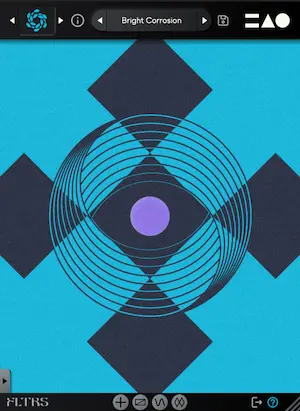
To truly understand FLTRS, one must step away from traditional linear rotary knobs and embrace a spatial, visual workflow. Upon launching the plugin, users are greeted by the Perform View—a centralized interface driven by three distinct axes (X, Y, and Z).
1. The Perform View and Macro System
Each axis in FLTRS is visually coded with a unique geometric shape:

- The Circle (X-Axis)
- The Triangle (Y-Axis)
- The Equal Sign (Z-Axis)
Hovering a cursor over the interface dynamically shifts the pointer to reflect these shapes. By clicking and dragging, the user simultaneously manipulates an entire cluster of parameters tied to that specific macro. The bottom of the interface provides real-time feedback, displaying active parameters and percentage values as they change.
Flanking the central view is the Control Panel. Here, users adjust the fundamental parameters of the selected algorithm—typically cutoff frequency, resonance, and a third variable unique to the chosen filter type. Input and output gains sit cleanly at the top and bottom, complemented by a wet/dry blend control. For users who prefer an unobstructed view of the Perform View interface, the Control Panel can be collapsed via a simple tab at the bottom of the window.

2. Exploring the 37 Filter Algorithms
At the heart of FLTRS’s sonic versatility is its library of 37 filter algorithms. Rather than relying on static equalization curves, each algorithm bundles a specialized filter topology with custom-tailored internal effects and routing.
The collection spans a massive historical and modern spectrum:

- Vintage Analog Emulations: Legendary topologies are heavily represented, including Moog-style ladder filters, Korg MS-20-inspired circuits, and Sallen-Key designs.
- Polyphonic Synth Classics: Warm, characteristic filters drawn from vintage polyphonic synthesizers—specifically the Jupiter-6, Juno series, and modern OTA (Operational Transconductance Amplifier) emulations.
- Experimental and Spectral Designs: For producers chasing futuristic textures, FLTRS features wild spectral and feedback-driven algorithms like the Feedback Mesh Filter, Odysseus, and various non-linear digital processors.
Navigating this vast library is streamlined through the effect browser, accessible by clicking the algorithm logo in the upper-left corner. For a fast entry point, MNTRA includes an Elements preset list. These serve as raw, unmodulated starting templates for each algorithm, offering a pure showcase of what each distinct circuit brings to a dry signal before automation or LFOs are introduced.
3. Mastering the Control Mapping Window
Behind every parameter lies deep customization. Users can reveal the Control Mapping Window by right-clicking a parameter or selecting its associated tab.

Inside this window, interactive response tables dictate how macros affect individual parameters. Users can draw custom response curves to define how an effect scales across its range, or expand the view into a larger canvas for precise macro contouring.
- Top Pro-Tip: A common pitfall for new users is attempting to drag parameter graphics (such as cutoff or resonance) directly in the UI. By default, these are bound to macro axes. To make direct, unassigned manual tweaks, users must click the Hand Icon to unlock manual control.
Supporting Context & Metrics: Modulation, Dynamics, and Mastering
FLTRS is not merely a static tone-shaper; it is a living, breathing modulation ecosystem. When combined with its internal envelope follower and mastering chain, it transforms individual tracks into dynamic, evolving sonic elements.

The "Animod" Modulation System
Accessible via the bottom navigation bar, the Animod page houses three complex modulation sources alongside an envelope follower.
Each modulator features selectable wave shapes (sine, triangle, square, random) and a step sequencer mode for rhythmic, sequenced filtering. Crucially, FLTRS supports modulation on modulation. The rate and intensity of a modulator are not fixed; their parameters can be mapped to manual control, an axis macro, or even another LFO. For instance, assigning LFO 2 to control the rate of LFO 1 creates cascading, polyrhythmic modulations that constantly evolve over time.

A dedicated Paths table provides clear visual feedback, mapping out precisely where each modulator is routed to prevent routing chaos in complex patches.
The Envelope Follower
Designed to react dynamically to incoming audio transients, the envelope follower is exceptionally effective on rhythm sections, drums, and aggressive basslines.

By analyzing the amplitude of an input signal, the follower can dynamically push or pull parameters—such as closing a lowpass filter cutoff every time a snare hits or a bass note punches through the mix. The interface features a visual shape monitor with an adjustable threshold control, allowing producers to dial in exact triggering points. Attack and release times can be adjusted independently or linked via a chain icon for cohesive dynamic response.
The Mastering Section
Before audio leaves FLTRS, it passes through an onboard Mastering Section. This final stage is split into two essential tools:

- Parametric Equalizer: Allows for final tonal sweetening and surgical frequency sculpting.
- Mastering-Grade Compressor/Limiter: Equipped with selectable Modern and Vintage modes, this final processor glues the processed signal together, catches stray transient peaks, and ensures output levels remain controlled and commercially competitive.
Official Statements & Industry Reception
MNTRA Instruments has steadily carved out a distinct niche for itself by prioritizing tactile, visual, and organic sound design experiences over traditional skeuomorphic software interfaces.
Reflecting on the design philosophy behind the software ecosystem that includes MNDALA 2, BRUITAGE, and BOREALIS, MNTRA emphasizes that music software should encourage physical interaction and discovery. By mapping complex multi-parameter shifts to intuitive X/Y/Z axes, FLTRS successfully eliminates "menu-diving," allowing producers to focus entirely on performance and sonic evolution.

Early user feedback within electronic music production communities highlights the plugin’s uncanny ability to transform flat, static stems into rich, evolving beds of audio. Whether used subtly on an individual vocal track or aggressively across every channel of a dense techno mix, FLTRS delivers an organic weight that distinguishes it from clinical digital EQ and filter plugins.
Future Outlook
As the boundaries between synthesis, mixing, and sound design continue to blur, plugins like MNTRA FLTRS point toward the future of digital signal processing. Producers are no longer satisfied with single-function utilities; modern workflows demand tools that are simultaneously deep, inspiring, and fast to navigate.

By merging 37 meticulously curated filter topologies with a spatial graphic macro system and deep modulation routing, FLTRS proves that there is still plenty of room for innovation in classic effects categories.
FLTRS is available now at a special introductory price of $49 until May 14th. For more information, sound demos, and system requirements, visit the official MNTRA Instruments website.