Executive Overview
In the ever-expanding universe of virtual instruments and software samplers, standing out requires more than just pristine audio fidelity or a massive library of gigabytes. It demands a paradigm shift in workflow, interface design, and real-time interaction. Enter MNDALA 2, the flagship, free sound engine developed by MNTRA Instruments.
While traditional sample players like Native Instruments’ Kontakt have long dominated the scoring and production landscape with their folder-heavy hierarchies and meticulous multisampling, MNDALA 2 boldly follows its own unique trajectory. Built from the ground up to support MNTRA’s proprietary sample packs—which feature staggering Extended Resolution Audio captured at 32-bit/384kHz with ultrasonic frequency capture—the engine merges deep synthesis capabilities with an organic, visual-first workflow.

At first glance, loading up MNDALA 2 can feel akin to touching down in a foreign landscape. Its custom graphical user interface (GUI), focus on dynamic art assets, and centralized real-time parameter controls break away from conventional DAW conventions. However, beneath its alien exterior lies a deeply logical architecture comprising advanced multi-samplers, flexible internal generators, comprehensive step sequencers, an expansive macro-modulation system, and a robust global effects bus.
This guide serves as an authoritative, comprehensive walkthrough designed to demystify MNDALA 2. Whether you are looking to install your first free instrument libraries, map complex modulation axes to your hardware controller, or sculpt living, breathing acoustic-electronic hybrids, this manual will ensure you extract the absolute maximum potential from MNTRA’s revolutionary sound engine.

Detailed Chronology: Navigating the MNDALA 2 Ecosystem
To truly master MNDALA 2, a producer must understand the step-by-step evolution of a patch within its environment—from initial library acquisition to deep-level macro routing and micro-tuning.
Phase 1: Installation, the Library, and Preset Management
Your journey begins with the deployment of the free MNDALA 2 sound engine. Once hosted inside your Digital Audio Workstation (DAW) as a VST, AU, or AAX plugin, your first destination is the Library tab.

- The Audio Standard: MNTRA sets a high bar here. Because MNDALA 2 natively handles Extended Resolution Audio captured at 32-bit/384kHz, even free instruments carry an immense amount of high-frequency data and transient clarity, allowing for extreme pitch-shifting and stretching without typical digital artifacts.
- Content Acquisition: After selecting a free or paid library from the catalog, the engine prompts you to designate a download and storage directory. Best practice dictates organizing these sample folders on a dedicated, fast solid-state drive (SSD) to ensure seamless streaming.
- The Preset Browser: Accessible via the upper-left corner of the GUI, the browser allows you to filter instruments by Type, Character, and Preset name. Beyond factory presets, producers can easily save modifications, manage custom subfolders, and build their own sonic templates from scratch.
Phase 2: The Perform View and Real-Time Parameter Controls (RTPCs)
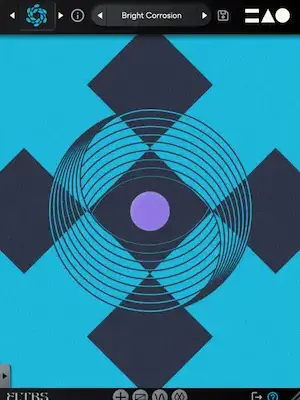
Once a preset is loaded, you are greeted by the Perform View. Similar to the Play View found in modern synthesizers like Arturia’s Pigments, this screen serves as the primary canvas for performance and composition. It also showcases MNTRA’s artistic vision, featuring dynamic, fluid artwork that visibly morphs and reacts as you manipulate the interface.
The philosophical core of MNDALA 2 rests on Real-Time Parameter Controls (RTPCs). Because a single preset can harbor up to six independent sample layers—each packed with its own modulation, effects, and step sequencers—adjusting parameters individually during a live performance or mix pass would be impossible. MNTRA solves this by tethering almost the entire engine to three macro axes: X, Y, and Z.

- The Axes: Represented respectively by an equal sign (
=), a triangle (△), and a circle (○), these three macro controls act as the central nervous system of the instrument. - Control and Automation: You can manipulate these axes directly within the Perform View by dragging the translucent sliders on the left, interacting with the central graphic, or mapping them directly to physical knobs and faders on an external MIDI controller. Furthermore, every axis can be fully automated within your DAW’s arrangement view for evolving, cinematic transitions.
Supporting Context & Metrics: Under the Hood
While the Perform View keeps your creative focus unburdened by menu-diving, diving deeper into MNDALA 2 reveals an uncompromising modular powerhouse. Let us examine the technical metrics and functional pages that power the engine.
The Matrix Page: Mapping Macro Spaces
Positioned directly to the right of the Perform View, the Matrix page is where the magic of macro routing takes physical form. Here, producers manage the volume and stereo panning of each of the six sampler lanes across the X and Y axes.

- Gain and Pan Tables: Each row features a dedicated table displaying the starting position (left) and ending position (right) of the macro. By default, these tables follow a linear upward ramp, but they can be redrawn entirely.
- Custom Curves and Shapes: Clicking the square icon in the bottom-right corner expands the table for precision editing. Producers can select from factory-curved shapes or click along the line to add custom nodes, pulling and bending trajectories to create complex, nonlinear crossfading between sample layers as a macro sweeps from zero to maximum.
The Samplers Page: Traditional Synthesis Meets Ultrasonic Audio
If the Perform View is about expression, the Samplers page is where raw sound design takes place. Arranged in a vertical column on the left are the six available sampler slots.
- Sample Maps & Articulations: Each slot loads a "sample map," which frequently contains multi-articulation recordings captured under ultra-high-resolution conditions.
- Parameters Galore: Editing tools include Velocity Range tables, Velocity-to-Gain mappings, tuning adjustments, and vibrato controls. The envelope section utilizes standard AHDSR (Attack, Hold, Decay, Sustain, Release) points, complemented by Sample Start Modulation to let keyboard velocity dynamically alter playback positions.
- Channel Strip Essentials: Next to each sample volume knob sit the Multi Mic Mixer, Heat saturation circuit, and individual EQ settings. Additionally, global parameters like envelopes and portamento feature link buttons, enabling instant synchronization across all active samplers.
Generators and Colour FX Slots
Beyond recorded audio, MNDALA 2 allows producers to supplement or replace samples with built-in synth oscillators via the Generator slot. Three distinct generator types are available:

- Additive
- Frequency Modulation (FM)
- Simple Synth: A virtual-analog single oscillator featuring classic sine, triangle, square, sawtooth, and noise waveforms.
For spatial and tonal manipulation, each sampler features three Colour slots for stereo insert effects. The expansive roster runs the gamut from lush reverbs and delays to specialized filters, modulation effects, and compressors. Adjusting effect parameters is as simple as dragging on the GUI and pinning the dry/wet mix to your macro axes or internal modulators. For overall mix cohesion, an additional five stereo bus effects are housed under the Global FX tab.
The Sequencer Section: Motion and Stride
Rhythmic movement is vital to modern electronic and cinematic composition. MNDALA 2 provides a comprehensive step sequencer for every individual sampler layer, complete with dedicated lanes for Note, Velocity, and Length.

- Standardization: A global link button allows users to lock these three settings across all samplers simultaneously.
- Randomization and Stride: Dedicated randomize and reset buttons inspire happy accidents, while controls for swing/shuffle, DAW-synced speed, step counts, and Stride offer surgical rhythmic control. The Stride parameter dictates the interval of sequencer steps between notes (e.g., a Stride of 2 triggers a note every other beat, while 1 fires continuously).
AniMod Global Modulation System
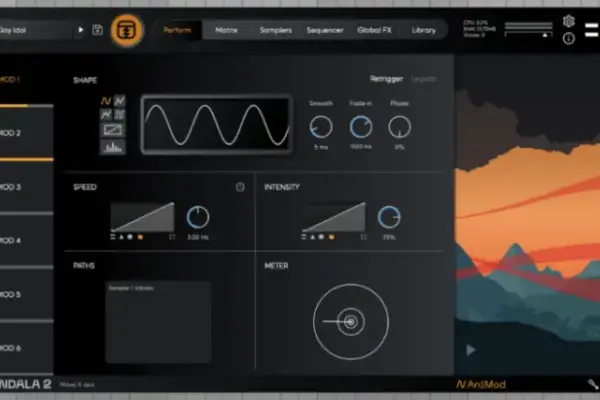
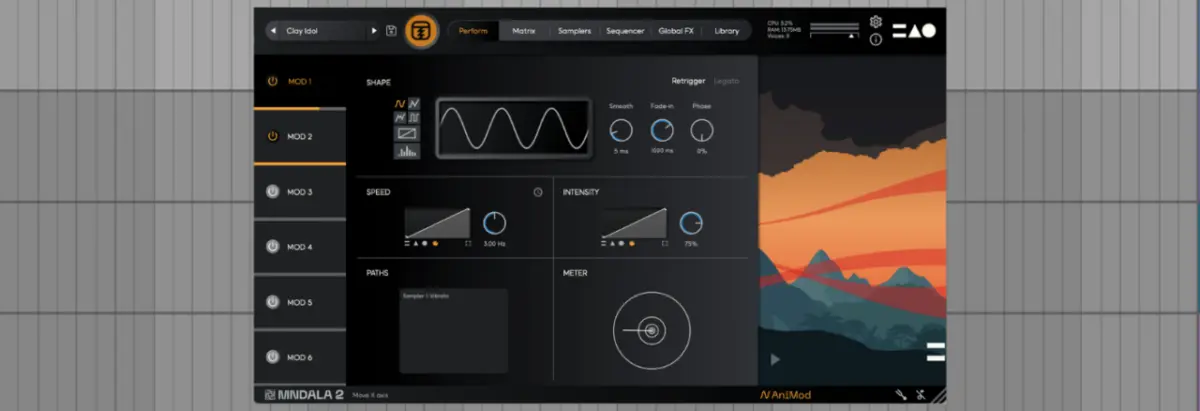
To elevate patches from static soundscapes to living organisms, MNDALA 2 features the AniMod Global Modulation System, accessed by clicking "AniMod" in the lower right corner.
Providing six modulation sources in a left-hand column, AniMod functions similarly to an LFO or envelope generator on a hardware synth. Sources feature multiple shapes—sine, triangle, square, random, custom, and stepped. Selecting the "custom" shape lets you draw unique modulation curves directly into the viewer. You can dial in speed, intensity, assign sources directly to the X, Y, and Z axes, and monitor routing paths via the dedicated Paths window.

The Tuning Section
Finally, microtonal experimentation and alternate temperaments are addressed in the Tuning section, accessed via the tuning fork icon. Producers can assign unique tuning presets on a per-sampler basis or link them globally, as well as draw custom tuning maps manually within the editor.
Official Statements and Industry Reception
MNTRA Instruments has consistently positioned MNDALA 2 as a bridge between acoustic performance and digital sound design. Company founder Brian D’Oliveira—renowned for his extensive work in scoring interactive media and capturing rare acoustic instruments—has frequently emphasized the importance of tactile expression in software instruments.

"The core philosophy behind MNDALA 2 was to remove the barrier between the composer and the complex web of parameters lying beneath a modern sampled instrument," notes the MNTRA development team. "By abstracting multi-layered sound design, heavy modulation, and spatial effects into intuitive real-time axes, we allow musicians to perform their patches rather than just trigger them."
Industry reception has echoed this sentiment. Reviewers and professional composers alike have praised the engine for its staggering audio resolution, unique visual identity, and ability to transform organic source material into alien, futuristic soundscapes with minimal CPU overhead.

Future Outlook: The Evolution of Sample Engines
As music production technology marches forward, software environments like MNDALA 2 point toward a future where the boundary between sampling and synthesis is completely blurred. With MNTRA having already teased upcoming architectural expansions—such as the forthcoming Shaper slot reserved for future updates—the ecosystem is poised to become even more modular and versatile.
For producers working in film scoring, ambient electronica, sound design, and avant-garde dance music, mastering MNDALA 2 offers an unfair advantage. It challenges traditional, linear workflows and replaces them with an organic, performative approach to sound creation.

To explore free instrument downloads, browse expanding sample libraries, and dive deeper into MNTRA’s sonic universe, visit the official MNTRA Instruments Website and check out their comprehensive collection of free tools available at the MNTRA Shoppe Free Section. Furthermore, for deeper insights into the mind of MNTRA’s leadership, you can stream the full interview with Brian D’Oliveira on the Attack Podcast, available now via Apple Podcasts and Spotify.