Executive Overview
In the ever-expanding universe of audio software plugins, finding a genuinely innovative approach to signal processing is becoming increasingly rare. Most developers remain safely anchored within the familiar territory of standard low-pass, high-pass, and band-pass filtering topologies.

Enter MNTRA Instruments, a developer known for challenging conventional software design. Following the release of their flagship instrument MNDALA 2—as well as specialized effect processors like the BRUITAGE distortion plugin and the BOREALIS reverb—MNTRA has returned with FLTRS, an advanced effect plugin that redefines how producers interact with filter parameters.

Rather than relying on static knobs or linear slider arrays, FLTRS combines 37 meticulously modeled filter algorithms with a graphical, macro-driven control paradigm. By leveraging a three-axis spatial workflow (X, Y, and Z axes), the plugin allows producers to morph multiple parameters simultaneously with intuitive mouse gestures or complex automation pathways.

Furthermore, FLTRS is not just a collection of filters; it is a comprehensive sound-shaping ecosystem. Equipped with a deep modulation engine (Animod), a dynamic envelope follower, and a full-featured mastering suite complete with compression and EQ, FLTRS bridges the gap between surgical sound design and expressive, performance-oriented manipulation.

In this comprehensive feature and walkthrough, we will examine the architectural philosophy of FLTRS, explore its diverse algorithm library, unpack its macro and modulation mechanics, and demonstrate how producers can transform sterile tracks into living, breathing soundscapes.

Detailed Chronology & Architectural Walkthrough
To understand the workflow of FLTRS, one must first examine its interface hierarchy. The plugin departs from standard rack-mounted plugin layouts, favoring a spatial design that prioritizes performance and real-time interaction.

1. The Perform View: A Bird’s-Eye Spatial Perspective
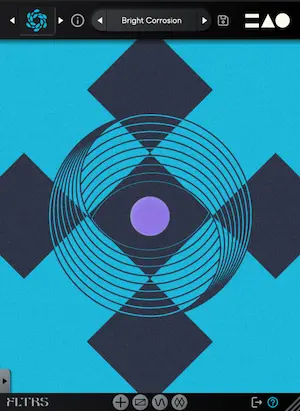
When you instantiate FLTRS on a track, you are greeted by the Perform View. This interface is dominated by a central visual canvas representing the X, Y, and Z macro axes.

- Axis Identification: Each axis is assigned a distinct geometric symbol—a circle, a triangle, or an equal sign. Hovering your mouse over the interface automatically updates your cursor to reflect the corresponding symbol.
- Macro Morphing: By clicking and dragging within this space, you simultaneously manipulate all parameters linked to that specific macro vector. The active parameter values and percentage shifts are dynamically displayed at the bottom of the screen.
- The Control Panel: Positioned on the left side of the interface, the Control Panel houses core parameters for the chosen algorithm. Typical controls include cutoff, resonance, drive, and envelope amounts, flanked by global dry/wet mixing, input gain, and output gain controls. For a cleaner visual workspace, this panel can be collapsed using the arrow tab at the bottom.
2. Navigating the 37 Filter Algorithms
FLTRS features an impressive library of 37 distinct filter algorithms. Each algorithm packages a foundational filter type alongside a complementary effect processor. The library spans legendary analog emulations and experimental digital structures:

- Vintage Analog Emulations: Includes faithful recreations of the Moog-style ladder filter, the aggressive Korg MS-20 filter circuit, and classic Sallen-Key configurations.
- Classic Synth Filters: Features three synth-inspired architectures modeled after the Roland Jupiter-6, the Juno chorus-filter hybrids, and modern OTA (Operational Transconductance Amplifier) designs.
- Experimental and Spectral Designs: For producers seeking unchartered sonic territory, FLTRS offers spatial, feedback-mesh, and spectral-domain algorithms that push sound design far beyond traditional filtering.
Users can access the algorithm browser by clicking the logo in the upper-left corner or quickly cycle through options using the adjacent navigation arrows. MNTRA thoughtfully includes a category of starting presets known as Elements. These serve as raw, unmodulated starting points for every algorithm, allowing sound designers to audition the core tone of each filter before introducing automation or internal modulation.

Supporting Context & Metrics: Working with Macros and Modulation
The true power of FLTRS lies in its deep routing capabilities. Moving beyond basic mouse gestures, the plugin empowers users to construct intricate, evolving patches through advanced macro mapping and internal modulation sources.

[Input Signal]
      │
      ▼
[Filter Algorithm (37 Types)] ◄─── [X, Y, Z Macro Axes]
      │                                     │
      ├──> [Animod Engine (LFOs/Steppers)] ─┘
      │
      ├──> [Envelope Follower (Transient Triggering)]
      │
      ▼
[Mastering Section (EQ & Vintage/Modern Limiter)]
      │
      ▼
[Processed Audio Output]
Unlocking the Macro System
While it is tempting to grab a parameter graphic (such as cutoff or resonance) and drag it directly, FLTRS protects its macro assignments by default. To make manual adjustments, users must switch the parameter mode to manual control (indicated by the hand icon).

- The Control Mapping Window: Accessible via parameter right-clicks or bottom-tab navigation, this window reveals scaling tables that dictate how macros influence specific targets.
- Custom Envelope Shapes: Each mapping table features an interactive response curve. Users can click and drag to reshape how the parameter responds across the macro range, or expand the view to access complex algorithmic shapes.
The Animod Modulation Section
For automated evolution, FLTRS incorporates Animod, a dedicated modulation page housing three complex modulators and a versatile step sequencer.

- Modulator Architecture: Each modulator offers selectable waveforms—including sine, triangle, square, and random generators—paired with customizable shaping tables.
- Modulation Routing (Modulation on Modulation): A standout feature of FLTRS is its open routing matrix. Rate and intensity parameters for the modulators are not restricted to static values; they can be mapped to macro axes, manual control, or even other modulators. For example, users can route an LFO to sweep the rate of a second LFO, creating organic tempo shifts and unpredictable rhythmic textures.
The Envelope Follower
Designed to breathe life into transient-heavy material such as drums, percussion, and aggressive basslines, the built-in envelope follower translates incoming audio amplitudes into dynamic control signals.

- Fine-Tuning Transients: Producers can adjust attack and release times (chainable for unified control) and use the visual shape monitor to set precise triggering thresholds.
- Dynamic Interaction: By routing the envelope follower to filter cutoffs or drive parameters, static loops instantly react to the groove and velocity of the incoming signal, creating an organic "pumping" or "opening" effect.
Official Statements & Design Philosophy
MNTRA Instruments has consistently championed instruments and effects that encourage tactile, performance-driven interaction rather than purely mathematical mixing. In developing FLTRS, the engineering team focused on eliminating the clinical sterility often associated with digital filter plugins.

Industry observers and early beta testers have noted that FLTRS successfully bridges the gap between software flexibility and hardware-style character. By coupling meticulously captured analog non-linearities with a fluid graphical interface, MNTRA provides producers with an environment where filtering ceases to be a corrective mixing chore and instead becomes a primary composition and performance tool.

Future Outlook & Pricing
As electronic music production continues to embrace generative workflows, polyrhythmic modulation, and hands-on performance control, plugins like FLTRS point toward the future of software signal processing. By turning abstract parameter routing into a spatial, visual experience, MNTRA lowers the barrier to complex sound design while offering infinite depth for advanced producers.
Availability and Launch Offer
- Product: MNTRA Instruments FLTRS Effect Plugin
- Formats: Compatible with major DAW platforms (VST3, AU, AAX).
- Launch Pricing: Available at a special introductory price of $49 USD until May 14th.
- Where to Buy: Interested producers can explore audio demos, video walkthroughs, and purchase the plugin directly via the official MNTRA Instruments product page.