Executive Overview
In the modern landscape of live electronic music and digital performance, the boundary between auditory stimuli and visual art is increasingly porous. Audiences no longer merely want to hear a set; they demand an immersive, symbiotic experience where sight and sound act as two halves of a single, cohesive organism. While various software ecosystems offer bridging capabilities, few match the deep, highly responsive integration achieved by pairing Ableton Live with TouchDesigner.

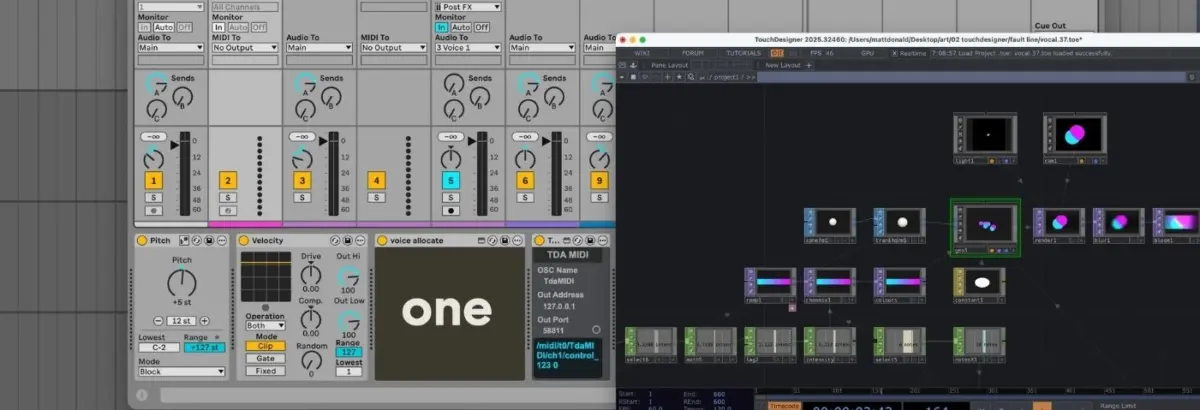
Authored by Matt Donald, a recent deep-dive tutorial breaks down a sophisticated custom performance setup that moves beyond traditional reactive visuals. Instead of a one-way street where audio simply triggers visual effects, this workflow establishes a dynamic, bidirectional feedback loop. Harmonised live vocals directly drive responsive 3D graphics, while the spatial positioning and state of those visuals simultaneously manipulate the audio mix in real time.

This comprehensive guide explores the mechanics of that performance setup. By examining the complex routing within Ableton Live, the CPU-efficient node-based architecture of TouchDesigner, and the crucial bridge provided by TDAbleton, producers and visual artists can learn how to construct a living, breathing multimedia instrument.

Detailed Chronology: Building the Performance Architecture
To understand how a performance of this caliber comes together, one must dissect it layer by layer: first clarifying the Ableton routing, then mapping out the TouchDesigner network, and finally observing how these two powerhouses communicate in a live context.

1. The Ableton Live Vocal Processing and MIDI Routing Setup
The foundation of the performance featured in the reference video relies on up to seven distinct vocal channels: one raw live vocal paired with six harmonised voices. While Ableton’s native Auto Shift device is capable of handling polyphony natively, relying on a single instance can limit deep, granular control. To overcome this, the setup deploys a separate, dedicated instance of Auto Shift for each harmony voice.
The signal flow begins at the master MIDI track, which receives performance data from a live MIDI controller.
- Transposition & Velocity Flattening: Incoming notes are slightly transposed, and their dynamics are flattened via a Velocity device to ensure uniform performance triggers.
- Voice Allocation: The data is then routed into a custom Max for Live device aptly named Voice Allocate. This utility splits incoming chords and multi-note passages, assigning a unique ID to every single note played.
- Individual Dispersal: Each unique note ID is sent to a corresponding Voice Receive device—another custom Max for Live utility designed to capture only its assigned ID.
- The Audio Chain: Simultaneously, the live vocal audio is routed into a master audio track and multed out to every single instance of Auto Shift. Because each Auto Shift is grouped into a dedicated pair with an adjacent MIDI track (listening to its specific Voice Receive device and set to monophonic MIDI mode), the system cleanly splits a single controller input into six distinct, precisely controlled harmony channels.
[Live MIDI Controller]
        │
        ▼
[Master MIDI Track] ──(Transposition / Velocity Flatten)
        │
        ▼
[Voice Allocate (Max for Live)] ──(Splits notes, assigns IDs)
        │
        ├──────────────────────┬──────────────────────┐
        ▼                      ▼                      ▼
[Voice Receive 1]      [Voice Receive 2]      [Voice Receive 3] ... (up to 6)
        │                      │                      │
        ▼                      ▼                      ▼
[Auto Shift Track 1]   [Auto Shift Track 2]   [Auto Shift Track 3] ...
        ▲                      ▲                      ▲
        └──────────────────────┴──────────────────────┘
                         [Live Vocal Audio]
2. The TouchDesigner Visual Network
With the audio side divided into distinct, isolated channels, the visual side requires a parallel architecture that remains light on CPU usage. TouchDesigner achieves this through node-based development—functioning conceptually similar to Max/MSP, but heavily optimized for GPU-accelerated graphics processing.
(Note: TouchDesigner is freely available to download via Derivative’s official website, though free-tier outputs are capped at a 1280×1280 resolution before requiring a commercial or educational license.)
To keep computational overhead manageable during complex live sets, the project utilizes instancing:
- The Core Geometry: The network starts with a single Sphere SOP (Surface OPerator), which undergoes mild transformations before feeding into a Geometry Component (Geo Comp) where the instances are generated.
- Position & Movement: A collection of Noise CHOPs (CHannel OPerators) generates organic, fluid, and randomized XYZ coordinates for each sphere, bounded carefully within screen dimensions.
- Color and Texture: A Ramp TOP (Texture OPerator) interpolates between two distinct end colors, giving every individual instance a unique chromatic profile. By applying a constant material to the Geo Comp, the spheres are rendered completely flat—stripping away depth perception to create striking, minimalist 2D-style geometric objects in a 3D space.
- Post-Processing Pipeline: Finally, the scene is framed by a Camera Comp, illuminated by a Light Comp, and captured via a Render TOP. Before hitting the final screen output, the visual signal passes through bloom and blur filters to enhance its atmospheric glow.
3. Bridging the Gap: TDAbleton Integration
While TouchDesigner can communicate natively using Open Sound Control (OSC), the integration process is streamlined exponentially through TDAbleton. This bundled suite of Max for Live devices and custom MIDI controller scripts allows bidirectional data flow between Ableton Live and TouchDesigner with minimal friction.
By dropping a TDAbleton device onto an Ableton track, producers can instantly expose track parameters, levels, and MIDI data to TouchDesigner nodes. In this performance setup, the connection operates as a two-way street:
- Audio Level Mapping: An
abletonLevelCHOP reads the audio level directly from Ableton’s master channel. This live amplitude data is mapped to two visual parameters: the opacity of the Ramp TOP (making colors more solid and vivid as the music gets louder) and the speed of the Noise CHOPs (causing the instances to zip across the screen with greater velocity during dynamic peaks). - MIDI Note Tracking: An
abletonMIDICHOP monitors all active notes from the master input track. By taking the total note count and adding one (to account for the dry live vocal), TouchDesigner dynamically dictates how many spatial positions the Noise CHOPs must generate, how many instances the Geo Comp renders, and how many color shades the Ramp TOP interpolates. - Spatial Audio Pan Control: The X-axis (left/right) coordinates of the instances generated by the Noise CHOPs are mapped in reverse back to the pan controls of seven individual
abletonTrackCOMPs inside Ableton—one for every voice channel. Visually shifting a circle to the left physically pans that specific harmony voice to the left ear in the stereo field. - Glitch Triggers and FX Returns: A Count CHOP monitors for a specific performance trigger (in this case, an F3 note strike). Once a set threshold is met, it triggers an external audio send out of Ableton into a Hologram Electronics Chroma Console set to an "Inference" algorithm—introducing a fragmented, glitchy texture. An
abletonLevelCHOP reads the return level of this effect and uses it to drive a sudden color shift in TouchDesigner, ensuring that visual aberrations tear across the screen in exact sync with audio artifacts.
Supporting Context & Metrics: Why Real-Time Integration Matters
The fusion of Ableton Live and TouchDesigner represents a broader paradigm shift in electronic music performance. Historically, live visuals were handled by a dedicated VJ working independently from the DJ or live musician, often leading to disconnected sets where the visuals loosely mirrored the tempo via basic beat-detection algorithms.

By integrating these workflows, artists reclaim total authorship over the sensory experience. Key structural advantages of this workflow include:
- GPU Offloading: Utilizing TouchDesigner’s instancing features shifts heavy rendering tasks away from the CPU—which is already heavily taxed running multiple instances of Ableton’s Auto Shift, Max for Live devices, and native plugins—and onto the graphics card.
- True Interactivity: Moving beyond simple audio-reactive reactivity (where lights flash to a kick drum) to structural interactivity (where note counts, voice panning, and transient states dictate geometry and spatial layout) creates a deeply intuitive instrument. The artist does not just play music; they literally sculpt the physical space around them.
- Accessibility: With Ableton Live remaining the industry standard for electronic music production and performance, and TouchDesigner offering a robust, accessible free tier for visual artists, the barrier to entry for cross-disciplinary performance art has never been lower.
Future Outlook: The Next Wave of Multimedia Performance
As computing hardware continues to advance, the convergence of digital audio workstations (DAWs) and visual programming environments will only deepen. We are moving toward an era where spatial audio formats (such as Dolby Atmos and ambisonics) will interface natively with 3D spatial graphics engines, allowing sounds and visuals to orbit an audience in true 360-degree virtual space.

Projects like the Ableton-TouchDesigner vocal harmoniser setup offer a glimpse into the future of live electronic performance. They remind us that the future of music production does not stop at the master stereo output. For modern producers looking to elevate their live shows, mastering tools like TDAbleton and node-based visual programming is no longer just an experimental detour—it is the next essential frontier.

Explore more music production workflows, Max for Live devices, and sound design guides in our store, and don’t forget to check out Ableton Live to start building your own custom performance rigs today.