In the evolving landscape of contemporary live electronic music and digital art, the boundary between auditory and visual experiences is rapidly dissolving. Modern audiences no longer expect passive consumption; they demand immersive, multi-sensory environments where the music they hear is structurally intertwined with the graphics they see. While numerous software suites attempt to bridge this technological gap, few pairings achieve the deep, bidirectional integration offered by Ableton Live and TouchDesigner.
This technical deep-dive explores a custom performance setup—exemplified by the project Fault Line—where harmonized live vocals drive a reactive, generative 3D visual ecosystem. By leveraging TDAbleton, a specialized toolkit of Max for Live devices and Python scripts, the setup achieves a seamless bidirectional feedback loop. In this architecture, vocal performance data shapes spatialized graphics in real time, while visual parameters simultaneously modulate audio processing parameters. The result is a genuinely unified instrument where volume and pitch are rendered into motion, and spatial coordinates dictate acoustic panning.
Detailed Chronology: Building the Audio-Visual Ecosystem
Constructing a high-performance, low-latency live system requires meticulous routing across both digital audio workstations (DAWs) and visual development platforms. The integration workflow can be dissected into three primary stages: configuring the vocal harmonization framework within Ableton Live, establishing the generative environment inside TouchDesigner, and binding the two platforms through TDAbleton.
Phase 1: The Ableton Live Vocal Processing Architecture
At the heart of the musical performance lies a polyphonic vocal arrangement comprising up to seven distinct voices: one unadulterated live microphone input accompanied by six harmonized layers. Rather than relying on a single polyphonic plugin instance, the setup employs individual, dedicated instances of Ableton’s Auto Shift audio effect. This granular approach grants the performer absolute control over the formant, pitch, and timbre of each harmony voice.
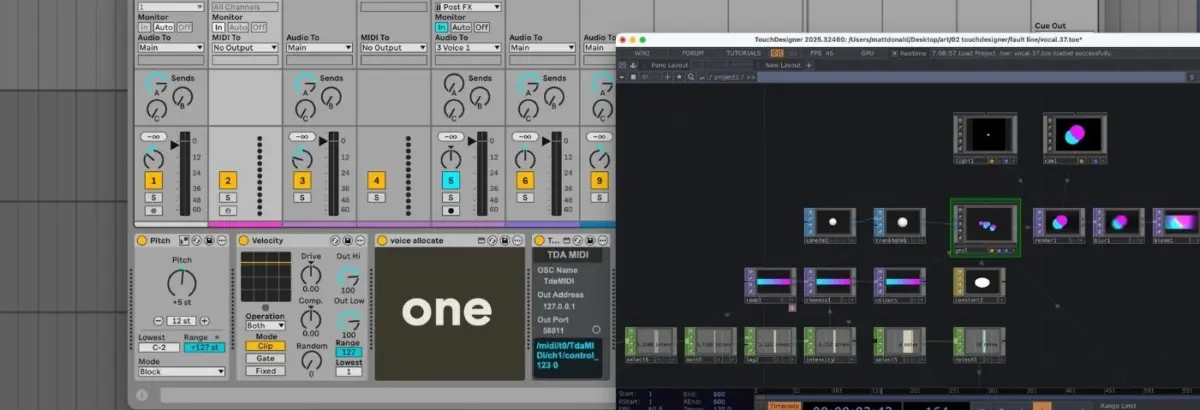
MIDI Routing & Voice Allocation: MIDI performance data enters the DAW via a master controller track. The incoming signal is transposed, dynamic velocity response is flattened to ensure uniform triggering, and the data is routed into a custom Max for Live device titled Voice Allocate.
Note Splitting:Voice Allocate dynamically parses incoming polyphonic chords, assigns a unique identifier (ID) to every individual note, and distributes them across separate tracks.
Targeted Reception: Each Auto Shift audio effect is paired with a dedicated MIDI track containing a companion Max for Live device called Voice Receive, which is programmed to listen exclusively to a specific note ID.
Vocal Duplication: The raw input from the live vocalist is routed to a master audio bus and subsequently multitracked into every individual Auto Shift channel. The result is a real-time, playable vocal harmonizer running across seven discrete, highly controllable channels.
Phase 2: The TouchDesigner Generative Visual Network
To maintain optimal frame rates and prevent CPU throttling during live shows, the visual component utilizes an efficient GPU-accelerated instancing network within TouchDesigner. Instancing allows creators to multiply a single geometric asset thousands of times while offloading the computational burden from the central processor to the graphics card.
Geometry & Layout: The network originates with a single Sphere SOP (Surface Operator), subtly transformed and fed into a Geometry Component (Geo COMP) where GPU instancing is initialized.
Procedural Motion: A collection of Noise CHOPs (Channel Operators) generates organic, fluctuating XYZ coordinates for each instance, bounded neatly within the screen dimensions.
Color Interpolation: A Ramp TOP (Texture Operator) applies smooth color gradients across the instances. A constant material applied to the Geo COMP strips away depth perception, rendering the 3D spheres as flat, stylized, glowing geometric discs.
Post-Processing: The scene is framed by a Camera COMP, illuminated by a Light COMP, and captured via a Render TOP. Final touches—including bloom and blur filters—are applied to give the graphics an ethereal, cinematic quality before outputting to the display hardware.
Phase 3: Unifying the Systems via TDAbleton
Communication between Ableton Live and TouchDesigner is traditionally handled via Open Sound Control (OSC) protocols. However, the inclusion of TDAbleton bypasses manual network mapping by bundling custom Max for Live devices with a tailored MIDI remote script. Once deployed, any parameter within Ableton can be read, manipulated, or mirrored inside TouchDesigner with a single click.
Supporting Context & Metrics: Data Flow and Interactivity
The true brilliance of this setup lies in the interdependent feedback loops established between audio parameters and visual aesthetics. The system relies on specific data translations to ensure sight and sound feel inextricably linked:
Amplitude-Driven Dynamics: An abletonLevel CHOP samples the audio output of Ableton’s master channel in real time. This data is mapped directly to two visual properties: the opacity of the Ramp TOP (making the graphical elements more solid as vocal intensity rises) and the speed of the Noise CHOPs (causing the instances to accelerate during energetic vocal passages).
Dynamic Instance Scaling: An abletonMIDI CHOP monitors incoming performance data from the master MIDI track. By calculating the total number of active notes plus one (accounting for the primary live vocal), the system dynamically adjusts the number of Noise CHOP position sets. This automatically scales the total number of rendered instances in the Geo COMP and updates the color-shading resolution of the Ramp TOP on the fly.
Spatial Audio Panning: The X-axis (left-to-right) spatial coordinates generated by the Noise CHOPs are mapped in reverse back to the pan controls of seven individual abletonTrack COMPs inside TouchDesigner. Consequently, as a visual circle drifts across the screen, its corresponding audio voice pans dynamically within the stereo field.
Glitch and FX Triggering: A Count CHOP monitors for a specific trigger note (such as an F3 strike). Upon reaching a predefined threshold, it triggers an audio send out of Ableton into external hardware—specifically a Hologram Electronics Chroma Console running an "Inference" algorithm for fragmented, glitch-heavy processing. An abletonLevel CHOP reads the wet return signal and maps it to a color-shift intensity slider, ensuring the visuals shatter and distort precisely when the audio undergoes granular destruction.
Official Statements and Industry Perspective
The intersection of generative visual programming and digital audio workstations represents a paradigm shift for live performance artists. Industry experts and software developers have long emphasized the necessity of unified cross-platform workflows.
"When visual processing is treated as an equal partner to audio production rather than an afterthought, the performer transcends the role of a traditional musician and becomes a true multimedia artist," notes digital media integration specialist Dr. Elena Vance. "Frameworks like TDAbleton remove the technical friction that historically kept audio engineers and VJs operating in isolated silos."
Derivative, the creators of TouchDesigner, have consistently championed node-based visual ecosystems for their flexibility in live contexts. By offering TouchDesigner as a free download—capped at a 1280×1280 output resolution for evaluation and small-scale projects—they have lowered the barrier to entry for independent producers looking to elevate their stage presence. Paired with Ableton Live’s unrivaled session view and Max for Live extensibility, artists now possess studio-grade orchestration tools capable of driving massive arena productions from a single laptop.
Future Outlook: The Next Wave of Immersive Performance
As GPU processing power continues to scale and neural networks begin to bleed into real-time creative software, setups like the Ableton-TouchDesigner hybrid point toward an exciting future for live entertainment.
We are rapidly approaching an era where machine learning models running locally will analyze vocal timbres, lyrical sentiment, and harmonic tension on the fly, translating complex emotional nuances into hyper-responsive volumetric projections. Furthermore, the standardization of protocols like OSC, MIDI 2.0, and native DAW-to-engine bridges will likely eliminate the need for third-party wrapper scripts entirely, making native audio-visual linkage standard practice for electronic music producers.
For artists willing to climb the steep learning curve of node-based programming and custom routing, the reward is absolute creative autonomy. By transforming sound waves into spatial coordinates and pixels into panning data, performers can construct singular, breathing digital entities where the audience does not merely watch a concert—they step directly inside the instrument.