Executive Overview
In the rapidly evolving landscape of digital audio workstations (DAWs) and audio editing software, few names carry the historical weight and ubiquitous recognition of Audacity. For 25 years, the free, open-source editor has served as an indispensable gateway for millions of creators—from garage musicians and independent podcasters to sound designers and students—offering zero-cost entry into multi-track recording and audio manipulation. However, as production standards have grown exponentially more demanding, even the most beloved legacy software can begin to show its age.
Enter Audacity 4: the most comprehensive, ambitious, and transformative update in the software’s illustrious 25-year history.
Designed to catapult the platform into a new era without abandoning the core philosophies that made it a household name, Audacity 4 introduces a complete UI overhaul, modernized clip editing architectures, customisable Workspaces, and enhanced real-time effect handling. While retaining its foundational commitment to being entirely free and open-source forever, this milestone release addresses long-standing user grievances regarding workflow friction, rigid clip management, and visual clutter.
By bridging the gap between legacy simplicity and contemporary professional demands, Audacity 4 fundamentally redefines what a zero-cost audio editor can achieve. This comprehensive report examines the structural innovations, workflow enhancements, and strategic motivations underpinning Audacity’s monumental silver jubilee release.
Detailed Chronology: The Evolution to Version 4
To fully appreciate the magnitude of Audacity 4, it is necessary to contextualize its development within the software’s broader timeline. Created in 1999 by Dominic Mazzoni and Roger Dannenberg at Carnegie Mellon University, Audacity quickly established itself as the go-to utility for straightforward audio splicing and waveform manipulation. For nearly two decades, its utility was defined by its reliability, cross-platform availability, and destructive editing paradigm.
The trajectory of the software shifted dramatically in recent years. The acquisition of Audacity by Muse Group in 2021 marked the beginning of a modernization campaign. While initial updates under the new ownership sparked vibrant debates within the open-source community concerning telemetry and privacy policies—concerns that the developers subsequently addressed and clarified—they also unlocked new financial and developmental resources.
Version 3.0, launched in 2021, introduced the unified .aup3 project file format, solving the frustrating fragmentation of older project directories. Subsequent iterations incrementally built upon this foundation, introducing cloud integration via audio.com, limited real-time effect support, and minor interface clean-ups.
However, these updates were largely evolutionary. Audacity 4 represents a revolutionary leap. The development team spent years re-architecting the software’s underlying codebase—laying structural foundations designed not just for immediate feature rollouts, but to ensure the platform can evolve rapidly for decades to come. The result is an application that feels simultaneously familiar to veterans and startlingly modern to newcomers.
Core Innovations and Workflow Redesigns in Audacity 4
The fourth era of Audacity focuses squarely on eliminating workflow friction. Professional and hobbyist audio engineers alike have long cited clip management and non-linear editing limitations as Audacity’s primary bottlenecks compared to commercial heavyweights like Pro Tools, Reaper, or Ableton Live. Version 4 systematically dismantles these barriers.
1. Advanced Clip Editing and Non-Destructive Workflows
In previous iterations, such as Audacity 3, moving and pasting clips was governed by restrictive placement rules that often forced users into tedious workarounds when aligning audio. Audacity 4 revolutionizes this aspect of the software by introducing overlapping clips, robust clip grouping, and sophisticated ripple editing capabilities.
- Overlapping Clips: Creators can now freely overlay audio regions, allowing for seamless crossfading, layering, and ambient blending directly on the timeline.
- Clip Grouping: Multiple audio regions can be locked together as a single entity, preventing accidental desynchronization during complex multitrack arrangements.
- Non-Destructive & Ripple Editing: Adjusting the timing or duration of one clip can now automatically ripple down the timeline, dynamically shifting subsequent audio elements without manual intervention.
2. Revamped Envelopes and Precision Sample Editing
Shaping the volume and dynamics of audio has also received a major structural upgrade. The clip envelope tool features enhanced drag-and-drop shaping options, paired with a highly responsive, real-time waveform display that visually communicates changes as they are made.
Furthermore, sample-level editing is now dramatically streamlined. Rather than requiring users to switch to a separate, cumbersome "draw mode" to manipulate individual audio samples, editors can simply zoom into a waveform until individual samples are visible and edit them directly. This granular level of control brings Audacity closer to the precision required for forensic audio restoration and meticulous sound design.
3. Targeted Exporting Capabilities
For years, exporting audio in Audacity meant rendering an entire project from start to finish, requiring users to manually select and isolate regions or trim files afterward in external software. Audacity 4 introduces intelligent targeted exporting, enabling creators to instantly export specific sections—such as a designated loop region—without processing the rest of a massive master project. This feature alone promises to save podcasters and electronic music producers countless hours of rendering time.
UI/UX Modernization, Effects, and Custom Workspaces
Beyond timeline mechanics, Audacity 4 represents a complete aesthetic and functional reimagining of the user interface.
Overhauled Built-In Effects and Real-Time Plugin Integration
Every built-in effect within Audacity has been redesigned from the ground up for enhanced usability and visual clarity. More importantly, the software’s support for real-time effects has been significantly expanded. Creators can now load and manipulate a much wider range of third-party plugins—including VST3, Audio Unit (AU), and LV2 formats—without halting playback.
Adding to this monitoring precision, every individual track now features its own dedicated meter. Crucially, these track meters double as input monitors when recording live audio, providing immediate visual feedback on signal levels and preventing clipping at the source.
Customisable Workspaces
Different audio tasks require vastly different visual layouts. Editing a multitrack orchestral arrangement demands maximum timeline real estate, whereas recording a multi-guest podcast prioritizes clear metering, routing, and script windows.
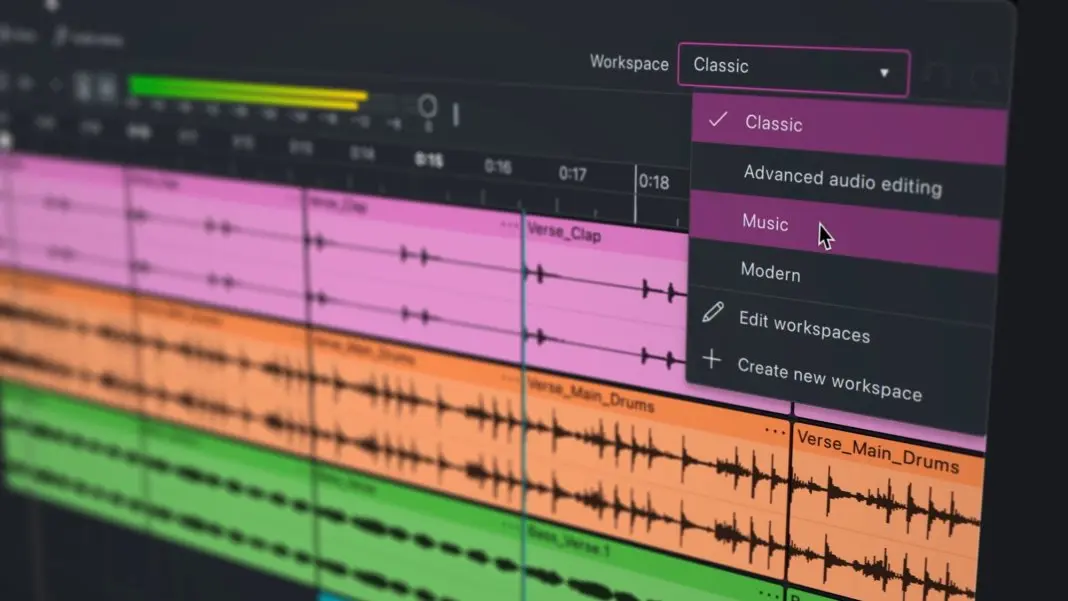
Audacity 4 introduces customisable Workspaces, allowing users to configure, save, and instantly recall distinct UI layouts tailored to specific projects. A creator can toggle seamlessly between a "Music Production" workspace and a "Podcasting" workspace with a single click, tailoring toolbars, windows, and panels to the task at hand.
Visual Polish and Flexibility
The interface boasts a cleaner, more modern aesthetic with improved navigation throughout. The primary playback meter now supports both horizontal and vertical orientations, adapting to any screen configuration. Additionally, acknowledging that long-time users may prefer the classic look they have grown accustomed to over the past 25 years, the developers have included a toggle allowing users to switch between the traditional Audacity appearance and the sleek, modern makeover.
Supporting Context & Metrics: The Open-Source Audio Ecosystem
To understand the cultural and economic importance of Audacity 4, one must evaluate the broader market dynamics of audio production software.
| Feature / Metric | Commercial DAWs (e.g., Pro Tools, Logic Pro) | Audacity (Legacy Versions) | Audacity 4 |
|---|---|---|---|
| Pricing Model | Subscription / High Upfront Cost | Free & Open Source | Free & Open Source |
| Clip Overlap & Grouping | Industry Standard | Restricted / Absent | Fully Supported |
| Real-Time Plugin Support | Advanced (VST3/AU/AAX) | Limited / Recent Addition | Expanded VST3, AU, LV2 |
| Custom Workspaces | Standard in Pro DAWs | Absent | Fully Implemented |
| Target Audience | Professional Studios / Engineers | Hobbyists / Podcasters | From Novices to Advanced Creators |
For millions of creators globally, commercial DAWs remain financially out of reach or unnecessarily complex for straightforward audio editing tasks. Audacity has historically filled this gap, boasting hundreds of millions of downloads across its lifetime.
However, open-source projects often struggle with technical debt—the accumulation of outdated code that makes implementing modern features notoriously difficult. By dedicating significant development cycles to under-the-hood structural refactoring, Audacity 4 resolves this debt. By improving plugin architecture, modernizing the codebase, and tightening integration with collaborative platforms like audio.com, Muse Group has positioned Audacity not merely as a basic recorder, but as a robust, future-proof node in the modern creator’s digital toolkit.
Official Statements and Industry Insights
The release of Audacity 4 has been accompanied by transparent communication from the development team regarding their long-term vision for the software.
In the official Audacity 4 announcement video, product designer Alex Dawson shed light on the philosophy guiding the update:
"We’ve spent years carefully preserving what makes Audacity the most popular audio tool in the world, whilst paving the way for major additions and improvements in the future," Dawson explained.
Addressing the profound structural changes hidden beneath the updated interface, Dawson emphasized that the update is designed for longevity:
"Most of the important changes made in this version are under-the-hood foundations, which will allow us to move much faster than ever before. And as always, Audacity remains free and open source. Forever."
This dual commitment—respecting the software’s rich legacy while aggressively modernizing its underlying architecture—has been met with cautious optimism and early praise from the open-source community and audio engineering forums alike. Industry observers note that by maintaining its zero-cost, open-source ethos while incorporating professional-grade features like ripple editing and custom workspaces, Audacity is effectively lowering the barrier to entry for advanced audio production on a global scale.
Future Outlook: What Audacity 4 Means for Creators
The launch of Audacity 4 marks the definitive end of an era and the beginning of a highly promising chapter for open-source audio software. By successfully marrying the simplicity that made it famous with the sophisticated workflows demanded by modern creators, Audacity has cemented its relevance for the next quarter-century.
Looking ahead, the structural foundations laid in Version 4 open the door to exciting possibilities. With a modular workspace system, cleaner codebase, and accelerated plugin handling, the development team is well-equipped to introduce further innovations—potentially including deeper cloud collaboration tools, advanced AI-assisted noise reduction, and even more refined non-linear editing capabilities.
For now, however, the immediate impact is clear. Whether you are an independent musician laying down demo tracks, a podcaster editing weekly interviews, or a student exploring sound design for the first time, Audacity 4 offers an unprecedented level of creative freedom, precision, and polish—all without costing a single cent.
Audacity 4 is available for immediate, free download across Windows, macOS, and Linux via the official Audacity Team Website.