Executive Overview
In the rapidly evolving landscape of software-based audio processing, genuine innovation is often overshadowed by iterative updates and nostalgic emulations of vintage hardware. However, boutique developer MNTRA Instruments consistently carves out its own distinct path. Following the critical acclaim of their flagship instrument MNDALA 2, alongside boundary-pushing effects like the BRUITAGE distortion unit and the BOREALIS reverb, the developer has returned with an ambitious new audio processor: FLTRS.

At first glance, FLTRS presents itself as a filter plugin. Yet, discarding traditional categorizations is essential when evaluating MNTRA’s hardware-inspired yet software-native design philosophy. FLTRS is far from your standard lowpass, highpass, and bandpass affair. Instead, it bridges the gap between classic analog filter topologies and a futuristic, graphic-based macro workflow. Packed with 37 distinct filter algorithms, an expansive "Animod" modulation engine, an intuitive envelope follower, and a dedicated mastering-grade final stage, FLTRS aims to transform clean, lifeless tracks into gritty, character-driven sonic landscapes imbued with organic motion.

Available at a special introductory launch price of $49 until May 14th, FLTRS demands a closer look by modern producers and sound designers seeking to inject unprecedented depth into their mixes. This comprehensive review and walkthrough explores the plugin’s architecture, its diverse filter algorithms, macro management, advanced modulation capabilities, and overall impact on contemporary music production workflows.

Detailed Chronology & Architectural Overview: Navigating the FLTRS Ecosystem
To fully understand the power of FLTRS, one must first trace its architectural lineage. Built upon the same foundational workflow engine that powers MNDALA 2 and its sister effects processors, FLTRS abandons the endless rows of rotary knobs typical of traditional plugin design. Instead, it relies heavily on spatial interaction, graphic manipulation, and macro-driven control nodes.

The Perform View: A Spatial Approach to Control
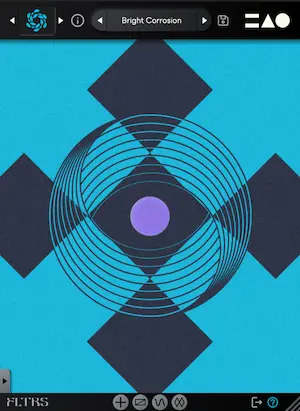
Upon instantiating FLTRS on a channel strip, users are greeted by the Perform View. This interface acts as a visual and spatial representation of three distinct control axes, designated as X, Y, and Z. Each axis is visually coded with a unique geometric shape:

- A circle
- A triangle
- An equal sign (=)
When a user hovers their mouse cursor over the central graphic interface, the cursor dynamically morphs into the corresponding geometric symbol. Clicking and dragging within this space allows the producer to simultaneously drive multiple, complex parameters linked to that specific macro axis. At the bottom of the interface, real-time feedback displays the associated parameters alongside their current percentage values, ensuring complete visibility over sweeping changes.

Positioned on the left side of the user interface is the Control Panel, which houses the foundational controls for the currently selected filter algorithm. While the primary parameters—typically cutoff frequency, resonance, and a third algorithm-specific variable—reside here, the top and bottom sections also host global input/output gain controls and a dry/wet mix slider. For those who prefer a completely unobstructed view of the Perform View, the Control Panel can be smoothly hidden by clicking the arrow tab located at the bottom edge.

Secondary Pages and Modular Navigation
Beneath the primary interface lie dedicated architectural layers, accessible via intuitive icon tabs at the bottom of the screen:

- The Animod Modulation Section: Where complex LFOs, step sequencers, and modulation routing matrices live.
- The Mastering Section: A final tone-shaping and dynamics control stage.
- Extended Parameters: Accessible via a dedicated plus icon for algorithms that feature deep, advanced settings beyond the standard macro mappings.
Supporting Context & Metrics: Unpacking the 37 Filter Algorithms
The true heart of any filter plugin lies in the depth and diversity of its core algorithms. Rather than offering a few generic filter types with variable slopes, FLTRS ships with 37 distinct filter algorithms. Each algorithm is a preloaded, highly optimized hybrid combining a foundational filter topology with supplementary processing elements.

Bridging Vintage Analog and Experimental Spectral Design
The algorithm library reads like a historical museum of synthesizer design, juxtaposed with forward-thinking digital processing:

- Classic Analog Emulations: Includes legendary designs such as the Moog-style ladder filter, Korg’s aggressive MS-20 filter topology, and classic Sallen-Key configurations.
- Synth-Inspired Filters: Replicates the distinct sonic signatures of iconic polysynths, including the Roland Jupiter-6, the Juno chorus-infused filter characteristics, and modern OTA (Operational Transconductance Amplifier) circuits.
- Experimental & Spectral Processors: For producers chasing more avant-garde textures, FLTRS includes wild feedback mesh filters, spectral processors, and unorthodox mathematical filtering models.
Exploring the "Elements" Starting Points
Navigating an expansive library of 37 algorithms can occasionally lead to choice paralysis. To counteract this, MNTRA includes an Elements list within the preset browser. Because FLTRS does not utilize a traditional "Init" (initialized) preset structure, the Elements serve as baseline starting points for every single algorithm, completely devoid of heavy modulation.

Loading these base elements onto a clean synthesizer track immediately reveals the profound character inherent in each design:

- Feedback Mesh Filter: Introduces metallic reflections, complex phase interactions, and spatial width.
- Odysseus Filter: Adds a warm, highly resonant upper-midrange bite that cuts through dense mixes.
- Sallen-Key Filter: Delivers smooth, musical low-end suppression with a distinct analog saturation curve when pushed into self-oscillation.
Working With Macros and Modulation: The Engine of Motion
Static filtering is rarely enough in modern electronic music production. FLTRS excels by turning static audio elements into living, breathing entities through its advanced macro and modulation routing systems.

Mastering the Control Mapping Window
While users can manipulate parameter graphics directly, direct changes will not occur unless the parameter is switched to manual control (indicated by the hand icon). Otherwise, parameters remain slaved to their assigned macro axes.

To alter how a macro behaves, producers can open the Control Mapping Window by right-clicking a parameter or selecting its associated tab. Here, visual mapping tables display an envelope representing how the effect parameter scales across the macro’s full range. Clicking the square icon in the lower right corner expands this view, unlocking a diverse library of custom envelope shapes to map precise curves.

The Animod Section: Modulation on Modulation
Beyond standard macro automation, FLTRS features Animod—a powerhouse modulation engine comprising three advanced modulators and an envelope follower.

- Flexible Waveforms: The modulators support sine, triangle, square, and random waveforms, all of which can be reshaped via custom mapping tables. A built-in step modulator also allows for rhythmic, sequenced parameter changes.
- Rate and Intensity Routing: Every modulator features independent rate and intensity controls. Crucially, these controls can be targeted by other modulators. This allows for complex, organic routing schemes, such as utilizing an LFO on Modulator 2 to dynamically speed up and slow down the rate of Modulator 1. This "modulation on modulation" capability prevents repetitive loops from sounding static or robotic.
The Envelope Follower
Designed specifically for transient-heavy source material like drums, percussion, and aggressive basslines, the built-in envelope follower translates incoming amplitude dynamics into active modulation signals.

Complete with adjustable threshold, attack, and release parameters (which can be chained together for streamlined control), the envelope follower can dynamically pull down filter cutoffs on heavy kick hits or open up high-pass filters on snare transients. Users can fine-tune their threshold points by monitoring the real-time visual feedback of the input signal directly inside the shape monitor.

Official Statements and Future Outlook: Mastering and Market Impact
Before an audio signal exits FLTRS, it passes through a comprehensive Mastering Section. Designed to glue the processed output back together, this final stage features:

- Parametric Equalizer: For surgical tone-shaping and surgical frequency carving.
- Mastering-Grade Compressor/Limiter: Equipped with two distinct operational modes—Modern for transparent peak control and Vintage for harmonically saturated character.
Industry Reception and Future Outlook
As software developers increasingly explore hybrid analog-digital processing paradigms, plugins like FLTRS signal a shift away from skeuomorphic emulations toward tactile, visual-first workflow designs. By marrying 37 meticulously modeled filter topologies with a spatial macro framework and deep modulation capabilities, MNTRA Instruments has crafted an effect processor that transcends basic frequency filtering. It functions simultaneously as a sound design sandbox, a dynamic rhythm generator, and a mixing tool.

For producers operating within techno, ambient, IDM, film scoring, and modern electronica, FLTRS offers an efficient route to adding grit, motion, and organic life to otherwise sterile audio tracks. With its introductory launch price set at $49 until May 14th, the plugin represents an exceptional value proposition for creators looking to expand their sonic palette ahead of the summer production season.