In the ever-expanding universe of virtual instruments and software samplers, standing out requires more than just pristine audio fidelity or massive multi-gigabyte libraries. While industry titans like Native Instruments’ Kontakt continue to dominate the foundational sample-playback landscape, innovative boutique developers are constantly rethinking how producers interact with sound. Enter MNTRA Instruments and their flagship free sound engine, MNDALA 2.
At first glance, MNDALA 2 defies convention. It is fundamentally a sample player, yet it operates by an entirely different set of philosophical and technical rules. Built around a striking, highly dynamic visual language and a workflow centered on real-time parameter manipulation, the engine can initially feel like stepping into an alien ecosystem. However, beneath its avant-garde graphic user interface (GUI) lies a remarkably powerful, deep, and flexible workstation.
MNDALA 2 is engineered to handle cutting-edge Extended Resolution Audio, supporting ultrasonic content recorded at a staggering 32-bit/384kHz. This capability ensures that every transient, nuance, and harmonic artifact of MNTRA’s proprietary sample packs is preserved with breath-taking clarity. Whether you are manipulating acoustic instruments sampled to their absolute physical limits or pushing synthesized textures into uncharted sonic territory, MNDALA 2 provides the tools necessary to sculpt truly unique audio.
This comprehensive guide will break down the MNDALA 2 ecosystem, exploring its navigation, sample architecture, macro controls, synthesis engines, sequencing capabilities, and global modulation systems, enabling you to harness its full creative potential in your DAW workflow.
Detailed Chronology & Structural Breakdown
To truly master MNDALA 2, producers must understand its internal architecture, which is modular yet deeply interconnected. The workflow flows logically from asset acquisition and library management down to micro-level modulation and synthesis.
1. The Library & Preset Management System
Your journey with MNDALA 2 begins in the Library tab. After installing the free core engine, users navigate here to download both free and paid instrument packs. Because MNDALA 2 deals with ultra-high-resolution audio files, managing your storage location during each library acquisition is crucial.
Once your libraries are downloaded, you transition to the Preset Browser—accessible via the upper-left corner of the GUI. Here, presets are organized by:
Instrument: The source sample pack.
Type: The foundational sonic category.
Character: Descriptive tags defining the emotional or timbral quality.
Preset: Specific functional patches.
Producers can easily recall factory presets, modify them, save subfolders, or construct their own custom libraries from scratch.
2. The Perform View: Macro Control & RTPCs
The heart and soul of MNDALA 2 lies in its Perform View, a primary workspace conceptually similar to the Play View found in modern synthesizers like Arturia’s Pigments. This screen is not just functional; it is a visual canvas. MNTRA’s art department has designed reactive, dynamic imagery for every instrument that morphs and shifts in real-time as you interact with the engine’s core macros.
MNDALA 2 relies heavily on Real-Time Parameter Controls (RTPCs), expressed primarily through three macro axes:
X-Axis: Represented by an equal sign (=).
Y-Axis: Represented by a triangle (△).
Z-Axis: Represented by a circle (◯).
These three symbols are ubiquitous throughout the GUI, acting as signposts indicating how individual parameters can be tied to macro movements. Because a single MNDALA 2 preset can comprise up to six distinct sample layers—each packing its own unique modulation, effects, and sequencing parameters—managing parameters individually would quickly become overwhelming.
Instead, the three global macro axes bring this complexity into a unified control scheme. You can manipulate these axes directly within the Perform View by dragging the translucent sliders on the left, interacting with the central graphic, or—most effectively—mapping them to a physical MIDI controller or automating them directly inside your DAW timeline.
3. The Matrix Page: Sculpting Axis Relationships
Once you understand the macro axes, the next logical step is defining how they control your sound. This happens on the Matrix page.
Here, you can independently adjust the volume and pan of each of the six sampler lanes across the X and Y axes. Each row provides dedicated gain and pan tables mapping the starting position (left) to the ending position (right) of a macro sweep. By default, these tables follow a linear rising ramp, but producers can click the square icon in the bottom-right corner to expand the table for precise editing.
Within this expanded view, you can select preset modulation shapes or draw custom curves by clicking along the line to generate interactive nodes. Remote access icons (circle, triangle, equal sign) sit on the right side of the screen, allowing you to test your macro programming on the fly without returning to the Perform View.
4. Samplers and Synthesis Architecture
Moving further into the engine, the Samplers page is where traditional sound design and synthesis collide. Arranged in a vertical column on the left, the six sampler lanes allow you to select specific "sample maps"—multi-sampled recordings that often include multiple articulations, dynamic layers, and round-robins.
Once a sample map is loaded, the right side of the interface reveals a vast array of parameters:
Velocity Range & Velocity-to-Gain: Tailor how dynamic performance affects the patch.
Tuning & Vibrato: Micro-pitch adjustments and modulation.
AHDSR Envelopes: Comprehensive shaping of Attack, Hold, Decay, Sustain, and Release times.
Sample Start Modulation: Dynamically shift the playback start point based on velocity.
Multi Mic Mixer, Heat Saturation, & EQ: Located adjacent to the sample volume knob, these tools allow for multi-microphone balance and tonal warmth.
For parameters like envelopes and portamento, producers will notice a Link button. Engaging this forces all six samplers within the preset to conform uniformly to the adjusted settings, streamlining workflow.
Beneath these controls sit dedicated effect and generator slots. MNDALA 2 features three types of built-in Generators (synthesizer-style oscillators that can supplement samples or act as standalone sound sources):
Additive
FM (Frequency Modulation)
Simple Synth: A virtual-analog single-oscillator model featuring sine, triangle, square, saw, and noise waveforms.
Additionally, three Colours slots provide stereo insert effects ranging from lush reverbs and delays to specialized filters, modulators, and compressors. These effects feature pin-able wet/dry parameters that can be linked directly to the macro axes or external modulators. Five additional stereo bus effects are available under the Global FX tab.
5. Advanced Sequencing
MNDALA 2 features a robust, multi-lane step sequencer built directly into the engine. Each sampler lane possesses its own independent sequencer containing tracks for Note, Velocity, and Length.
Just like the synthesis parameters, a global link button allows users to standardize sequencer settings across all active samplers simultaneously. Independent randomize and reset buttons for each lane encourage happy accidents. At the bottom of the sequencer window, producers can dial in shuffle, DAW-synced speed parameters, step counts, and Stride. Stride is a particularly creative parameter that dictates the number of sequencer steps between played notes (e.g., a setting of 2 triggers a note every other beat).
6. The AniMod Global Modulation System
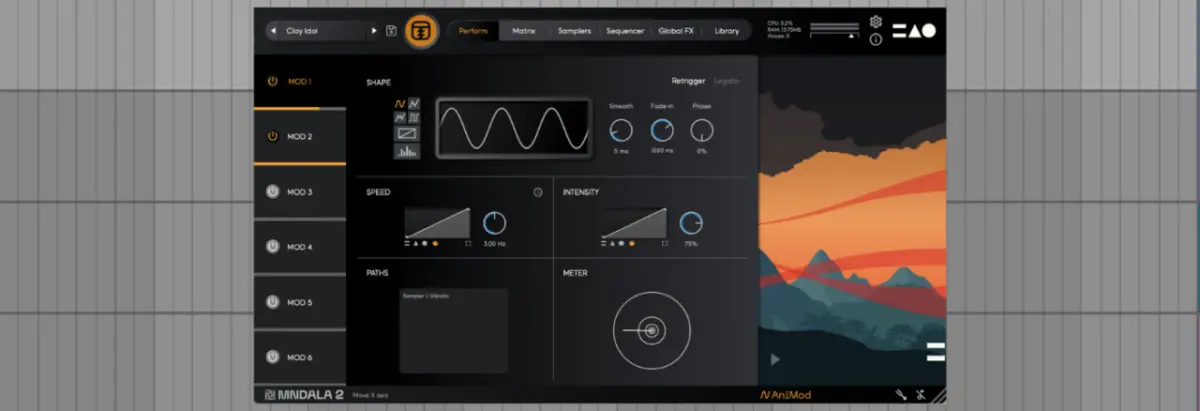
For producers looking to inject evolving, organic movement into their patches, MNDALA 2 includes the AniMod Global Modulation System, accessed via the button in the lower-right corner.
AniMod features six source modulators arranged in a vertical column on the left. Modulation shapes include sine, triangle, square, random, stepped, and custom, the latter of which allows users to draw bespoke modulation curves directly into a dedicated viewer. Speed, intensity, and axis assignments (X, Y, Z) are fully customizable, with a comprehensive Paths window tracking active modulation routings.
7. Micro-Tuning Capabilities
Finally, the Tuning section (accessed via the tuning fork icon in the lower-right corner) provides deep micro-tonal control. Users can assign tuning presets on a per-sampler basis or utilize the link button to enforce global temperaments. A built-in manual editor also allows for the creation of custom tuning scales.
Supporting Context & Metrics
To appreciate the engineering marvel behind MNDALA 2, one must look at the specifications defining modern virtual instrument design:
Audio Resolution: 32-bit / 384kHz Extended Resolution Audio support, capturing ultrasonic acoustic frequencies that transcend standard human hearing but contribute to phase coherence, saturation, and transient snap when pitched down.
Voice Architecture: Up to 6 simultaneous sample/generator layers per preset.
Modulation Infrastructure: 3 macro axes (X, Y, Z), 6 AniMod global modulation sources, and per-sampler step sequencers.
Accessibility: 100% free core sound engine with a hybrid ecosystem of free and premium commercial instrument libraries.
Official Statements & Industry Reception
MNTRA Instruments, spearheaded by visionary composer and sound designer Brian D’Oliveira, has consistently championed a philosophy of organic, tactile audio exploration. Speaking on the design ethos behind instruments that bridge acoustic performance and software synthesis, the development team emphasizes breaking away from static sample playback.
"The main thing to remember is that MNDALA 2 is focused on Real-Time Parameter Controls, or RTPCs," notes the MNTRA development team. By abstracting complex routing trees into intuitive, visually reactive X, Y, and Z axes, the engine bridges the gap between deep sound design and fluid live performance.
Furthermore, Brian D’Oliveira recently expanded on these production philosophies during an appearance on the Attack Magazine Podcast. Discussing the intersection of physical acoustic recording techniques and digital sound manipulation, D’Oliveira highlighted how capturing instruments at extreme sample rates unlocks entirely new dimensions of musical expression.
Future Outlook
As virtual instrument technology marches toward greater CPU efficiency and hyper-realistic sonic modeling, engines like MNDALA 2 point the way forward. By refusing to copy the standard template set by legacy sample players, MNTRA Instruments has carved out a distinct niche for producers, cinematic composers, and sound designers seeking organic inspiration.
With placeholder architecture like the upcoming "Shaper" slot hinting at future expansions, MNDALA 2 is poised to remain a vital, evolving tool in the modern electronic and film-scoring toolkit. Whether you are downloading their extensive suite of free instruments or investing in premium acoustic libraries, mastering MNDALA 2 will fundamentally change how you approach spatial movement, morphing textures, and real-time performance in your DAW.