Executive Overview
In an ecosystem saturated with standard-issue lowpass, highpass, and bandpass plugins, finding a filter effect that genuinely pushes the boundaries of sound design is a rarity. Enter MNTRA Instruments, a developer widely acclaimed for forging deeply organic, character-driven virtual instruments and effects like MNDALA 2, BRUITAGE, and BOREALIS. Their latest release, FLTRS, refuses to play by the conventional rules of audio processing.

Rather than relying solely on traditional cutoff and resonance knobs, FLTRS combines an impressive arsenal of 37 distinct filter algorithms with a graphical, macro-driven workflow. Borrowing the spatial-axis interaction model from their flagship software lines, FLTRS maps parameters across an intuitive X, Y, and Z plane. This approach allows electronic music producers, sound designers, and mixing engineers to breathe kinetic life, rich grit, and unpredictable motion into sterile audio tracks.

Available at a special introductory price of $49 until May 14th, FLTRS represents a major evolution in how we interact with filter effects. This deep-dive walkthrough explores the plugin’s architectural layout, algorithmic depths, macro system, modulation matrices, and mastering tools, demonstrating how to transform clean, lifeless recordings into texturally rich soundscapes.

Detailed Chronology & Architectural Walkthrough
To understand the power of FLTRS, one must first look at how its interface and workflow are structured. MNTRA has designed the plugin to bridge the gap between deep, modular-style sound shaping and immediate, performance-oriented control.

The Bird’s-Eye View: Perform View and the Control Panel
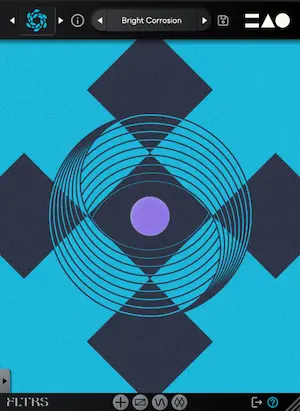
When you first instantiate FLTRS in your digital audio workstation (DAW), you are greeted by the Perform View. This visual centerpiece represents the X, Y, and Z axes as geometric shapes: circles, triangles, and equal signs. MNTRA uses a clever cursor-tracking system; as your mouse hovers over these graphics, your cursor transforms to reflect the active symbol. Clicking and dragging across the Perform View alters multiple parameters simultaneously in real-time, displaying precise percentage changes at the bottom of the interface.

Flanking the visualizer is the Control Panel. Here, users gain direct access to core parameters dictated by the active filter algorithm—typically including cutoff frequency, resonance, and a third variable algorithm-dependent parameter. Top-level input gain, a wet/dry mix control, and bottom-level output gain round out the primary routing options. For a cleaner look, the Control Panel can be collapsed using the arrow tab at the base of the UI.

Additional pages—such as the Animod modulation section, advanced parameters, and the mastering suite—are easily accessed via minimalist icons positioned along the bottom edge of the plugin window.

Exploring the 37 Filter Algorithms
At the core of FLTRS’ sonic palette are 37 distinct filter algorithms. These are not merely digital approximations; they incorporate meticulously modeled classic analog hardware alongside innovative digital topologies:

- Vintage & Analog Emulations: Includes legendary Moog-style ladder filters, aggressive Korg MS-20 filters, classic Sallen-Key architectures, and vintage synth-inspired models from the Roland Jupiter-6 and Juno lines, alongside modern OTA (Operational Transconductance Amplifier) designs.
- Experimental & Spectral Models: For producers looking to push beyond traditional analog warmth, FLTRS offers wilder spectral and experimental algorithms like the Feedback Mesh Filter and the Odysseus Filter.
Navigating these algorithms is handled via the logo in the upper-left corner, which opens a dedicated browser filled with historical and technical insights. Alternatively, users can step through them using the adjacent directional arrows.

To help users acclimate, MNTRA includes an Elements list within the preset browser. These serve as raw, unmodulated starting points for every algorithm. For instance, applying the Feedback Mesh Filter, Odysseus Filter, or Sallen Key Filter to a clean synthesizer track immediately injects distinct harmonic textures and analog-style bite without requiring a single modulation assignment.

Mastering the Macro and Control Mapping Systems
The true genius of FLTRS lies in its macro mapping engine. Every parameter in the Control Panel features an icon indicating its axis assignment. By right-clicking a parameter or opening the Control Mapping Window, producers can fine-tune the range, scaling, and response curves of each macro.

Each table displays an envelope curve mapping how the effect reacts across its operational range. Clicking the square icon in the lower-right corner unlocks an expanded view featuring complex envelope shapes.

- Top Pro-Tip: A common pitfall for newcomers is attempting to drag a parameter graphic (like cutoff or resonance) directly with the mouse. Unless the parameter is explicitly unlocked via its hand icon for manual control, direct manipulation is bypassed in favor of macro automation. Once unlocked or automated—such as automating a lowpass filter to gradually close over time—producers can achieve sweeping, organic builds and transitions with ease.
Supporting Context, Modulation Metrics, & Sound Design
Static filtering is useful for basic mixing tasks, but modern electronic music demands movement. FLTRS addresses this through its comprehensive Animod modulation engine and an advanced Envelope Follower.

The Animod Modulation Matrix
Accessible via the bottom navigation bar, the Animod section houses three complex modulators alongside the envelope follower.

- Waveforms & Step Sequencers: Modulators offer standard wave shapes (sine, triangle, square, random) alongside fully customizable tables and a step modulator for rhythmic, sequenced parameter changes.
- Modulation-on-Modulation: Every modulator includes independent rate and intensity controls. Because these controls can be mapped to any of the three macro axes, manual control, or other modulators, FLTRS supports deeply complex routing. For example, assigning an LFO within Modulator 2 to control the rate of Modulator 1 results in evolving, organic modulations that speed up and slow down dynamically. A dedicated Paths table provides a clear visual overview of every modulation destination.
Dynamic Tracking with the Envelope Follower
For material rich in transients—such as punchy drum breaks, driving basslines, or rhythmic percussion—the onboard Envelope Follower is an indispensable tool. Functioning similarly to hardware envelope followers or native DAW utilities (such as Ableton Live’s internal device), it translates incoming amplitude changes into modulation data.

The Envelope Follower features an intuitive threshold control tied to a visual input signal monitor. Users can fine-tune attack and release times (which can be linked via a chain icon) and adjust input gain independently. By setting the threshold to trigger on transient peaks, producers can duck filter cutoffs, inject pumping motion, or drive distortion algorithms dynamically in time with the groove.

The Mastering Section
Before audio exits FLTRS, it passes through an integrated Mastering Section. This final stage features a precise parametric equalizer for surgical tone-shaping and a high-grade compressor/limiter offering switchable Modern and Vintage modes. This ensures that even when pushing filters into self-oscillation or driving aggressive analog distortion, the final output remains controlled, polished, and ready for commercial release.

Official Statements & Industry Reception
Sound designers and early adopters have praised MNTRA Instruments for steering away from cookie-cutter plugin design. By translating the complex spatial control paradigms of their virtual instruments (like MNDALA 2) into an effect format, MNTRA has successfully democratized advanced modular sound design.

Industry analysts note that FLTRS fills a vital gap in the modern production toolkit. While traditional EQ and filtering plugins are often viewed as corrective mixing tools, FLTRS positions the filter as a primary creative instrument—turning everyday stems into living, breathing textural elements.

Future Outlook
As plugin developers continue to seek innovative ways to combat screen fatigue and inspire creativity through intuitive user interfaces, MNTRA’s graphical macro approach serves as a compelling blueprint. The success of FLTRS suggests a growing demand for effects that encourage tactile, performance-based interaction over endless micro-adjustments in nested menus.

For producers looking to inject grit, character, and relentless motion into their productions, FLTRS is an essential addition to the plugin folder. FLTRS is available now at a special introductory price of $49 until May 14th. To explore demos, audio examples, and purchasing options, visit the official MNTRA Instruments website.