Executive Overview
In the contemporary landscape of electronic music and live multimedia art, the barrier separating audio engineering from visual production is rapidly dissolving. Modern audiences no longer simply listen to a performance; they expect to experience it as a unified, synesthetic event where sonic textures and visual aesthetics inform, challenge, and elevate one another. Achieving this deep level of integration has historically required complex, proprietary software bridges, cumbersome hardware arrays, or prohibitively expensive custom coding.

However, a new workflow championed by modern electronic music producers showcases how to seamlessly bridge the gap between sound and sight. By pairing Ableton Live—the industry-standard digital audio workstation (DAW)—with TouchDesigner, a node-based visual development platform, creators can construct a dynamic, bi-directional performance ecosystem.

In this custom performance setup, harmonized vocals do not merely trigger static background graphics. Instead, they drive reactive, immersive 3D visuals in real time. Conversely, spatial and visual data generated within the graphics pipeline loop back to shape the audio parameters. The result is a true cybernetic loop: a living performance where volume and pitch are rendered visible, and spatial visual coordinates dictate the stereo panning and processing of the live audio mix. This comprehensive technical breakdown explores the underlying architecture, routing strategies, and cross-platform communication protocols that make this real-time audio-visual synergy possible.

Detailed Chronology: Step-by-Step Architectural Breakdown
To understand how this immersive experience is constructed, the performance pipeline must be examined across three distinct domains: the Ableton Live vocal and MIDI routing network, the TouchDesigner generative visual network, and the TDAbleton communication bridge that unites them.

Phase 1: Polyphonic Vocal Harmonization in Ableton Live
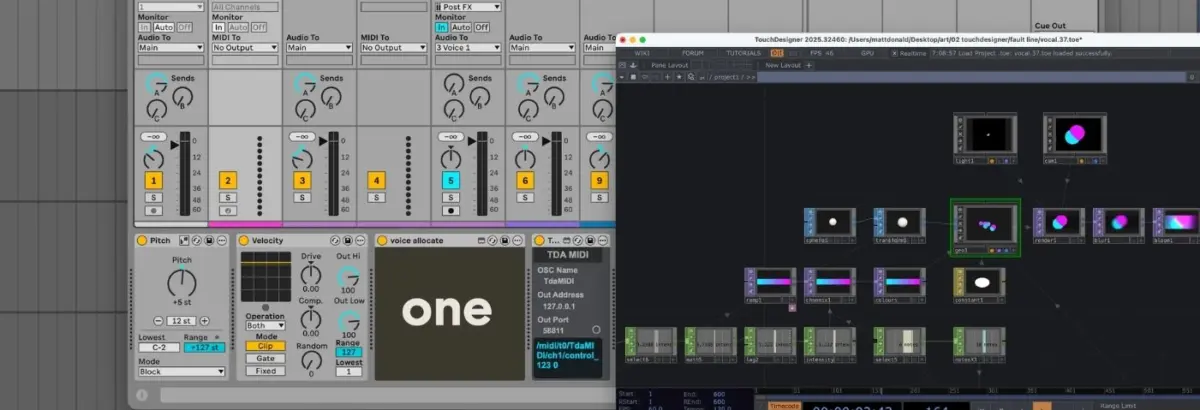
The foundation of the performance centers on a live vocal input paired with six harmonized companion voices, totaling up to seven distinct vocal channels. While Ableton’s native Auto Shift audio effect is natively capable of polyphonic operation, relying on a single instance for complex harmonies limits independent control. To achieve surgical precision, Matt Donald’s configuration deploys seven individual instances of Auto Shift, with each instance assigned to a dedicated audio track.

- Master MIDI Ingestion: MIDI data originating from a live performance controller enters Ableton via a designated master MIDI track. The incoming stream is subtly transposed, and its velocity dynamics are flattened to ensure consistent triggering behavior.
- Voice Allocation via Max for Live: The processed MIDI data is routed into a custom Max for Live device aptly named Voice Allocate. This utility parses incoming notes, assigns a unique identification (ID) number to each active note, and distributes them across separate channels.
- Targeted Voice Reception: Each Auto Shift audio track is paired with an adjacent MIDI track containing a complementary custom Max for Live device called Voice Receive. Each Voice Receive device listens exclusively for its assigned note ID.
- Monophonic Mapping: The Auto Shift devices are set to a monophonic MIDI tracking mode, receiving note data strictly from their respective Voice Receive counterparts. Meanwhile, the raw live vocal audio is bussed to a master audio track and simultaneously fed into all seven Auto Shift instances.
The resulting architecture yields a fully realized, live-played vocal harmonizer where the primary vocal and its six harmonic shadows occupy independent, highly controllable channels.

Phase 2: Lightweight GPU-Accelerated Visuals in TouchDesigner
With audio processing secured, the visual environment must be engineered to respond instantaneously without consuming excessive CPU resources, which are already heavily taxed by multiple real-time pitch-shifting algorithms. TouchDesigner accomplishes this via GPU-accelerated instancing.

- Instancing Architecture: Instead of calculating geometric transformations on the CPU, TouchDesigner renders multiple versions of a base shape from a single source entirely on the graphics card.
- Geometry and Positioning: The network begins with a single Sphere SOP (Surface OPerator). After minor transformations, the sphere is fed into a Geometry Component (Geo Comp) where instancing is initiated. A collection of Noise CHOPs (CHannel OPerators) generates organic, continuously evolving XYZ spatial coordinates for each instance, bounded neatly within standard screen parameters.
- Color and Texturing: A Ramp TOP (Texture OPerator) assigns a dynamic color gradient to each instance by interpolating between two user-defined endpoint colors. A constant material applied to the Geo Comp strips away depth perception, rendering the 3D spheres as flat, striking, graphic circular elements.
- Lighting and Post-Processing: The scene is captured by a Camera Component, illuminated by a Light Component, and compiled via a Render TOP. Before hitting the final display output, the signal passes through bloom and blur filters to add atmospheric glow and motion softness.
Phase 3: The Cross-Platform Nexus via TDAbleton
While TouchDesigner natively supports Open Sound Control (OSC) for network communication, Derivative and the live-performance community have streamlined this workflow through TDAbleton. TDAbleton is a curated suite of Max for Live devices and companion control scripts that establish a robust, two-way data highway between the DAW and the visual engine.

Once installed, TDAbleton allows producers to drag and drop monitoring devices directly onto Ableton tracks. This enables TouchDesigner to read parameters from—and write automation back to—any element within Ableton with single-click simplicity.

Supporting Context & Metrics: Bi-Directional Parameter Mapping
The true brilliance of this setup lies not in the isolation of sound and graphics, but in how deeply their data streams intertwine. The performance network relies on several key cross-platform data mappings:

- Amplitude-Driven Dynamics (
abletonLevel CHOP): An audio-level monitoring CHOP taps into Ableton’s master channel. This live amplitude data is mapped simultaneously to two distinct visual parameters: the opacity of the Ramp TOP (making the circles more solid and opaque as the vocal volume increases) and the speed of the Noise CHOPs (causing instances to dart across the screen with greater velocity during loud passages). - Polyphony-Aware Scaling (
abletonMIDI CHOP): A MIDI-monitoring CHOP tracks incoming performance notes. The total count of active MIDI notes plus one (accounting for the primary live vocal) dynamically adjusts the TouchDesigner network. This value scales both the number of position-generating Noise CHOPs (determining instance count) and the color interpolation steps in the Ramp TOP. - Spatial Audio-Visual Panning: The horizontal (X-axis) spatial coordinates generated by the TouchDesigner Noise CHOPs are mapped directly to the pan controls of seven individual
abletonTrack COMPs. As visual elements drift across the screen, their corresponding vocal harmonies physically pan across the stereo field in real time. - Glitch and FX Triggering: A Count CHOP monitors for a specific trigger note (F3). Each time the note is struck, an internal counter increments. Upon hitting a set threshold, it fires a trigger that routes audio out of Ableton into external hardware—such as a Hologram Electronics Chroma Console set to its fragmented, glitch-heavy Inference algorithm. A secondary
abletonLevel CHOPcaptures the wet return level of this effect and maps it to a visual color-shift intensity, causing the graphics to fracture and disintegrate in lockstep with the audio degradation.
| Parameter Domain | Source Platform | Target Platform | Effect / Result |
|---|---|---|---|
| Vocal Volume | Ableton (Master Audio) | TouchDesigner (Ramp & Noise) | Increases visual opacity and motion velocity. |
| Note Density | Ableton (Master MIDI) | TouchDesigner (Geo Comp) | Dynamically spawns visual instances based on active harmonies. |
| Spatial Position | TouchDesigner (Noise X-Axis) | Ableton (Track Panning) | Pans individual vocal harmonies across the stereo field. |
| FX Feedback | Ableton (Chroma Console) | TouchDesigner (Color Shift) | Fractures graphics when glitch effects are triggered. |
Official Statements and Industry Insights
The convergence of performance software platforms like Ableton Live and TouchDesigner reflects a broader paradigm shift in electronic music culture. Creators are increasingly moving away from pre-rendered video clips synced to linear timelines, favoring generative, highly responsive audio-reactive environments.

Industry developers and veteran media artists note that the democratization of visual programming tools has leveled the playing field for solo performers. "When you tie visual parameters directly to the physical nuances of a performance—such as vocal resonance, pitch allocation, and stereo positioning—the audience immediately senses the authenticity," notes production integration specialists. "It stops feeling like a light show accompanying a concert, and starts feeling like a single, cohesive organism."

Furthermore, the accessibility of TouchDesigner’s free tier—which allows creators to prototype complex node networks capped at a 1280×1280 resolution—has lowered the barrier to entry for musicians looking to expand their visual toolkit without investing thousands of dollars in bespoke enterprise software licenses right out of the gate.

Future Outlook: The Evolution of Synesthetic Live Sets
As computing power increases and GPU optimization techniques continue to evolve, workflows bridging Ableton Live and TouchDesigner are poised to become standard operating procedure for underground electronic acts and major touring headliners alike.

Future iterations of these workflows will likely leverage machine learning and advanced spectral analysis within Max for Live to map complex timbral qualities—such as harmonic distortion, formant shifts, and transient density—directly to 3D mesh deformations and particle simulations in TouchDesigner. Moreover, the integration of network protocols like Network Stream (NDI) and improved OSC implementation will allow performers to seamlessly stream these reactive visuals across multi-screen stage setups with near-zero latency.

For producers and visual artists willing to master the intricacies of TDAbleton, node-based scripting, and real-time data routing, the reward is absolute: the ability to construct immersive, breathing performance spaces where sound possesses physical geometry, and light holds a distinct, audible voice.