Executive Overview
The 1980s left an indelible mark on modern electronic music, defining an era through neon aesthetics, gated reverbs, and, most notably, the widespread adoption of tuned, marimba-esque percussive sounds. Found everywhere from the dance-pop productions of Madonna and Gloria Estefan to iconic cinematic scores like Predator and Romancing the Stone, these glassy, wooden, and metallic textures became the sonic signature of a decade.
While classic analog subtractive synthesizers excel at generating warm pads and sweeping leads, they historically struggled to replicate the chaotic, organic complexity of real-world physical objects—such as glass bells, struck metal tubes, or hollowed-out timber. Historically, producers bridged this gap using FM (Frequency Modulation) synthesis and sampling. Today, however, software instrument design has evolved to a new frontier.

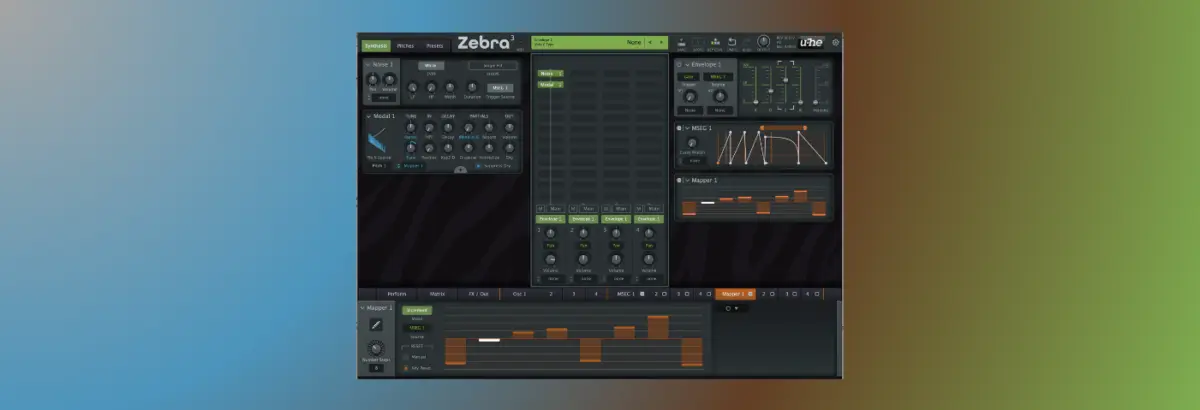
In this edition of Synth Secrets, we dive deep into u-he’s Zebra 3—currently available in public beta—to explore how its advanced Modal modules leverage genuine physical modelling. Rather than merely playing back a static recording or approximating overtone structures via math, Zebra 3 calculates the acoustic resonances of physical objects in real-time. By feeding a simple, transient-rich source of white noise through Zebra 3’s physical modelling engine, producers can effortlessly transform raw noise into a vibrant, dancefloor-ready percussive arpeggio capable of anchoring minimal techno, tech-house, or tropical Latin-infused grooves.
Detailed Chronology: Step-by-Step Sound Design Walkthrough
To demonstrate the staggering depth and flexibility of Zebra 3’s new physical modelling architecture, we will construct a driving percussive rhythm completely from scratch, starting with nothing more than a burst of white noise.

Step 1: Initializing the Noise Source and Volume Envelope
Open up Zebra 3 and load an initial (INIT) preset. Direct your attention to the center panel and replace the default oscillator module with a Noise 1 module.
To shape this formless noise into a sharp, percussive transient—resembling a drumstick striking a hard surface—we must configure Envelope 1. Set the Attack, Sustain, and Release parameters to 0, while dialing in a tight Decay time of approximately 400 milliseconds. Next, draw in a single, one-bar-long note on C2 within your DAW’s piano roll and hit play. Change the Noise Shape parameter to Single Hit to lock in a snappy, highly controlled volume envelope profile.

Step 2: Introducing the Modal 1 Module
With our percussive transient established, place a Modal 1 module immediately following the noise source in your signal chain. This module analyzes the dynamic volume profile of the incoming white noise and calculates realistic physical resonances based on that input.
Activate the Suppress Dry function to filter out the raw, uncolored noise source, leaving only the resonant acoustic output. Even at this early stage, playing back the pattern reveals an uncanny realism: each successive hit varies slightly from the last. This organic variation is the hallmark of u-he’s new Modal architecture, injecting human-like life into repetitive electronic sequences.

Step 3: Applying Physical Models via Slots A and B
While the sound currently resembles a tuned synth drum, it lacks the distinct sonic identity of a physical object. To imbue it with tangible material character, click the small + symbol within the Modal module to reveal two distinct physical modelling slots: A and B.
Zebra 3 allows producers to load a different physical model into each slot and seamlessly crossfade between them (or modulate the balance using internal modulators). For this patch, load the Punched Can model into slot A. Immediately, the synthesized tone transforms, taking on the unmistakable, metallic resonance of a real hollow container.

Step 4: Analyzing the Relationship Between Noise and Modelling
To fully understand how Zebra 3’s architecture operates, temporarily switch the Noise Shape parameter back to Constant rather than Single Hit. This comparison demonstrates a vital principle: while the harmonic tonality and material resonance are governed entirely by the Modal module, the percussive envelope, attack characteristics, and rhythmic profile are dictated by the source sound.
While the constant noise setting yields an intriguing texture, it sacrifices direct control over the envelope shape. For precise rhythmic tightness, switch the setting back to Single Hit.

Step 5: Constructing Rhythmic Patterns via the MSEG
Zebra 3’s capabilities extend far beyond static hits. We can generate complex, evolving rhythmic phrases using the Multi-Step Envelope Generator (MSEG).
To ensure precise timing, load reference audio files (909_Kick.wav and 909_Hat.wav) into your session and set your project tempo to 126 BPM. Open the MSEG window and link the Trigger Source for both the noise generator and envelope from standard MIDI Gate to the MSEG. Draw in a skippy, syncopated rhythm, complete with a tight looping section at the end of the phrase to drive momentum.

- The Release Trade-Off: Experiment with different release settings. A release time of
0msintroduces a subtle click at the tail end of the pattern. When played in isolation, this click can sound harsh; however, when paired with a driving four-to-the-floor kick drum, it blends into the percussive groove to add punch and high-frequency grit. For breakdown sections where the percussion plays unaccompanied, dial in a longer release time (e.g.,323ms) for a smoother, more atmospheric tail.
Step 6: Programming a Melodic Riff with the Mapper Module
To turn our fixed-pitch rhythmic pattern into a dynamic melodic riff, duplicate your channel strip so you retain a clean percussive version for later use.
On your original channel, Ctrl-click (or right-click) the Modal 1 tuning parameter and assign Mapper 1 as the modulation source. Set the tuning modulation depth to 16. This routes the Mapper to control the pitch of the physical model across your sequence. Program a custom melodic sequence into the Mapper window (or load a pre-configured module preset) to give your percussion distinct musical notes.

Step 7: Layering Textures with the Metal Bowl Model
To add weight, width, and aggressive drive to the mix, duplicate your channel once more. On this third layer, we will adjust the Modal parameters to create a complementary high-end texture.
Select the Metal Bowl modelling preset. Disable Suppress Dry, set the core tuning to +12 semitones, and right-click the tuning parameter to expand its modulation range to -24. Push the Position parameter to 100, shorten the Decay to 19, reduce the Disperse parameter to 0, and introduce a 32-cent Stereo Tune to widen the image. The result is a sharp, clackety, and immensely powerful rhythmic layer.

Step 8: Final Arrangement and Polyphonic Jamming
With three distinct channels configured—the rhythmic noise percussion, the melodic tuned riff, and the wide metal bowl layer—load a complex MIDI file (such as Busy.mid) across all tracks.
Because these patterns utilize varied note lengths and overlapping triggers, they interact dynamically with Zebra 3’s internal loop points and envelope structures. Pan the channels across the stereo field, experiment with varying sustain and release lengths, and blend the patterns together for a rich, evolving live jam.

Supporting Context & Technical Metrics
The inclusion of physical modelling in modern software synthesizers represents a significant technological leap. Traditional sound design paradigms relied heavily on additive, subtractive, or wavetable synthesis, which approximate complex spectra through filtering and harmonic stacking.
| Synthesis Method | Core Mechanism | Real-World Acoustic Accuracy | CPU Overhead |
|---|---|---|---|
| Subtractive | Filtering harmonically rich raw waveforms | Low (Poor at imitating natural materials) | Minimal |
| FM Synthesis | Modulating carrier frequencies with operators | Moderate (Effective for bells and metallic stabs) | Low to Moderate |
| Sampling | Multi-velocity audio playback of real instruments | High (Limited by static recordings and memory) | Moderate to High |
| Physical Modelling | Real-time mathematical calculation of acoustic resonance | Extremely High (Dynamic, responsive, and infinitely variable) | Moderate |
By utilizing physical modelling algorithms, Zebra 3 bypasses the static limitations of audio samples. Because the resonance equations recalculate dynamically based on the input signal’s velocity, transient shape, and frequency content, no two notes sound identical. This introduces an organic, acoustic warmth into electronic music production that bridges the gap between hardware instruments and software flexibility.

Official Statements & Industry Impact
The announcement and public beta release of u-he’s Zebra 3 have sent ripples through the electronic music production community. Known widely for its predecessors—Zebra 2 and the legendary ZebraHZ (developed in collaboration with Hans Zimmer)—u-he has built a reputation for uncompromising sound quality and deep modular architecture.
Industry insiders and sound designers have praised the integration of the Modal modules, noting that physical modelling transforms Zebra 3 from a traditional wavetable synthesizer into a comprehensive acoustic laboratory.

"Synthesizers have spent decades trying to mimic the physical world through approximation," notes lead developer Urs Heckmann. "With Zebra 3’s physical modelling architecture, we aren’t just approximating the sound of an object—we are simulating the physical mechanics of how that object vibrates, resonates, and reacts to excitation. It changes the philosophy of patch creation entirely."
Early adopters participating in the public beta on platforms like KVR Audio have highlighted the modular flexibility of routing noise sources, MSEGs, and mappers into the physical modelling engine. Producers specializing in techno, ambient, and cinematic soundscapes have particularly commended how easily the engine generates complex percussive loops from minimal inputs.
Future Outlook
As software instruments continue to evolve, the boundaries separating electronic synthesis from acoustic modelling are dissolving entirely. Zebra 3’s public beta phase marks a major milestone for u-he, signaling a broader industry trend toward hybrid instruments that combine wavetable power, modular routing, and real-time physical simulation.
For electronic music producers, tools like Zebra 3 open up entirely new avenues for sound design. By mastering techniques such as noise-to-resonance conversion, multi-slot modelling blends, and MSEG modulation, artists can craft unique, signature percussive palettes that stand out in modern mixes.
Whether you are looking to recreate the lush, tuned percussion of 1980s synth-pop blockbusters or forge cutting-edge, futuristic sound design for underground techno, Zebra 3’s physical modelling engine proves that incredible sonic depth can originate from something as simple as a burst of white noise.
Zebra 3 is currently available in public beta. Producers can download the installer and access beta licensing cards via community forums such as KVR Audio.