Executive Overview
A decade after Image-Line first redefined portable music production by shrinking the power of a full digital audio workstation (DAW) into the palm of a musician’s hand, the company has released its most ambitious mobile software update to date. FL Studio Mobile 5 arrives as a monumental milestone for the platform, fundamentally bridging the gap between desktop-bound sample libraries and on-the-go beatmaking.
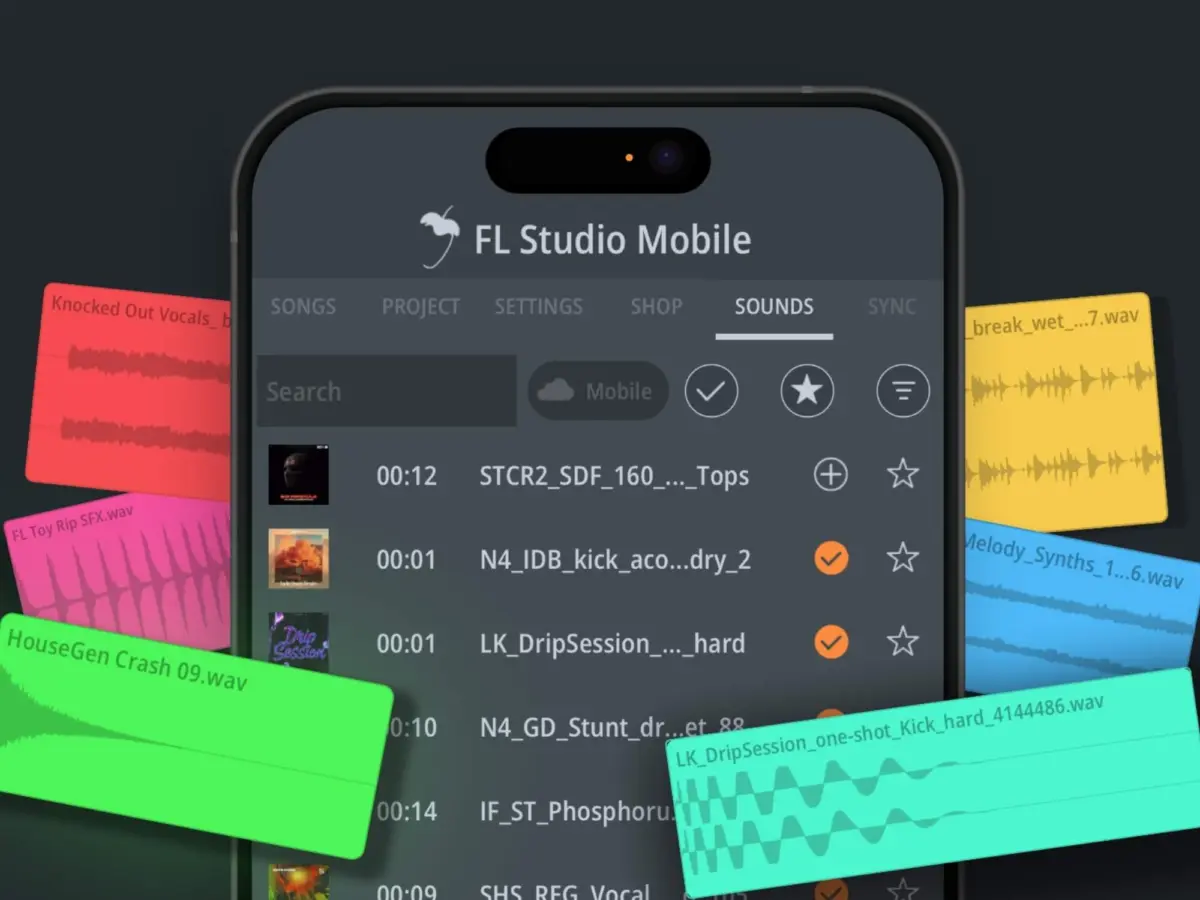
At the heart of this release is direct integration with FL Cloud Sounds, a massive, high-caliber sample repository that was previously locked behind desktop environments. By extending this feature to mobile devices, Image-Line has democratized production resources on an unprecedented scale. Free mobile users are instantly granted access to thousands of curated, royalty-free introductory sounds, while paid FL Cloud subscribers unlock a sprawling arsenal of over two million audio assets directly from their smartphones and tablets.
Beyond cloud connectivity, FL Studio Mobile 5 addresses some of the community’s most persistent workflow requests. The update introduces a highly anticipated Portrait Edit Mode, allowing producers to build tracks vertically using one hand—a game-changer for commuters and impromptu mobile sessions. Furthermore, Image-Line has refined peripheral support by bolstering mouse and keyboard functionality, introducing spacebar playback controls, advanced keyboard shortcuts, and a new "burn notes" feature.
True to Image-Line’s famous "Lifetime Free Updates" policy, version 5 is entirely free to existing users. This release not only cements FL Studio Mobile’s status as a premier on-the-go production suite, but it also blurs the boundaries between mobile apps and heavy-duty studio setups, signaling a new era for portable electronic music creation.
Detailed Chronology: A Decade of Mobile Evolution
To understand the weight of the FL Studio Mobile 5 release, it is necessary to examine the trajectory that brought Image-Line to this juncture.
2014–2016: Putting a Studio in Your Pocket
When mobile application stores first began maturing into viable creative marketplaces, music software developers rushed to capture the touchscreen market. However, early DAW apps were largely toy-like, offering limited polyphony, restrictive track counts, and constrained user interfaces.
When Image-Line first ported the FL Studio architecture to mobile platforms a decade ago, it represented a paradigm shift. Producers could sketch out ideas on long flights, lay down melodies during train commutes, and export project files directly into the desktop version of FL Studio. This seamless desktop-to-mobile pipeline turned the application into an essential auxiliary tool for thousands of producers worldwide.
2018–2022: Scaling Up and Refining the Engine
Over the next several years, FL Studio Mobile steadily evolved. Image-Line introduced AUv3 and IAA support on iOS, improved audio recording capabilities, expanded the built-in instrument and effect plugin suite, and optimized the engine for low-latency performance across an increasingly diverse range of mobile devices.
Yet, despite these massive hardware optimizations, one major limitation remained: content sourcing. While desktop users enjoyed sprawling browser ecosystems loaded with loop packs, one-shots, and melodic stems, mobile users were largely restricted to locally stored factory content or manual sample side-loading via cloud storage or local file systems.
2023–2024: The Birth of FL Cloud
The launch of FL Cloud represented a massive strategic pivot for Image-Line. Transforming their software ecosystem into an interconnected, subscription-backed online hub, the company integrated mastering services, distribution options, and an ever-expanding royalty-free sounds library directly into the desktop DAW.
While the desktop community rapidly adopted FL Cloud, mobile users watched from the sidelines. The architectural gap between a lightweight mobile app and a massive online sound-delivery infrastructure proved difficult to bridge—until now.
Today: FL Studio Mobile 5
With the official deployment of Version 5, the two ecosystems finally converge. FL Studio Mobile is no longer just a standalone scratchpad; it is now an active, synchronized node within the broader FL Cloud network.
Supporting Context & Metrics: Architecture, Cloud Integration, and Workflow Upgrades
FL Studio Mobile 5 is not merely a cosmetic update; it represents a comprehensive overhaul of how mobile producers interact with audio assets, physical interfaces, and workspace layouts.

The FL Cloud Sounds Integration: Over Two Million Sounds at Your Fingertips
The standout feature of version 5 is its native integration with FL Cloud. The implementation has been carefully designed to prevent storage bottlenecks on mobile devices, which frequently struggle with limited hard drive capacities compared to desktop rigs.
- Streamlined Browsing: Producers can browse, audition, and filter through the entire FL Cloud library directly from within the mobile app. Searching can be executed via genre tags, curated collections, instrument types, and mood descriptors.
- Cloud-First Auditioning: Audio samples are streamed in high quality directly from the cloud. This means users can audition thousands of loops and one-shots within the context of their project without wasting local storage space downloading unnecessary files.
- On-Demand Downloading: Storage management is handled automatically. Only the specific sounds incorporated into active tracks are downloaded locally to the device, ensuring that project files remain portable and lightweight.
- Tiered Access:
- Free FL Mobile Users / Free Cloud Tiers: Access to thousands of foundational, high-quality sounds to kickstart creativity.
- FL Cloud Plus / Pro Subscribers: Full, unfettered access to over two million royalty-free sounds, samples, and loops, syncing seamlessly between desktop and mobile accounts.
Portrait Edit Mode: Mobile Production, Unbound
For years, mobile music software has enforced a strict landscape-only orientation, mirroring traditional desktop monitor layouts. While practical for multi-track arrangements and piano roll editing, landscape orientation is notoriously difficult to operate using a single hand while standing on public transit or walking.
FL Studio Mobile 5 introduces a fully optimized Portrait Edit Mode. This highly requested feature allows creators to interact with the DAW vertically, transforming the smartphone into a streamlined, one-handed beatmaking machine. Whether punching in drum patterns on the step sequencer, adjusting mixer faders, or tweaking parameter automation, the interface scales intelligently to vertical dimensions without sacrificing functionality.
Enhanced Peripheral Support and Workflow Polish
Recognizing that many mobile producers attach Bluetooth keyboards, MIDI controllers, and trackpads to their tablets and phones, Image-Line has significantly upgraded hardware integration in Version 5.
- Keyboard Shortcuts & Spacebar Control: Users can now utilize standard keyboard shortcuts to navigate the workspace more efficiently. Notably, hitting the spacebar now instantly starts and stops sample playback—a fundamental workflow habit for desktop producers that was previously absent on mobile setups.
- Burn Notes Feature: Version 5 introduces the ability to "burn notes" directly onto a track. This allows producers to convert complex or layered MIDI data into consolidated, easily editable audio or persistent note events on a selected track, streamlining CPU usage and opening up new sound-design possibilities.
- Global Quality-of-Life Fixes: Across the board, latency optimizations, UI responsiveness updates, and stability enhancements make Version 5 the smoothest-running iteration of FL Studio Mobile to date.
Official Statements
The release of FL Studio Mobile 5 marks a proud moment for Image-Line, reflecting a decade of continuous product refinement and deep engagement with their global user base.
Constantin Koehncke, CEO of Image-Line, shared his perspective on the milestone release:
"Ten years ago, we put a full music studio in people’s pockets. With Version 5, we’re taking another big step by bringing FL Cloud sounds to mobile.
Thousands of sounds are now available for free to every FL Studio Mobile user, making it easier than ever to get started and make music wherever you are. And with portrait mode, one of our most requested features, we’re delivering something our community has been asking for for a long time."
Image-Line’s product development team emphasized that the integration was built with mobile performance metrics at the forefront, ensuring that expanding access to a two-million-strong sample library did not compromise the app’s legendary speed and stability.
Future Outlook: The Blurring Lines Between Mobile and Desktop Production
As mobile hardware continues to rival the processing capabilities of mid-tier desktop computers from just a few years ago, the traditional boundaries separating mobile applications from professional production suites are rapidly dissolving.
FL Studio Mobile 5 is a prime indicator of where the music technology industry is heading. By connecting mobile users to a massive, cloud-based asset ecosystem, Image-Line has removed the friction that once forced producers to treat mobile apps as secondary or disposable sketching tools. Today, a track can be initiated on a smartphone during a morning commute using cloud-streamed samples, refined via tablet in portrait mode during a flight, and finalized on a heavy-duty studio desktop rig—all utilizing the exact same ecosystem.
Pricing and Availability
FL Studio Mobile 5 is available now across iOS, Android, and Windows store platforms.
- Existing Users: Free, in adherence to Image-Line’s historic Lifetime Free Updates policy.
- New Users: The application can be purchased directly from respective app stores.
- FL Cloud Tiers: New users can initiate a free trial of FL Cloud. Paid subscription tiers include FL Cloud Plus at $99 per year and the comprehensive Pro tier at $149 per year.
For more information, technical specifications, and download links, visit the official FL Studio Mobile website.