Executive Overview
In the crowded landscape of virtual instruments and software samplers, standing out requires more than just high-fidelity source audio—it demands a reinvention of workflow. Enter MNDALA 2, the flagship, free-to-download sound engine from MNTRA Instruments. While software samplers like Native Instruments’ Kontakt have long dominated the industry standard for sample playback, MNDALA 2 rejects traditional GUI conventions in favor of a fluid, organic, and visually immersive approach to sound design.
Built from the ground up to handle Extended Resolution Audio—including ultrasonic content recorded at a staggering 32-bit/384kHz—MNDALA 2 bridges the gap between ultra-detailed acoustic sampling and aggressive electronic synthesis. At its core, the engine is powered by Real-Time Parameter Controls (RTPCs), translating complex, multi-layered sample interactions into three intuitive macro axes. Whether you are crafting ambient soundscapes, evolving cinematic textures, or rhythmically driven electronica, MNDALA 2 provides a deeply flexible sandbox.

This comprehensive guide explores every facet of the MNDALA 2 ecosystem. From installation and library management to the depths of the Perform View, Matrix routing, Samplers page, step sequencers, and the AniMod global modulation system, we break down how to extract maximum creative potential from this powerful free tool.
Detailed Chronology: Navigating the MNDALA 2 Interface
Adopting a new software instrument often comes with a steep learning curve, particularly when it breaks away from conventional plugin layouts. MNDALA 2 uses a striking visual language that can feel unfamiliar upon first launch. However, once producers understand its underlying structure, the workflow becomes remarkably fluid.

1. Installation, Library Management, and the Preset Browser
The journey begins inside the Library tab. Once the free MNDALA 2 engine is installed, users navigate here to browse and download MNTRA’s expansive catalog of free and paid instrument packs. Because MNDALA 2 supports ultra-high-resolution audio files, users are prompted to designate a dedicated download location for sample content every time a new library is acquired.
Once downloaded, the Preset Browser—accessible from the upper-left corner—serves as the command center for asset management. Producers can filter patches by Instrument, Type, and Character, or modify existing subfolders and construct custom user presets. If any parameter or button ever feels opaque, hovering the mouse over the control reveals a helpful, plain-language description in the lower-left corner.

2. The Perform View and Real-Time Parameter Controls (RTPCs)
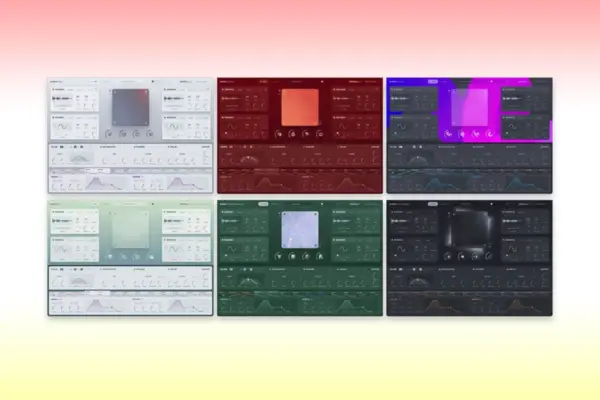
The Perform View functions as the primary workspace for composition and live manipulation. Beyond housing the controls, it showcases MNTRA’s dynamic graphic art department: each instrument features a bespoke visual asset that morphs and reacts in real-time as the macro axes are manipulated.
MNDALA 2’s architecture relies heavily on Real-Time Parameter Controls (RTPCs). Because a single preset can combine up to six distinct sample layers—each with independent modulation, sequencing, and per-layer effects—managing individual parameters manually would quickly become chaotic. MNDALA 2 streamlines this by mapping virtually every parameter within the engine to three global macro axes:

- X-Axis: Represented by an equal sign (
=) - Y-Axis: Represented by a triangle (
△) - Z-Axis: Represented by a circle (
◯)
These symbols appear throughout the graphical user interface (GUI), indicating how specific parameters tie back to macro movements. Producers can control these axes by dragging the translucent sliders on the left side of the Perform View, interacting directly with the central graphic, or mapping them to an external MIDI controller for tactile manipulation and DAW automation.
3. The Matrix Page: Sculpting Macro Relationships
To fine-tune how the X and Y macro axes interact with the six sampler layers, producers move to the Matrix page. Here, individual gain and pan tables dictate how each layer behaves across the range of the macro.

By default, tables are set to a simple linear ramp rising to the right, but they can be radically reconfigured. Clicking the square icon in the bottom-right corner expands the table for precision editing, granting access to preset geometric shapes or custom node-based curve drawing. The inclusion of remote-access icons for the circle, triangle, and equal signs on the right side of the screen allows sound designers to test their macro routings on the fly without returning to the Perform View.
Supporting Context & Metrics: Under the Hood of MNDALA 2
Beyond its unique visual layout, MNDALA 2 is a powerhouse of audio fidelity and hybrid synthesis.

Extended Resolution Audio and the Samplers Page
The technical backbone of MNTRA’s instrument line is its commitment to capturing sound far beyond the standard human hearing threshold. By processing audio recorded at 32-bit/384kHz, MNDALA 2 captures ultrasonic harmonics and transient details that, when pitch-shifted, stretched, or modulated, retain pristine clarity and organic warmth.
The Samplers page provides deep synthesis control across all six available sampler lanes. Key features include:

- Velocity Range & Velocity-to-Gain Tables: Perfect for expressive, multi-dynamic sample maps.
- AHDSR Envelopes & Tuning/Vibrato Controls: Essential shaping tools for dialing in pitch stability and amplitude behavior.
- Sample Start Modulation: Allows velocity data to dynamically alter where a sample playback begins.
- Multi-Mic Mixer, Heat Saturation, and EQ: Placed directly adjacent to the sample volume knob for immediate tonal shaping.
Furthermore, many parameters feature a link button (such as envelope settings and portamento), enabling global changes that instantly conform all samplers within a preset to unified values.
Synthesis Generators and Effects Routing
When raw samples aren’t enough, MNDALA 2 bridges the gap between sampling and virtual analog synthesis via its Generator slot. Producers can blend synthesizer-style oscillators with loaded audio or use them entirely on their own. Three generator types are available:

- Additive
- FM (Frequency Modulation)
- Simple Synth: A virtual-analog single-oscillator offering sine, triangle, square, saw, and noise waveforms.
For spatial and tonal processing, the Colours section provides three stereo effect slots per sampler. A massive library of algorithms—ranging from lush reverbs and delays to specialized filters, modulation effects, and compressors—can be loaded here. Their dry/wet parameters can then be pinned directly to the macro axes or external modulators. An additional five stereo buss effects are available under the Global FX tab.
Step Sequencers and the AniMod Modulation System
Rhythmic complexity is built directly into MNDALA 2 via dedicated step sequencers for each sampler, featuring independent lanes for Note, Velocity, and Length. Settings can be standardized globally via a link button, while randomize and reset buttons inspire quick variations. Bottom-tier controls manage shuffle, DAW-synced speed, step counts, and Stride (which dictates the interval of sequencer steps between notes—for instance, a Stride of 2 triggers notes every other beat).

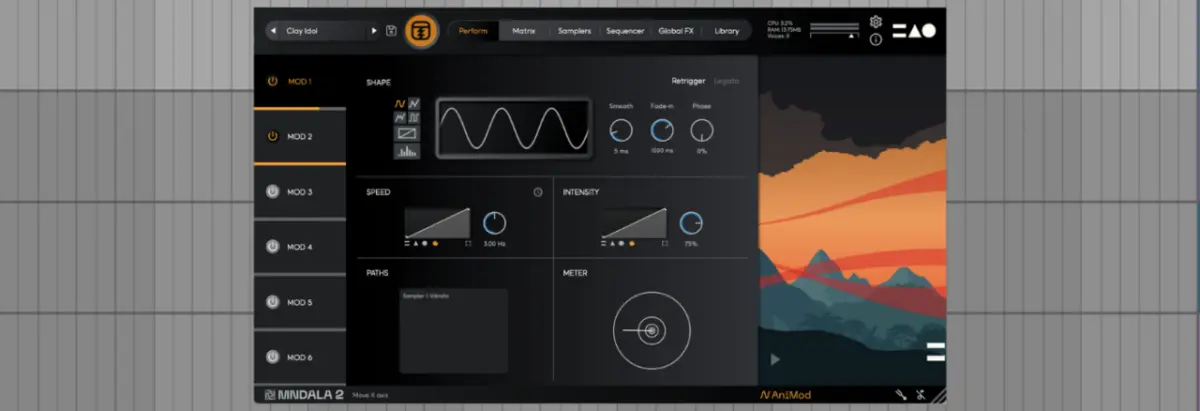
For advanced movement, the AniMod Global Modulation System (accessed via the ‘AniMod’ label in the lower-right corner) unlocks six source modulators. Users can choose from sine, triangle, square, random, custom, and stepped waveform shapes, draw custom curves in the viewer, and assign modulation intensity and speed directly to the X, Y, and Z axes. Finally, the Tuning section (represented by a tuning fork icon) provides access to microtonal scales and custom temperament adjustments on a per-sampler or global basis.
Official Statements and Industry Impact
MNTRA Instruments has consistently positioned MNDALA 2 not merely as a sample player, but as an artistic ecosystem. Speaking on the design philosophy behind their instruments, company leadership emphasizes that the fusion of organic acoustic recording techniques with hyper-modern digital manipulation is designed to spark genuine inspiration rather than sterile replication.

The software’s innovative interface has drawn praise across the electronic music production community for encouraging tactile, performance-oriented sound design. By removing the tedious menu-diving typical of advanced samplers and replacing it with spatial RTPC mapping, MNTRA has successfully merged the depth of modular synthesis with the accessibility of modern preset browsers.
Future Outlook
As software developers continue to push the boundaries of virtual instruments, platforms like MNDALA 2 point toward a future where audio quality and visual feedback are deeply intertwined. With placeholders already integrated into the engine architecture—such as the upcoming Shaper slot reserved for future updates—MNTRA Instruments is actively expanding the capabilities of the platform.

For producers looking to broaden their sonic palettes without breaking the bank, MNDALA 2 offers an unprecedented entry point. Between the free core engine, the generous catalog of complimentary instrument libraries available on the MNTRA website, and the limitless routing potential of the RTPC macro system, it stands as an essential tool for forward-thinking music producers, sound designers, and cinematic composers alike.
For further listening and deep dives into the minds shaping modern music technology, check out MNTRA founder Brian D’Oliveira’s recent appearance on the Attack Magazine Podcast, available now on Apple Podcasts and Spotify.