In the modern landscape of electronic music production and live electronic performance, the boundary between auditory experience and visual feedback has become increasingly porous. Audiences no longer settle for passive listening paired with static, pre-programmed background loops; they demand an immersive sensory ecosystem where sight and sound speak the same language. Meeting this demand requires robust digital craftsmanship, software synchronization, and a deep understanding of real-time data processing.
Enter the powerful, synergistic union of Ableton Live and TouchDesigner. While numerous visual solutions populate the market, few integrate with Ableton as seamlessly or robustly as Derivative’s node-based visual development platform. This comprehensive technical guide and investigative overview explores how a custom-engineered performance setup utilizes harmonized live vocals to drive responsive, generative visuals in real-time. By examining the intricate routing protocols, Max for Live devices, GPU-optimized instancing networks, and bidirectional control parameters, producers and visual artists alike can learn how to build a living, breathing performance rig where volume and notes are physically seen, and visual positions are audibly heard.
Detailed Chronology: Step-by-Step Breakdown of the Audio-Visual Pipeline
To fully grasp how an interconnected setup operates in a high-pressure live environment, we must dissect the architecture of the signal path. The performance framework relies on a master-slave communication paradigm where audio, MIDI, and visual data streams cross-pollinate continuously.
1. The Ableton Live Vocal Processing and Voice Allocation Rig
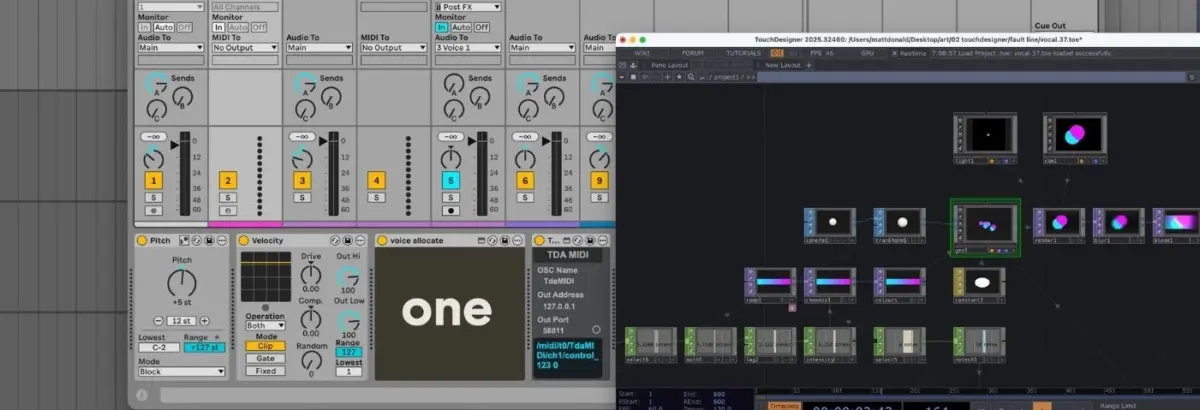
At the heart of the musical composition is a complex polyphonic vocal arrangement featuring up to seven distinct voices: a raw, unprocessed live vocal alongside six harmonized counter-parts. Although Ableton’s native Auto Shift audio effect natively supports polyphony, this specific live performance setup leverages individual instances of Auto Shift for surgical, isolated control over each harmonic layer.
Master MIDI Routing: Incoming MIDI data from a live performance controller hits a master MIDI track. Here, the signal is subtly transposed via Pitch parameters, and the velocity dynamics are flattened to ensure uniform trigger responses across all processing channels.
The "Voice Allocate" Max for Live Device: The normalized MIDI stream is directed into a custom Max for Live device known as Voice Allocate. This clever utility parses all incoming notes played simultaneously, assigns each note a unique sequential identification number (ID), and routes individual notes out to dedicated Voice Receive devices.
Monophonic Auto Shift Channels: Because each Auto Shift effect is housed in an audio channel grouped directly with a corresponding MIDI track, it receives input from a single, dedicated instance of Voice Receive. Configured strictly in monophonic MIDI mode, each Auto Shift channel processes a solitary note split directly from the primary controller input.
Audio Routing: The clean, dry audio captured from the live vocalist is routed to a master audio track, which simultaneously feeds the audio signal into all six parallel Auto Shift instances, yielding a rich, seven-voice live vocal harmonizer running across independent channels.
2. Establishing the Bridge via TDAbleton
While TouchDesigner can communicate with digital audio workstations via Open Sound Control (OSC) protocols, building custom parsing networks from scratch can introduce latency and configuration overhead. To streamline this, the rig utilizes TDAbleton—a bundled collection of Max for Live devices and an accompanying MIDI controller script developed specifically for this cross-platform workflow.
Once installed, TDAbleton establishes a two-way communication highway. TouchDesigner can effortlessly pull telemetry and stream metrics from any parameter within Ableton Live while simultaneously sending control data back down the line without missing a beat.
3. The TouchDesigner Node Network and GPU Instancing
To maintain high frame rates and avoid taxing the host computer’s CPU during a live show, the visual component relies heavily on GPU-driven instancing within TouchDesigner. Instancing enables creators to multiply a single base geometry across hundreds or thousands of iterations using graphics card memory rather than processor threads.
Geometry and SOPs: The visual network initiates with a single Sphere SOP (Surface Operator), which undergoes subtle spatial transformations before feeding directly into a Geometry Component (Geo Comp) where GPU instancing is declared.
Generative Positioning (CHOPs): A matrix of Noise CHOPs (Channel Operators) generates organic, constantly shifting X, Y, and Z coordinate values for each instance, cleanly bounded within the dimensions of the display screen.
Color Interpolation (TOPs): A Ramp TOP (Texture Operator) assigns a dynamic, interpolated color gradient across the instances. A constant material is applied to the Geo Comp to strip away artificial 3D depth perception, resulting in flat, stylized glowing circular shapes.
Render Pipeline: The visual collection is captured by a Camera Comp, illuminated through a Light Comp, and rendered via a Render TOP. Final touches—including real-time bloom and blur effects—are layered on before the signal pushes out to the main output screen.
4. Bidirectional Interactivity and Feedback Loops
The true genius of this hybrid performance setup lies in its closed-loop feedback design: audio parameters directly alter visual attributes, while visual states simultaneously manipulate audio mixing parameters.
Master Volume Tracking: An abletonLevel CHOP samples the real-time audio output level from Ableton’s master channel. This data maps directly to two key visual parameters: the opacity of the Ramp TOP (meaning louder vocals produce more solid, opaque colors) and the speed of the Noise CHOPs governing instance movement (so higher energy yields faster motion).
Dynamic MIDI Scaling: An abletonMIDI CHOP tracks all active notes from the master input. By taking the total active MIDI note count and adding one (accounting for the primary live vocal), TouchDesigner dynamically dictates two things: the number of active sets generated by the Noise CHOPs (modifying the total instance count in the Geo Comp) and the resolution of the color shade steps in the Ramp TOP.
Spatial Pan Modulation: The horizontal (X-axis) coordinate data generated by the Noise CHOPs mapping individual instances is routed directly back into Ableton, controlling the stereo pan positions of seven distinct abletonTrack COMPs—one for each vocal voice.
Effects Triggers and Glitch Processing: A Count CHOP monitors for specific performance triggers (such as an F3 note strike). Once a threshold is crossed, it fires a trigger that routes audio out of Ableton through an external hardware effects processor—a Hologram Electronics Chroma Console set to its fragmented, glitch-heavy Inference mode. A secondary abletonLevel CHOP reads the return level of this processed signal and maps it directly to a visual color-shift intensity, causing the on-screen graphics to fracture and tear in perfect sync with the audio degradation.
Supporting Context & Metrics: Technical Specifications and Hardware Demands
Deploying a real-time, multi-application performance ecosystem demands strict adherence to system optimization guidelines. Operating systems, audio driver buffers, and GPU allocation must be meticulously balanced to guarantee zero dropouts during a live performance.
System Layer
Component / Software
Function & Optimization Notes
Audio Engine
Ableton Live Suite
Manages polyphonic voice allocation, vocal routing, and real-time Max for Live processing. Requires an ASIO/CoreAudio buffer size of 128 samples or lower to maintain low latency.
Visual Engine
TouchDesigner (Non-Commercial / Commercial)
Handles node-based procedural generation, particle simulation, and GPU instancing. Free tiers limit output resolutions to 1280x1280px; commercial licenses are required for full HD/4K output.
Communication Bridge
TDAbleton (Max for Live)
Facilitates bidirectional data streaming (OSC/TCP) between DAW tracks and TouchDesigner operators without heavy scripting overhead.
Hardware FX
Hologram Electronics Chroma Console
External stereo hardware unit utilized for generative audio mangling and glitch processing driven by MIDI count triggers.
Processing Load
CPU vs. GPU Balance
Ableton places heavy demands on multi-core CPU threads, while TouchDesigner offloads particle and geometry calculations entirely onto the graphics card via GPU instancing.
Official Statements and Industry Insights
The convergence of algorithmic visual design and digital audio workstations represents a major paradigm shift for live electronic artists. Industry professionals and educators emphasize that moving away from linear video playback opens up entirely new dimensions of artistic expression.
"When you build a performance rig where visual geometry is literally tethered to MIDI note allocation and track panning, you eliminate the disconnect that plagues standard live shows. The audience isn’t just listening to a multi-layered vocal chain; they are watching the physical weight, volume, and stereo positioning of those harmonies mapped across architectural space in real time."
— Audio-Visual Systems Engineer & Live Performance Consultant
Furthermore, developers of bridging tools like TDAbleton note that lowering the barrier to entry between disparate software environments encourages experimentation.
"For years, visual artists and music producers operated in silos. By streamlining OSC and Max for Live integration, platforms like TouchDesigner and Ableton Live allow solo creators to act as both composer and lighting/video director simultaneously, ensuring every transient has a visual counterpart."
Future Outlook: The Evolution of Immersive Live Audio-Visual Rigs
As computing hardware continues to advance—particularly with the proliferation of unified memory architectures, Apple Silicon, and high-performance dedicated mobile GPUs—the complexity of real-time audio-visual rigs will only expand.
Key Trends Shaping the Future of Hybrid Rigs:
Spatial Audio Integration: With the widespread adoption of Dolby Atmos and ambisonic mixing in live environments, integration tools like TDAbleton are expected to evolve beyond simple stereo panning. Future iterations will likely map 3D spatial coordinates from immersive audio renderers directly into 3D TouchDesigner camera spaces, allowing visual objects to orbit audiences in exact alignment with acoustic sound sources.
AI-Driven Generative Feedback: Machine learning models running locally via Tensor-enabled nodes within TouchDesigner could soon interpret micro-variations in vocal timbre, formant shifts, and spectral centroids rather than relying solely on volume and MIDI note data. This will allow visuals to respond to emotional texture and vocal grit rather than just amplitude.
Hardware-Agnostic Standardization: As protocols mature, expect tighter out-of-the-box standardization between lighting desks (DMX/Art-Net), game engines (Unreal Engine/Unity), and DAWs, further blurring the lines between concert performance, interactive art installations, and virtual reality experiences.
By mastering frameworks like the Ableton Live and TouchDesigner pipeline, modern artists ensure they remain at the bleeding edge of live performance art—where every sound has a shape, and every movement tells a story.