In the rapidly evolving landscape of electronic music performance and audiovisual art, the barrier separating audio engineering from visual design continues to dissolve. Modern audiences increasingly expect live electronic shows to transcend traditional DJ sets or instrumental performances, demanding a cohesive sensory experience where sound and sight are inextricably linked. Achieving this synthesis—where audio cues dictate visual parameters, and visual transformations simultaneously warp the underlying soundscape—requires a sophisticated, highly synchronized technical architecture.
For electronic music producers, live performers, and creative coders, few software combinations are as powerful, flexible, and robust as Ableton Live and Derivative TouchDesigner. While Ableton Live remains the gold standard for timeline arrangement, clip launching, MIDI sequencing, and audio processing on stage, TouchDesigner serves as an unparalleled visual, node-based development platform capable of rendering complex, GPU-accelerated graphics in real time.
This technical feature explores a custom performance setup designed to bridge the gap between sight and sound. By analyzing a specific live configuration—featuring a multi-voice vocal harmonizer driven by live MIDI input and tightly coupled with a generative 3D visual network—we break down how audio can directly pilot visual geometry, color, and motion, while visual spatialization feeds back into real-time audio panning and effects processing. Whether you are an experienced live coder looking to refine your stage rig or a studio producer eager to step into the world of interactive visuals, this deep dive provides the blueprint for a truly responsive audiovisual ecosystem.
Detailed Chronology of the Technical Setup
Building a performance where up to seven distinct vocal streams and an equal number of geometric visual elements communicate bidirectionally requires a meticulous, step-by-step approach. The architecture is broken down into three core layers: the Ableton Live vocal and MIDI routing matrix, the TouchDesigner GPU instancing network, and the bi-directional data bridge facilitated by TDAbleton.
Phase 1: The Ableton Live Vocal and MIDI Matrix
At the heart of the musical performance is a complex vocal processing chain capable of taking a single live microphone input and dynamically multiplying it into a lush, seven-voice polyphonic choir in real time.
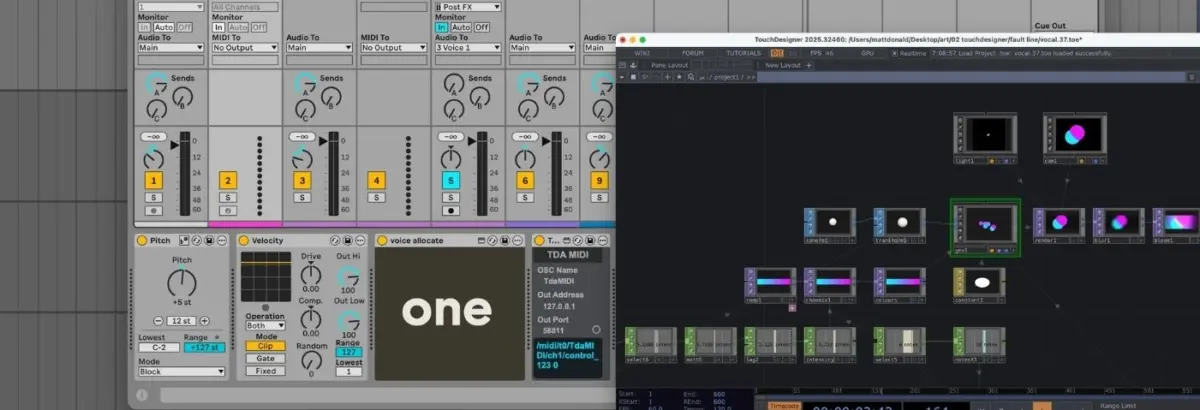
Master MIDI and Voice Allocation: Live MIDI input from a performance controller enters a master MIDI track. The incoming data undergoes a light transposition via a Pitch device, and its dynamics are flattened using a Velocity device to ensure consistent triggering. The data is then routed into a custom Max for Live device called Voice Allocate.
Individual Voice Routing: Voice Allocate parses the incoming polyphonic notes, assigns each active note a unique identification number (ID), and distributes them across a series of auxiliary tracks via companion Max for Live devices known as Voice Receive.
Monophonic Auto Shift Instances: Rather than relying on a single polyphonic instance of Ableton’s Auto Shift audio effect, the setup utilizes seven discrete channels (one live vocal plus six harmonized voices). Each Auto Shift device is paired with a dedicated MIDI track receiving input from a single Voice Receive ID. Set to monophonic MIDI mode, each Auto Shift precisely sculpts a single harmony derived from the player’s controller.
Audio Distribution: The raw, unprocessed audio from the live vocal microphone is routed to a master audio track, which simultaneously feeds the input of every single Auto Shift instance across the session.
Phase 2: The TouchDesigner Generative Network
To keep CPU overhead to an absolute minimum during live performance, the visual side of the equation relies heavily on GPU-based instancing within TouchDesigner. Instancing allows creators to duplicate a single base geometric shape thousands of times, offloading the heavy lifting from the central processor to the graphics card.
Geometry and Instancing: The visual network initiates with a single Sphere SOP (Surface OPerator). After minor transformations, this geometry is fed into a Geometry Component (Geo COMP) where GPU instancing is initialized.
Procedural Motion and Color: A collection of Noise CHOPs (Channel Operators) generates organic, fluid, and randomized XYZ coordinates for each instance, dynamically bounded within the screen’s viewing frustum. Meanwhile, a Ramp TOP (Texture Operator) applies a sweeping color gradient, interpolating smoothly between two distinct color endpoints.
Material and Rendering: A Constant Material is applied to the Geo COMP to strip away depth perception and artificial shading, resulting in flat, striking, circular graphical elements. The scene is framed by a Camera COMP, illuminated by a Light COMP, and captured via a Render TOP.
Post-Processing Effects: Before the visual signal reaches the final output display, it passes through a series of TOP-based visual effects, most notably bloom and blur filters, which give the geometry a glowing, cinematic aesthetic.
Phase 3: Establishing the Bi-Directional Bridge via TDAbleton
Communication between Ableton Live and TouchDesigner can be achieved through standard Open Sound Control (OSC) protocols; however, Derivative and the Max for Live community provide an integrated toolkit that streamlines the process entirely: TDAbleton.
Once installed, TDAbleton pairs a dedicated MIDI controller script with a robust suite of Max for Live devices. This integration allows TouchDesigner to query, monitor, and manipulate virtually any parameter within an Ableton Live set, and vice versa.
In this performance setup, the connection is truly bi-directional:
Audio-Driven Visuals: An abletonLevel CHOP samples the audio output level of Ableton’s master channel. This data is mapped directly to the opacity of the Ramp TOP (making the circles more solid as the volume swells) and the speed of the Noise CHOPs (causing the instances to race across the screen during louder vocal passages).
MIDI-Driven Geometry: An abletonMIDI CHOP monitors all active notes coming from the master MIDI track. The total count of active notes plus one (accounting for the dry live vocal) dynamically updates the number of position-generating Noise CHOPs and dictates the exact number of active instances rendered in the Geo COMP.
Visual-Driven Audio Panning: The X-axis (left-to-right) positional data generated by the Noise CHOPs for each instance is mapped directly back into Ableton Live, controlling the stereo panning of the seven individual vocal tracks via abletonTrack COMPs.
Interactive Glitch Triggers: A Count CHOP in TouchDesigner monitors for a specific MIDI note strike (F3). Each time the note is hit and reaches a set threshold, it fires a trigger that routes audio out of Ableton into an external hardware processor—a Hologram Electronics Chroma Console set to its "Inference" algorithm, introducing fragmented, glitchy textures. A secondary abletonLevel CHOP reads the return level of this effect and maps it to a real-time color shift in TouchDesigner, causing the visuals to fracture and tear precisely in time with the audio distortion.
When deploying a complex audiovisual rig in a live club or festival environment, system stability and latency are paramount. Understanding the underlying metrics of both platforms ensures a stutter-free performance.
CPU vs. GPU Distribution
One of the primary architectural challenges in live AV performance is resource management. Ableton Live is notoriously sensitive to CPU spikes, particularly when handling real-time pitch-shifting, polyphonic harmonization, and heavy Max for Live device querying. Conversely, TouchDesigner thrives when computational tasks are offloaded to the graphics processing unit (GPU).
By leveraging GPU instancing for the seven visual spheres rather than calculating independent geometries via CPU-bound scripts, TouchDesigner maintains a remarkably low CPU footprint—typically consuming less than 15% of total system resources on modern silicon (Apple M-series or dedicated NVIDIA/AMD GPUs). This leaves ample processing headroom for Ableton Live to manage complex audio plugins, low-buffer audio interface drivers, and real-time MIDI routing without experiencing digital artifacts, audio dropouts, or buffer underruns.
Resolution Constraints and Licensing
For producers exploring TouchDesigner for the first time, Derivative offers a fully functional, free-to-download version. However, artists must be mindful of its operational limitations:
Free/Non-Commercial License: Caps maximum output resolution at $1280 times 1280$ pixels and watermarks the output. While exceptional for prototyping, studio experimentation, and smaller club installations, it is insufficient for high-definition LED walls or projection mapping at major festival stages.
Commercial/Pro Licenses: Unlocks higher or unlimited output resolutions, native spout/syphon integration for inter-application video routing, and advanced rendering features required for professional touring acts.
Official Statements and Industry Insights
The convergence of performance art, electronic music production, and real-time generative graphics has garnered significant commentary from software developers and pioneering audio-visual artists alike.
"The future of live electronic music performance lies in tactile responsiveness. When an audience can physically witness the correlation between the timbre of a vocal and the spatial deformation of a visual object, the psychological impact of the music is multiplied exponentially. Tools like TDAbleton bridge a historical divide between musicians and visualists, allowing a single creator to command an entire immersive world from a laptop and a MIDI controller."
— Lead Creative Technologist, Derivative Community Showcase
Industry veterans note that the traditional workflow—where a DJ plays music while a separate lighting or visual technician improvises reactions from a booth—is increasingly being replaced by integrated, self-contained artist rigs. By programming the relationship between audio and visual parameters directly into the composition phase, producers retain absolute artistic control over their narrative arc, ensuring that every sonic crescendo is matched by an intentional visual counterpart.
Future Outlook: The Next Wave of Audiovisual Integration
As real-time rendering engines become faster and audio software adopts more open communication protocols, the boundary between sound design and visual programming will continue to blur. Several emerging trends are set to define the next generation of live performance setups:
AI-Driven Generative Visuals: Future iterations of platforms like TouchDesigner are beginning to incorporate machine learning models capable of analyzing incoming audio spectral data not just for volume and pitch, but for semantic and emotional context, generating evolving neural textures that respond to the "mood" of a track.
Spatial Audio and 3D Visual Mapping: With the rapid adoption of Dolby Atmos and immersive multi-channel sound systems in live venues, the mapping demonstrated between TouchDesigner instances and Ableton track panning is expanding into true three-dimensional acoustic spaces. Artists will soon be able to orbit vocal stems around an audience physically while 3D visual avatars mirror those exact spatial trajectories in real-time projection domes.
Hardware-Software Synergy: The integration of hybrid hardware processors (such as modular synthesizers, hardware multi-effects units, and dedicated MIDI performance surfaces) directly into the TDAbleton data stream will allow performers to break free from the screen entirely, manipulating complex lighting arrays and generative video shaders using purely tactile, analog-style controls.
Conclusion
The custom performance architecture detailed in this guide—pairing Ableton Live’s peerless audio routing and MIDI processing capabilities with TouchDesigner’s lightning-fast GPU instancing—demonstrates the ultimate potential of cross-platform art. By treating audio volume, note counts, and panning coordinates as shared data currencies, performers can construct a living, breathing organism where sound creates sight, and sight shapes sound.
Whether you are looking to elevate your next live set with reactive 3D graphics or simply eager to explore the endless possibilities of Max for Live and TDAbleton, this workflow provides a rock-solid foundation for the future of immersive electronic performance.
Don’t have Ableton Live yet? You can explore purchase options and secure your copy directly through Ableton Live’s official shop. (Note: This is an affiliate link; purchasing through it supports educational content creation at no additional cost to you.)