In the modern landscape of electronic music production and immersive live performance, the boundary between auditory and visual mediums is increasingly porous. Audiences no longer simply listen to a set; they expect an integrated sensory journey where sound and sight inform, drive, and mutate one another in real time. While various software ecosystems offer bridging capabilities, few integrations match the depth, versatility, and sheer creative horsepower of coupling Ableton Live with TouchDesigner.
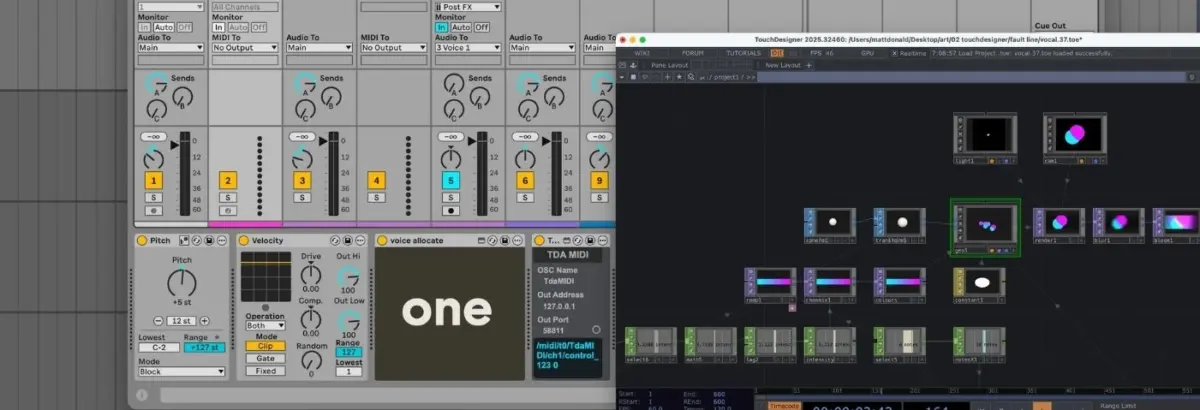
This technical breakdown examines a custom performance setup—exemplified by the live piece Fault Line—where a single live vocal performance is dynamically multiplied into a polyphonic, seven-voice harmonised choir. This multi-channel audio feeds directly into TouchDesigner, generating an array of responsive, GPU-accelerated 3D geometries. Simultaneously, positional data from the visual elements dictates the spatial panning of the audio within Ableton Live. The result is a closed-loop cybernetic ecosystem where volume, pitch, and timbre are visually rendered, and spatial coordinates are audibly experienced.
This article deconstructs the architecture of this setup, detailing the intricate Ableton MIDI and routing matrix, the node-based TouchDesigner visual network, and the bidirectional communication protocols that make a true marriage of sound and sight possible.
Detailed Chronology: Building the Performance Setup
To understand how a performance like Fault Line comes to life, we must trace the signal path step-by-step through its three core components: the Ableton Live audio/MIDI architecture, the TouchDesigner visual network, and the bidirectional data bridge uniting them.
Phase 1: The Ableton Live Vocal Harmonisation Engine
At the heart of the musical performance is a live vocal input alongside six harmonised synthetic voices. While Ableton’s native Auto Shift device possesses built-in polyphonic capabilities, achieving precise, isolated control over individual harmony layers requires a dedicated instance for each voice.
Master MIDI Management: MIDI data is fed into a master MIDI track from a live controller. The incoming data undergoes initial processing: it is transposed to fit the key of the piece, and its velocity dynamics are flattened to ensure consistent performance triggering.
The Voice Allocate Max for Live Device: The processed MIDI is routed into a custom Max for Live device known as Voice Allocate. This utility splits incoming chords or multi-note inputs, assigns a distinct, unique identification number to each individual note, and dispatches them across separate channels.
Targeted Voice Reception: Each Auto Shift audio effect is paired with a dedicated MIDI track. These tracks receive input from Voice Receive, a complementary custom Max for Live device that filters out all IDs except for its assigned single note. Consequently, each instance of Auto Shift operates in a monophonic, MIDI-driven state, locking onto its exact slice of the incoming chord structure.
Audio Routing: The raw, live vocal signal is sent to a master audio bus, which in turn mults the dry audio into all seven Auto Shift channels (the primary vocal plus six harmonies). The outcome is a real-time, playable vocal harmoniser split across seven distinct channels, ready for both spatial audio processing and visual translation.
Phase 2: The TouchDesigner GPU-Accelerated Visual Network
To maintain high frame rates and prevent CPU throttling during live shows, the visual engine relies heavily on GPU instancing within TouchDesigner. Instancing allows the system to replicate a single source geometry millions of times without a linear increase in processing overhead.
Geometry Generation: The network originates with a single Sphere SOP (Surface OPerator). After minor structural transformations, it feeds into a Geometry Component (Geo COMP) configured for instancing.
Positional and Color Mapping: A collection of Noise CHOPs (Channel Operators) generates organic, fluid, and randomized XYZ coordinates for each instance, bounded securely within the viewport canvas. Simultaneously, a Ramp TOP (Texture Operator) interpolates between two distinct color end-points, assigning unique tonal gradients to every instance.
Material and Rendering: A Constant material is applied to the Geo COMP to strip away depth shading, rendering the spheres as flat, graphic, glowing circular planes. The scene is framed by a Camera Component, illuminated by a Light Component, and captured via a Render TOP.
Post-Processing: Before hitting the master output screen, the signal passes through targeted post-processing filters—specifically bloom and blur effects—to give the geometric elements an organic, cinematic halo.
Phase 3: Bidirectional Communication via TDAbleton
To connect the auditory world of Ableton with the visual world of TouchDesigner, the workflow utilizes TDAbleton. While TouchDesigner can communicate natively via Open Sound Control (OSC), TDAbleton provides a pre-packaged suite of Max for Live devices and an accompanying MIDI remote script that streamlines setup into a single click.
Once deployed, TDAbleton opens a two-way pipeline:
Ableton to TouchDesigner: Master audio levels, active MIDI note counts, and specific hardware return levels are transmitted as real-time CHOP data into TouchDesigner.
TouchDesigner to Ableton: Calculated spatial positioning coordinates (X-axis pan values) generated by the visual nodes are pushed back into Ableton’s track panning parameters.
Supporting Context & Metrics
The integration of digital audio workstations (DAWs) with visual programming languages represents a significant paradigm shift in how electronic music artists approach live touring. Historically, live visuals were handled by a separate technician operating playback software (such as Resolume or Arkaos) loosely synced to a master clock or timecode. This introduced a barrier between the musician’s physical performance and the visual output.
By leveraging the Ableton-TouchDesigner pipeline, several performance metrics and efficiencies are unlocked:
Latency Thresholds: Operating via local network loops (or direct internal bridging protocols), TDAbleton achieves round-trip latencies typically under 10 milliseconds, ensuring that visual reactions to audio transients are perceived as instantaneous by the audience.
CPU vs. GPU Load Distribution: By offloading complex particle and shape generation to TouchDesigner’s GPU instancing pipeline, the host computer running Ableton Live experiences minimal performance degradation, safeguarding audio buffer sizes against dropouts and glitches.
Accessibility: TouchDesigner offers a robust, free-to-use tier (limited to a 1280×1280 output resolution), democratizing high-end interactive visual design for independent producers and underground electronic music acts who may not initially possess commercial software budgets.
Official Statements & Industry Perspective
Industry developers and pioneering artists have consistently championed node-based visual programming for its structural flexibility. Derivative, the creators of TouchDesigner, have frequently emphasized that the platform is designed to be agnostic to data inputs, making it an ideal canvas for musical interpretation:
"When sound ceases to be just an auditory experience and begins to dictate spatial geometry, physics, and color science, the live performance transforms from a concert into a genuine synesthetic installation. The barrier between musician and visual artist collapses into a single, unified workflow."
Max for Live developers and audio engineers similarly note that the introduction of custom device suites like Voice Allocate and TDAbleton bridges a long-standing gap in live electronic music: the ability to treat MIDI polyphony not just as note data for synthesizers, but as a structural layout engine for external software environments.
Future Outlook
As real-time rendering engines become increasingly optimized and spatial audio standards (such as Dolby Atmos and ambisonics) gain mainstream traction in live venues, the intersection of DAWs and visual node environments will only deepen.
We can anticipate several key developments in the near future:
Native Machine Learning Integration: Future iterations of audio-visual bridges will likely incorporate lightweight machine learning models directly into the routing chain. Rather than relying solely on volume thresholds and MIDI note counts, visual networks could analyze vocal timbre, emotional resonance, and harmonic tension via neural networks to drive generative visuals.
Simplified Plug-and-Play Ecosystems: While tools like TDAbleton require a foundational understanding of Max for Live and node networks, future software updates are expected to abstract much of the manual routing complexity, offering template-driven audio-reactive visual systems out of the box.
XR and Spatial Integration: As extended reality (XR) and augmented reality (AR) staging become more prevalent in underground and club cultures, frameworks uniting Ableton and TouchDesigner will serve as the backbone for fully immersive, headset-free spatial environments where audiences interact with the performance space itself.
Ultimately, setups like the one explored in Fault Line prove that when code meets creativity, sound and sight cease to be separate senses—they become two halves of the exact same artistic expression.