Executive Overview
In the hyper-competitive arena of Digital Audio Workstations (DAWs), industry heavyweights like Ableton Live, Apple’s Logic Pro, and Image-Line’s FL Studio command the lion’s share of the market, oxygen, and mindshare. Mention "Tracktion"—or its modern reincarnation, Waveform—to a younger generation of bedroom producers, and you are likely to be met with blank stares. Yet, among seasoned audio engineers and boutique software aficionados, the lineage of Julian Storer’s pioneering creation commands a measure of historical respect.
Originally launched in 2002 under the Tracktion moniker, the software was a harbinger of modern workspace design. It popularized a streamlined, single-window philosophy long before contemporary interfaces made it the industry standard. Fast-forward more than two decades, and the platform has matured into a comprehensive, feature-rich ecosystem available in both stripped-back free iterations and fully loaded paid tiers.
Enter Waveform 14 Pro, the latest iteration designed to test whether a legacy outsider can still pose a credible threat to the entrenched heavyweights. Waveform 14 Pro attempts to bridge the gap between traditional audio editing and avant-garde software customisation, most notably through the integration of an LLM-driven assistant and a revamped macro system.
However, our extensive evaluation reveals a software package caught in an identity crisis. While it introduces groundbreaking ways to automate deep system workflows, it simultaneously wrestles with UI eccentricities, occasional stability bottlenecks, and a steep learning curve that may alienate casual beatmakers. This review examines Waveform 14 Pro’s architecture, its triumphs in customisation, its pitfalls in artificial intelligence integration, and whether its $249 price tag holds up against formidable market rivals.
Detailed Chronology: From Tracktion to Waveform 14 Pro
To truly understand Waveform 14 Pro, one must trace its historical trajectory through the annals of music software development.
- 2002 (The Genesis): Julian Storer releases Tracktion. Unlike the multi-window floating panels of early Pro Tools or Cubase, Tracktion introduces a radical single-window GUI where the timeline, mixer, and browser coalesce into a unified fluid surface.
- The Mid-2000s to 2010s (Corporate Shuffling): The software changes hands several times, passing through Mackie before returning to its independent roots under the stewardship of Tracktion Software Corporation (now Market Place / Tracktion Corporation).
- 2018 (The Rebrand): Tracktion undergoes a major metamorphosis, rebranding its flagship DAW from "Tracktion" to Waveform, shifting focus toward modular synthesis, macro controls, and modern electronic music production.
- The 2020s (Iterative Scaling): Versions 10 through 13 introduce modular Racks, multi-track clip launchers, and deeper MIDI editing parameters. However, the software continues to battle market saturation dominated by Ableton Live and Logic Pro.
- September 2026 (The Release of Waveform 14 Pro): Tracktion unveils Waveform 14 Pro, introducing a heavily revised Actions panel, advanced automation curves, and an experimental LLM-driven "Assistant" designed to handle routing, MIDI generation, and native script-based macro creation.
Supporting Context & Metrics: Navigating the Interface and Workflow
First Impressions and Visual Ergonomics
Making the jump to Waveform 14 Pro is an eccentric experience, particularly for producers steeped in the rigid German utilitarianism of Ableton Live or the skeuomorphic elegance of Apple’s Logic Pro. Upon initial boot, Waveform feels less like a polished commercial product and more like an advanced, highly customizable open-source project from the Linux community.

Even minor details—such as the default font, which leans slightly toward a toy-like aesthetic—betray an unusual software philosophy. Yet, this visual eccentricity points to a deeper truth: almost every element of Waveform can be radically bent to the user’s will. In an unexpected display of total customisation freedom, users can even swap out system fonts for unconventional choices (yes, Comic Sans is technically possible, though perhaps ill-advised for professional mixing sessions).
The Redesigned Actions Panel
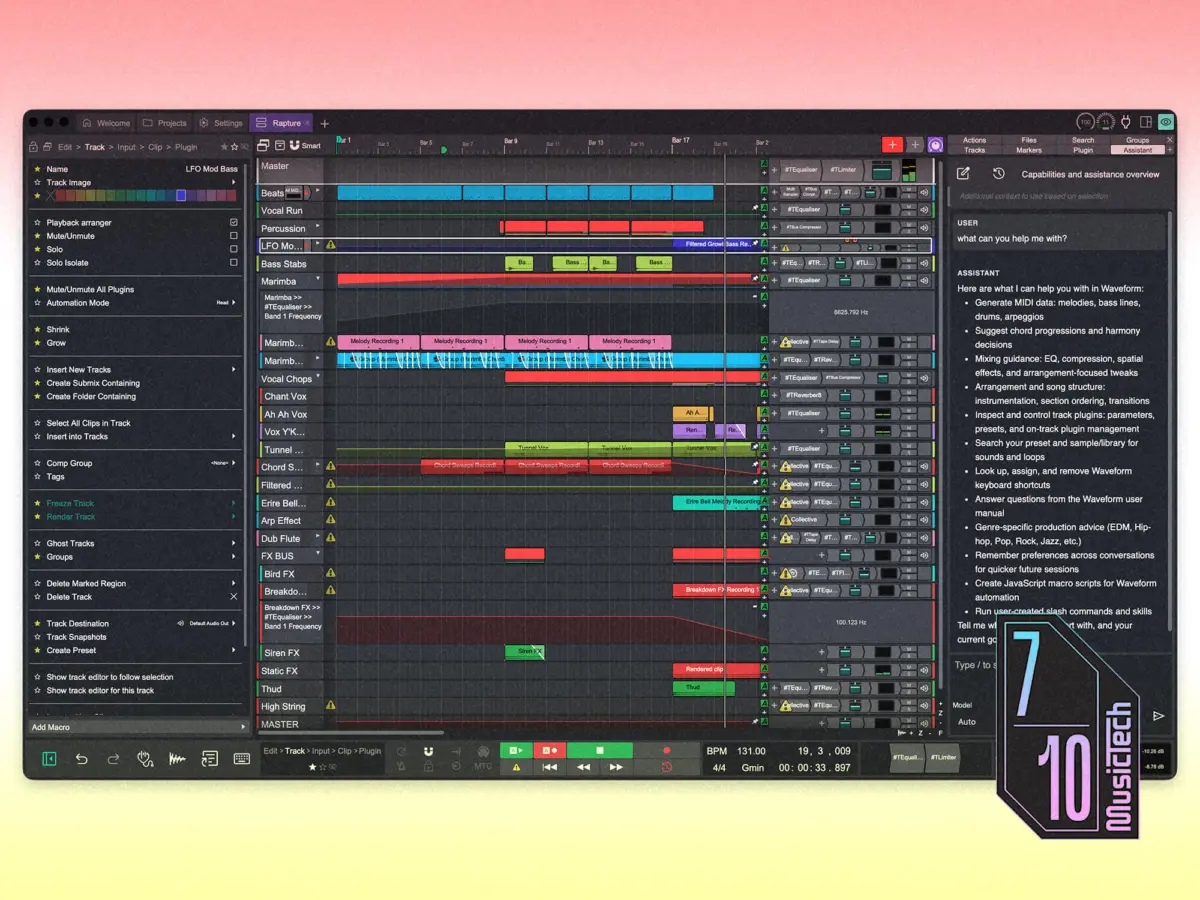
Central to Waveform 14 Pro’s organizational ethos is the newly updated Actions panel. This component has absorbed the functionality of the "Properties" tab found in Version 13 and earlier iterations. Instead of hiding parameters behind nested menus, the Actions panel dynamically displays relevant commands based on the active selection within the arrangement view.
[Selected Audio/MIDI Clip] ──> [Actions Panel Dynamically Populates] ──> [Immediate Access to Parameters, Edits & Transforms]While veteran users will likely appreciate the immediacy of this layout, newcomers may find the sheer density of text overwhelming. DAWs are traditionally visual and spatial mediums; trading graphical iconography for text-heavy action logs creates a steep cognitive load during the initial onboarding phase.
Arrangement, Recording, and Clip Launching
Once past the initial configuration hurdles, navigating the workspace feels familiar. The timeline runs cleanly from left to right, accompanied by a modular browser, a comprehensive mixer, and transport controls that can be toggled or hidden individually.
For users migrating from Ableton Live, hitting the traditional Tab key brings up Waveform’s Clip Launcher, an interface bearing a striking structural resemblance to Live’s Session View. This makes loop-based composition and live triggering instantly accessible to refugees from the Ableton ecosystem.
However, building out a comprehensive arrangement introduces friction beyond the expected learning curve of a new DAW. Routine editing functions do not always behave intuitively. For instance, tasks that require a simple drag-and-drop gesture in other environments often necessitate a detour through the Actions panel. Fifteen years of muscle memory built around competing workstations inevitably skews expectations, but Waveform presents an unusually high level of mechanical resistance during initial tracking sessions.

Technical Performance, Stability, and Limitations
A DAW can possess the most innovative feature set on paper, but if it collapses under the weight of a heavy third-party plugin chain, its utility plummets. Waveform 14 Pro’s performance profile is a mixed bag of impressive engineering and frustrating instability.
Reliability and Sandboxing
During testing, the software proved generally snappy and responsive when navigating medium-density projects. However, stability vulnerabilities emerged under stress testing. When a third-party Soundtoys plugin crashed unexpectedly, it brought the entire application down with it. This occurred because plugin sandboxing is disabled by default in Waveform 14 Pro.
On the bright side, Tracktion’s automated project recovery system is dependable, restoring sessions precisely where the user left off with minimal data loss. Nevertheless, enabling sandboxing out-of-the-box in future updates should be a non-negotiable priority for the developers.
Persistent Bugs
While minor UI bugs are expected in any major software release, one persistent issue stands out as a genuine operational hazard: MIDI notes sporadically failing to trigger during clip looping. Community forum discussions confirm that this is a lingering issue across multiple recent versions. For studio production, this is a minor annoyance easily fixed by re-triggering playback; for live performance environments, it is a dealbreaker that makes relying on Waveform for stage use risky.
Feature Strengths: In-Line MIDI and Racks
Despite its stability hiccups, Waveform 14 Pro excels in several unique workflow areas:
- In-Line MIDI Editing: A workflow triumph that allows users to edit MIDI data directly within the arrangement view without opening a separate bottom-docked piano roll editor.
- Modular Racks: Tracktion’s Racks environment offers a flexible patching grid for custom plugin chains that surpasses Ableton Live’s stock effect racks in pure routing freedom.
- Precision Automation: Automation nodes feature granular editing controls via the Actions panel, allowing exact numerical value entry, curve reshaping, and multiple multi-point transformations instantly.
Official Innovations: The LLM Assistant and Macro Automation
The single most heavily marketed and debated addition to Version 14 is the integration of an LLM-driven Assistant. Designed to act as an on-board copilot, the Assistant bridges the gap between different DAW philosophies. For instance, telling the Assistant "I am coming from Ableton Live" prompts it to explain equivalent functions and architectural differences.

AI-Driven MIDI and Plugin Routing
Beyond simple text-based help, the Assistant plugs directly into Waveform’s underlying API. This allows it to execute hands-on tasks: routing channels, instantiating plugins, adjusting settings, and generating MIDI data based on natural language prompts.
To test its limits, our review process tasked the Assistant with building an acid-house style track:
- Drum Programming: Asked for rolling hi-hats, trilled accents, syncopated kicks, and a classic snare backbeat, the Assistant successfully loaded a drum sampler and delivered a surprisingly accurate, rhythmically engaging pattern.
- Bassline Generation: When prompted to write a 303-style acid bassline, the AI struggled. It initially generated a vague, wandering chromatic sequence. It required multiple back-and-forth prompt engineering refinements to produce a passable foundation. Furthermore, the Assistant failed to configure Tracktion’s native BassOsc plugin into a proper 303 patch due to an inability to interpret the internal parameter naming conventions.
Economic and Practical Realities of AI Assistants
The Assistant is not a native, locally computed offline model; it requires the user to input their own Anthropic or OpenAI API keys. This translates to a pay-as-the-go utility model. A single experimental session spent coaxing an acid track out of the Assistant cost roughly half a dollar in API usage—a steep ongoing tax for a tool that frequently requires more user correction than actual creation. Additionally, response latency can occasionally stall creative momentum.
The True Triumph: AI-Generated Macros
While the Assistant exhibits growing pains when composing music, it shines brilliantly when deployed to generate macros. Historically, creating custom shortcuts and automated workflow macros in Tracktion required manual scripting in JavaScript.
With Waveform 14 Pro, users can simply type a single-sentence natural language prompt, and the AI translates it into functional macro code. Testing this feature yielded impressive results:
- Prompt 1: "Duplicate the selected MIDI clip and transpose the copy up one exact octave." (Executed successfully in under 30 seconds).
- Prompt 2: "Apply a uniform groove swing to every active audio and MIDI clip in the current session." (Successfully compiled and executed).
For editors handling repetitive, high-volume sessions, this feature transforms the customisation landscape, lowering the barrier to deep DAW personalization.

Future Outlook and Comparative Market Analysis
As the digital audio workstation market moves deeper into the mid-2020s, manufacturers face a philosophical fork in the road: do they streamline software to appeal to an increasingly casual, fast-moving generation of content creators, or do they double down on deep, complex customization for power users?
Tracktion has clearly chosen the latter with Waveform 14 Pro, but it occupies an awkward middle ground.
The Competitive Landscape
| DAW Ecosystem | Primary Target Audience | Core Advantage | Price Point |
|---|---|---|---|
| Ableton Live 12 | Electronic musicians, live performers | Session/Arrangement fluidity, Max for Live | Premium ($99 – $749) |
| Apple Logic Pro | Producers within the Apple ecosystem | Massive stock library, incredible value | Budget-Friendly ($199 flat) |
| REAPER | Tinkerers, budget-conscious power users | Infinite customisation, negligible CPU footprint | Shareware ($60 discounted) |
| Waveform 14 Pro | Power users seeking granular macro/AI control | Unique Racks, Actions panel, AI macros | Mid-Tier ($249) |
At $249, Waveform 14 Pro faces an uphill battle. While it packs a massive library of instruments and effects, competitors like Apple’s Logic Pro offer vastly superior content value straight out of the box for a lower price. Meanwhile, for die-hard tinkerers who prioritize customisation, scripting, and modular freedom above all else, REAPER remains the undisputed king at a fraction of the cost, backed by an enormous global community of scripters and forum contributors.
The Waveform Free Wildcard
The most disruptive argument in Waveform’s favor is not the Pro tier, but Waveform Free. By offering a remarkably capable, non-expiring free version that can be upgraded à la carte with specific Pro modules, Tracktion flips the traditional software purchasing model on its head. For producers hesitant to invest $249 upfront, downloading the free edition is an absolute no-brainer.
Conclusion
Waveform 14 Pro is an immensely capable, fiercely ambitious digital audio workstation. Its modular Racks, innovative Actions panel, in-line MIDI editing, and ground-breaking AI-powered macro generation prove that Tracktion refuses to rest on its laurels.
However, the software suffers from overreach. The UI styling can feel disjointed, stability is occasionally compromised by un-sandboxed third-party plugins, and the LLM Assistant remains an expensive, experimental novelty rather than an essential production partner.

When upgrading software generations, the ultimate hallmark of a great DAW is knowing when to stay out of the creator’s way. While Waveform 14 Pro is undoubtedly a credible and deeply flexible workstation, it spends so much time trying to prove its technological prowess that it occasionally forgets to let the music flow naturally.
Verdict: For power users obsessed with customisation and macro automation, Waveform 14 Pro—or its brilliant Free counterpart—is well worth exploring. For traditional bedroom producers and beatmakers, simpler, more cohesive alternatives like Logic Pro or Ableton Live will ultimately cause far fewer headaches in the studio.