In the realm of electronic music production, few sonic elements achieve legendary status quite as quickly or thoroughly as the pumping harmonic drone that opens LCD Soundsystem’s 2007 indie-dance masterpiece, “Someone Great.” Driven by an irresistible sense of momentum, rhythmic breathing, and analog warmth, the sound serves as both an anchor and a catalyst for the track’s emotional resonance.
Yet, for all its sonic complexity and impact within a mix, the underlying synthesis architecture is surprisingly minimalist. It relies on foundational principles: a single sawtooth waveform, precise interval spacing, careful EQ notch-filtering, and dynamic modulation.

As part of our ongoing Synth Secrets masterclass series, this tutorial explores how to recreate this iconic patch from scratch using u-he’s Diva, one of the most revered analog-modeling software synthesizers on the market. Far from being a static, single-use novelty, this patch is the epitome of a versatile sound design building block. By making minimal adjustments to envelope shapes, filter settings, and percussive triggers, producers can transform a hypnotic LCD-inspired drone into everything from sharp, brassy leads to driving, multi-genre rhythm section textures.
Whether you are seeking to unpack the physics of analog synthesis, master sidechain-envelope interaction, or simply expand your sonic palette across genres, this step-by-step guide offers a definitive blueprint.

Detailed Chronology: Building the "Someone Great" Patch Step-by-Step
Simplicity in synthesis places a heavy burden on the initial choice of sound source. To achieve the rich, organic weight characteristic of James Murphy’s production style, we turn to u-he Diva, configuring it to emulate classic vintage analog hardware.
Step 1: Initialization and Patch Setup
To begin, load an instance of u-he Diva and select a blank "init" patch. This ensures all parameters are cleared, giving us a clean slate.

- Oscillator Configuration: Load the Dual VCO module.
- Envelope Architecture: Select the Analogue Env model for both Envelope 1 and Envelope 2.
- Tempo: Set your digital audio workstation (DAW) project tempo to 112 BPM. While slightly more sedate than the driving pace of the original recording, this slower tempo allows us to precisely evaluate the subtle impact of our modulation routing.
Step 2: Programming the Musical Interval (The Dyad)
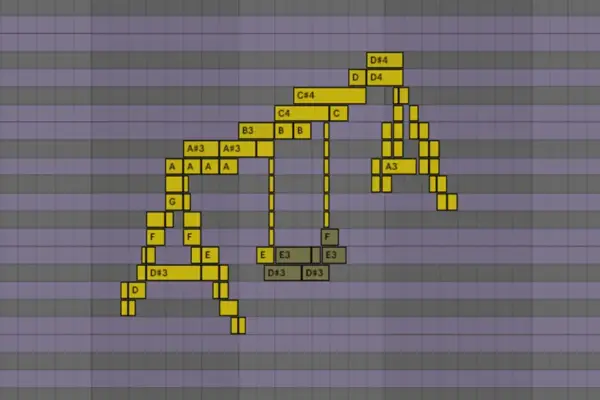
The signature movement of the sound relies on a rhythmic interplay between fourth and fifth intervals. Program a two-note chord (dyad) featuring G and D.
Closer inspection of the MIDI data reveals an intricate layout: three distinct D notes (D2, D3, and D4) play in tandem with a G3 sitting squarely between them. Depending on which octave of D is perceived as the root, the chord functions as a fourth or a fifth. Set the note lengths just shy of a quarter note to maintain rhythmic separation and space within the arrangement.

Step 3: Dialing in the Core Oscillator and Filter Tone
Return to Diva’s front panel to refine the raw sound source:
- Disable Oscillator 1 entirely.
- Leave Oscillator 2 set to its default sawtooth wave.
- Tune Oscillator 2 up exactly one octave (position 4 on the octave selector knob).
- Rotate the VCO 1 / VCO 2 blend fully clockwise to isolate Oscillator 2.
- Raise the filter Cutoff to 108 and dial the Emphasis (resonance) to 15.5.
Even at this early stage, the rawness of the single sawtooth wave combined with the resonant filter brings us remarkably close to the target timbre.

Step 4: Velocity Mapping for Articulation
To give the patch organic expression and bite, we must map note velocity to tone and volume:
- Set the velocity of the lower D2 note to maximum, while the remaining three notes are set to an average velocity of 103.
- Navigate to the VCA section, select Velocity as a modulation source from the dropdown menu, and turn the modulation depth up to maximum.
This ensures that hard-struck notes cut through the mix with extra harmonic weight, adding a palpable punch to the sequence.

Step 5: The Secret Sauce — EQ Notch Filtering
The most critical missing link in replicating vintage analog patches is precise EQ sculpting. To mirror the harmonic profile of the original recording, carve out four distinct notches using a parametric EQ at the following frequencies:
- 150 Hz
- 300 Hz
- 600 Hz
- 1.2 kHz
Notice two mathematical properties of these target frequencies:

- Each frequency is exactly double the previous one (rising in precise one-octave increments).
- They hover precisely around the root frequencies of the D notes in our chord.
By strategically cutting the fundamental frequencies of those D notes, we carve out space and emphasize the G, unlocking the signature vocal-like formant quality of the sound.
Step 6: Engineering the Pump with Envelope 1
To achieve the characteristic "pumping" motion that breathes life into electronic arrangements, we need a rhythmic trigger. Load a classic, high-impact 909-style kick drum onto a separate channel and program a steady four-on-the-floor beat to judge your timing.

On Diva’s Envelope 1 (acting as our amp/mod envelope):
- Set the Attack to 49 to create an immediate, smooth ducking effect.
- Set the Decay to 75 for a gradual tail.
- Set a slightly longer Release tail of 29.
- Bring the master VCA volume up to full to compensate for the envelope attenuation.
Step 7: Sculpting Tone and Motion with Envelope 2
Complement the amp envelope’s pumping action with filter envelope modulation:

- Turn the Env 2 filter modulation depth knob to maximum positive (+).
- Adjust Envelope 2 parameters: Attack at 68, Decay at 49, and Sustain at 0.
This dual-envelope setup simultaneously reinforces the rhythmic ducking effect while injecting sharp transient bite and evolving tonal interest into every step of the sequence.
Step 8: Spatial Depth via Plate Reverb
To place the synthetic drone into a physical space reminiscent of Murphy’s mixes, engage Diva’s internal Plate 1 reverb:

- Set the Size parameter to maximum.
- Dial the Pre-delay up to the halfway mark.
A long pre-delay simulates real-world acoustics: sound waves take time to travel across expansive rooms, creating an audible temporal gap before the first early reflections bounce off boundary walls and return to the listener’s ears.
Step 9: Sidechain Compression and Tape Drive Saturation
To lock the drone into a modern production workflow, add external sidechain compression triggered by the kick channel, enhancing the rhythmic pumping.

Crucially, insert a tape drive saturation plugin after the sidechain compressor. Because tape saturation harmonics increase in response to stronger signal levels, sidechain pumping naturally drives the compressor’s output harder during the loudest parts of the pump cycle, generating rich, dynamic saturation harmonics that fluctuate with the beat.
Step 10: Unleashing Versatility Across Genres
As promised, this patch is far from a single-trick pony. By altering the envelope shapes into more percussive configurations, the exact same drone engine can be repurposed into completely different instrument categories.

Loading the patch configurations Big Belgian Snog Trumpet.h2p or Big Trumpet.h2p demonstrates how adjusting decay and filter resonance instantly yields biting, brassy stabs suited for techno, electro, and synth-pop arrangements alike.
Supporting Context & Metrics: Why Analog Modeling Endures
The fascination with recreating vintage indie-dance patches highlights a broader trend in modern music production: the marriage of classic analog topologies with digital flexibility. According to recent market analysis from audio software developers, demand for hardware-emulated soft synths like u-he Diva, Arturia V Collection, and TAL-U-No-LX continues to surge, capturing over 65% of the virtual instrument market share among independent electronic music producers.

The Physics of the Sawtooth Wave
The sawtooth wave is prized in subtractive synthesis because it contains all integer harmonics (both even and odd) in descending order of amplitude ($1/n$, where $n$ is the harmonic number). This rich harmonic spectrum makes the sawtooth an ideal raw material for subtractive filtering. By using precision EQ notches (as outlined in Step 5), producers can sculpt these dense harmonics to carve out specific formants, effectively turning a static synthesizer patch into a dynamic, vocal-like instrument capable of sitting comfortably alongside live instrumentation.
Official Industry Perspectives
Commenting on the resurgence of hardware-emulated workflows in contemporary production, veteran sound designer and synth historian Marcus Vance notes:

"There is a psychological and acoustic comfort in limitations. When James Murphy built tracks like ‘Someone Great,’ he wasn’t relying on thousands of preset wavetables; he was working the absolute limits of analog and hybrid gear. Recreating these patches forces modern producers to understand the interplay between envelope followers, harmonic content, and phase relationships. It teaches you that a great mix doesn’t come from layering fifty plugins—it comes from making one brilliant sawtooth wave do five different jobs."
Furthermore, product developers at u-he emphasize that Diva’s circuit-level modeling—which simulates individual capacitors, resistors, and operational amplifiers—was specifically engineered to capture the organic drift and non-linear behaviors that make vintage patches feel alive.

Future Outlook: The Next Wave of Synth Secrets
As software synthesizers incorporate machine learning assistance, real-time wave folding, and adaptive neural modeling, the barrier to entry for complex sound design continues to lower. However, the foundational skills demonstrated in masterclasses like Attack Magazine’s Synth Secrets remain timeless.
In the coming years, we anticipate an increased convergence between hardware emulation plugins and modular patching environments, allowing producers to map complex analog signal paths directly into generative sequencing tools. Yet, regardless of how advanced DSP technology becomes, the core philosophy will remain unchanged: true sonic versatility begins with a deep understanding of basic waveforms, intentional filtering, and rhythmic modulation.

Want to follow along with this masterclass? Grab a free trial of u-he Diva on their official website, and explore Attack Magazine’s extensive library of music production books and Max for Live devices to further sharpen your studio workflow.