Executive Overview
In the rapidly evolving landscape of audio software development, innovation is often measured by how successfully a developer can reinvent a classic paradigm. MNTRA Instruments—renowned for their boundary-pushing flagship virtual instrument, MNDALA 2, alongside acclaimed processors like BRUITAGE (distortion) and BOREALIS (reverb)—has returned with a release that challenges conventional sound design conventions. Titled FLTRS, this new effect plugin initially presents itself as a standard filtering tool. However, a closer look reveals that it is far removed from the typical lowpass, highpass, and bandpass affairs that flood the modern plugin market.
Instead, FLTRS adopts the striking, graphic-based workflow characteristic of MNTRA’s ecosystem, mapping standard audio manipulation parameters onto a dynamic three-axis macro system. Boasting an impressive arsenal of 37 distinct filter algorithms, a deep modulation matrix known as Animod, an advanced envelope follower, and a full-featured mastering section, FLTRS is engineered to inject grit, character, and fluid motion into otherwise sterile audio tracks.

This comprehensive guide serves as an authoritative walkthrough of FLTRS. Designed for intermediate and advanced producers alike, we will explore the plugin’s architectural layout, deep-dive into algorithm selection, master the macro mechanics, and investigate how routing complex modulation paths can completely transform a mix.
Detailed Chronology: Navigating the FLTRS Architecture
To truly master FLTRS, one must first understand its unique visual and operational layout. Eschewing the rows of rotary knobs typical of traditional plugins, MNTRA has constructed a tactile, performance-oriented environment.

The Perform View and the Macro System
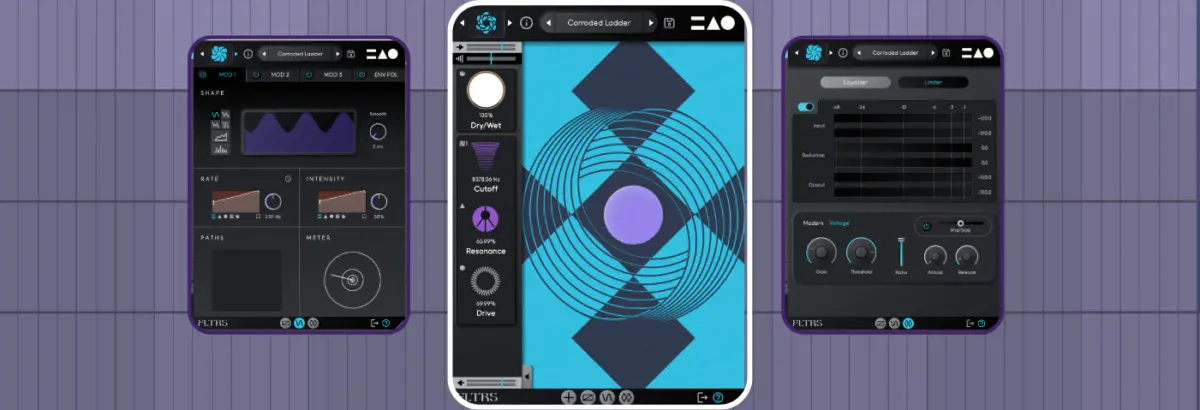
Upon launching FLTRS, users are greeted by the Perform View. This interface centers on a visual representation of the X, Y, and Z axes. Each axis is visually coded with a specific geometric shape: a circle, a triangle, or an equal sign.
When hovering your mouse over the central graphic, your cursor dynamically transforms into the corresponding symbol. Clicking and dragging within this space executes multi-parameter control, shifting multiple assignments simultaneously based on pre-configured percentages displayed cleanly at the bottom of the interface.

Flanking this central hub is the Control Panel located on the left side of the screen. Here, users can adjust basic parameters tied to the active algorithm—typically cutoff, resonance, and a third algorithm-specific variable. Global controls such as dry/wet mix, input gain, and output gain sit prominently at the top and bottom edges, alongside an envelope follower input gain control. For a distraction-free workspace, the Control Panel can be collapsed using the arrow tab at the bottom.
Navigating the 37 Filter Algorithms
FLTRS separates itself from the competition through its sheer variety of sound-shaping tools. The plugin houses 37 distinct filter algorithms, ranging from emulations of legendary analog hardware to uncompromised experimental digital architectures.

- Analog Emulations: Includes classic Moog-style Ladder filters, Korg MS-20 filters, and Sallen Key topologies.
- Synth-Inspired Models: Features dedicated filter architectures pulled from iconic instruments like the Roland Jupiter-6 and Juno synthesizers, alongside modern OTA (Operational Transconductance Amplifier) models.
- Experimental & Spectral: Designed for sound designers looking to push material into strange, evolving territories far beyond traditional subtractive synthesis.
Selecting an algorithm is as simple as clicking the logo in the upper left corner of any screen to open the effect browser, or clicking the directional arrows flanking the logo to rapidly cycle through options.
MNTRA has cleverly included an Elements list within the preset browser. Because FLTRS does not feature a traditional "init" (initialized) patch, these Elements serve as foundational, unmodulated starting points for each algorithm, allowing producers to audition the raw sonic character of every filter model instantly.

Supporting Context & Metrics: Working with Macros and Advanced Modulation
Understanding how to manipulate FLTRS’s macro and modulation frameworks is where the plugin truly shines. The interface relies heavily on deep data visualization tables rather than blind guesswork.
Unlocking Macro Control Mapping
While it is tempting to grab a parameter graphic (such as a cutoff or resonance slider) and drag it directly, FLTRS requires intent. Unless a parameter is explicitly assigned to manual control, direct mouse manipulation yields no change. By clicking the hand icon next to a parameter, you unlock direct interaction.

For deeper customization, opening the Control Mapping Window reveals detailed tables displaying:
- The assigned axis macro (represented by its corresponding geometric icon).
- An interactive envelope curve illustrating how the parameter responds across the macro’s range.
- An expansion square in the lower-right corner that opens a larger view, granting access to complex curve shapes and response curves.
Through automation—such as closing down the cutoff of a lowpass filter over the course of a phrase—producers can effortlessly transition a track from static to heavily evolving.

The Animod Modulation Section
For dynamic movement that breathes independently of DAW automation, FLTRS features Animod, a comprehensive modulation suite comprising three complex modulators and an envelope follower.
Each of the three modulators offers a variety of wave shapes—sine, triangle, square, and random—as well as a dedicated step sequencer mode for rhythmic modulation patterns. Crucially, Animod permits modulation on modulation. Because the rate and intensity parameters of each modulator possess their own mapping tables, users can assign an LFO to control the rate of another LFO. For example, routing Modulator 2 to dictate the speed of Modulator 1 creates undulating, acceleration-deceleration effects that sound organic and unpredictable.

The Envelope Follower
Operating similarly to hardware sidechain dynamics or DAW-native envelope followers (such as Ableton Live’s built-in device), the FLTRS envelope follower listens to an incoming audio signal and translates its transient energy into a continuous modulation source.
Particularly effective on transient-heavy material like drums and basslines, the envelope follower features:

- An adjustable threshold tied to an input signal graphic.
- Attack and release controls, which can be linked via a chain icon for synchronized envelope shaping.
- An independent input gain staging system to ensure optimal triggering accuracy.
By linking the envelope follower to filter cutoff or drive parameters, producers can achieve responsive, ducking, or opening filter sweeps that react dynamically to every hit of a snare or pluck of a bass note.
Official Statements & Design Philosophy
MNTRA Instruments has consistently championed an interface design philosophy that bridges the gap between scientific precision and artistic expression. Speaking on the development of their graphic-based macro ecosystem—which first caught the industry’s attention with MNDALA 2 and has since expanded into effect plugins like BRUITAGE and BOREALIS—the development team emphasizes that modern music production software should encourage tactile exploration rather than menu-diving.

"FLTRS isn’t complicated—far from it—but it is rather unique in how it goes about things."
By stripping away redundant menus and consolidating complex modulation routing into a unified, visual workspace, MNTRA aims to keep producers in the "creative flow state." Rather than treating filtering as a purely corrective mixing task, FLTRS reframes the filter as a living, breathing performance instrument. This design philosophy explains why parameters are mapped to geometric axes: it encourages users to interact with sound spatially, dragging a single cursor to orchestrate multiple micro-adjustments across resonance, drive, modulation depth, and envelope response simultaneously.

Future Outlook: Mastering, Pricing, and Availability
Before audio leaves the FLTRS signal chain, it passes through a dedicated Mastering Section. This final stage is equipped with:
- A precise parametric equalizer for surgical or broad tone-shaping.
- A mastering-grade compressor/limiter featuring selectable Modern and Vintage modes, ensuring that even the most extreme filter sweeps and heavily distorted modulations remain glued and controlled before hitting the master bus.
Market Impact and Availability
With a massive library of 37 algorithms, a powerful macro workflow, and the depth of the Animod modulation engine, FLTRS positions itself as a formidable competitor in the creative effects market. It bridges the gap between standard utility mixing tools and esoteric sound design processors.

For producers looking to incorporate FLTRS into their studio setups, MNTRA Instruments has made the plugin available at a special introductory price of $49 until May 14th. Given its versatility across synths, drums, vocals, and entire master busses, FLTRS represents an exceptionally deep sonic toolkit for forward-thinking electronic music producers, sound designers, and mix engineers alike.