Executive Overview
Virtual instrument design has long relied on familiar, time-tested paradigms—standard sample playback windows, conventional modulation matrices, and straightforward linear parameter mapping. While powerful, these conventional structures can occasionally breed creative fatigue, prompting producers to seek tools that challenge traditional workflows. Enter MNTRA Instruments’ MNDALA 2, a free, ground-up reimagining of what a sample engine can be.
At first glance, MNDALA 2 defies easy categorization. Functionally, it operates as a sample player comparable to industry giants like Native Instruments’ Kontakt, but it deliberately plays by its own set of rules. Built to house MNTRA’s proprietary sample libraries—which leverage astonishing Extended Resolution Audio captured at 32-bit/384kHz to capture ultrasonic content—MNDALA 2 replaces cluttered parameter lists with an immersive, visual, and highly tactile control scheme.

This guide provides an exhaustive walkthrough of MNDALA 2. Whether you are navigating its sweeping Perform View, configuring the intricate routing of its Matrix page, synthesizing raw audio within its multi-tiered Samplers tab, programming polyrhythmic patterns in the step sequencer, or modulating parameters via the AniMod Global Modulation System, this manual details how to master every facet of the engine. By the end, you will transition from feeling slightly intimidated by its avant-garde interface to fluidly harnessing its limitless expressive potential.
Detailed Chronology & System Architecture
Understanding MNDALA 2 requires moving past traditional synthesizer and sampler layouts to embrace its core philosophy: Real-Time Parameter Controls (RTPCs) driven by macroscopic spatial navigation.

[MNDALA 2 Architecture Overview]
 ├── Preset Layer (Up to 6 Sampler Lanes)
 │     ├── Audio Source (Sample Maps / Generators)
 │     ├── Per-Sampler Filters, Multi Mic Mixer, Heat Saturation, EQ
 │     ├── Dedicated Step Sequencers (Note, Velocity, Length)
 │     └── 3 x Colours (Per-Sampler Stereo FX Slots)
 └── Global Control Layer
       ├── RTPC Macro Axes (X [=], Y [▲], Z [●])
       ├── AniMod Global Modulation System (6 Modulator Sources)
       └── Global FX Bus (5 Stereo Processing Slots)
When you first load up MNDALA 2, you are interacting with a unified graphical user interface (GUI) that packs samples, modulators, spatial sound-shaping tools, and sequencers into an organic visual language. Think of it like navigating an unfamiliar city: while the street names and signs look different, the foundational layout—busses, routing, oscillators, and effects—remains universally familiar once you learn the local customs.
1. Installation, Sample Management, and the Preset Browser
Getting started with the engine is straightforward, but it requires specific file path management:

- The Library Hub: Once the free MNDALA 2 engine is installed inside your DAW (available in VST3, AU, and AAX formats), navigate directly to the Library tab. Here, you can access a curated ecosystem of both free and paid instrument packs.
- High-Resolution Storage Management: Because MNDALA 2 handles ultra-high-definition audio content recorded at 32-bit/384kHz, audio files are exceptionally large. Whenever you acquire a new library, the engine prompts you to designate a download and storage location. Ensure you allocate this to a fast SSD to prevent streaming bottlenecks.
- The Preset Browser: Accessible via the upper-left corner of the GUI, the Preset Browser allows you to filter and select patches based on Instrument, Type, Character, and specific Preset titles. Beyond factory patches, you can easily modify existing presets, save user variations, organize custom subfolders, and manage your sound design workflow.
2. The Perform View: Visual-Acoustic Synergy
The Perform View serves as your primary compositional canvas—conceptually similar to the Play View found in synths like Arturia’s Pigments. Beyond its utility as a performance space, it showcases MNTRA’s distinct artistic direction: each instrument features a dynamic, high-resolution visual graphic that physically morphs, breathes, and reacts in real-time as you manipulate the macro axes.
The engine’s beating heart rests upon three macroscopic axes, designated as X, Y, and Z, and represented graphically by an equal sign (=), a triangle (▲), and a circle (●), respectively. Because a single MNDALA 2 preset can run up to six individual sample layers simultaneously—each equipped with its own independent modulation, effects chains, and sequencers—managing parameters individually would quickly become unmanageable.

The three macro axes solve this complexity by functioning as global control vectors. Almost every parameter within the engine can be pinned to these axes. You can control them directly by dragging the translucent macro sliders on the left side of the Perform View, interacting with the central art graphic, mapping them to physical hardware knobs on an external MIDI controller, or automating them via your DAW’s arrangement lanes. Whenever you feel lost while hovering over an unfamiliar button, look to the lower-left corner of the interface for real-time contextual explanations.
Supporting Context & Technical Deep-Dive
To truly make MNDALA 2 sing, you must venture past the Perform View and explore its deep-level sound design pages: the Matrix, Samplers, Sequencers, AniMod, and Tuning sections.

The Matrix Page: Sculpting Macro Relationships
Located directly to the right of the Perform tab, the Matrix page is where macro assignments take concrete form. Here, you manage the volume and panoramic placement of all six sampler lanes relative to the X and Y axes.
- Gain and Pan Tables: Each row features individual gain and pan routing matrices for the X and Y macro axes. The left side of the table denotes the starting position of the macro, while the right side indicates its endpoint. By default, parameters follow a linear ramp rising to the right, but you can draw entirely custom response curves.
- Precision Editing: Clicking the square icon in the bottom-right corner expands the matrix table into a full-window editor. Here, you can select preset curve shapes, click directly on lines to drop custom nodes, and curve trajectory paths to achieve precise morphing behavior across your sample layers.
- Remote Testing: Notice the persistent circle, triangle, and equal sign icons on the right edge of the screen. These act as remote triggers, allowing you to audition how your macro routing responds without clicking back to the main Perform View.
The Samplers Page: Where Synthesis Meets Sampling
If you have experience programming traditional subtractive or wavetable synthesizers, the Samplers page will feel immediately intuitive. Arranged as a vertical column of six discrete slots on the left, this section governs sound generation and multi-mic routing.

- Sample Maps & Multi-Mic Architecture: Selecting a sample slot loads a "sample map," which frequently includes multiple dynamic articulations, round-robins, and microphone perspectives. Adjacent to the main volume knob, you’ll find MNDALA’s Multi Mic Mixer, Heat saturation circuit, and dedicated EQ settings.
- Global Parameter Linking: Many parameters—such as envelopes and portamento times—feature a link button. Engaging this forces all six samplers within a preset to mirror adjustments made to that specific parameter simultaneously.
- Generators and Oscillators: Beneath the sample controls lie slots for an integrated Generator and three effects. Generators allow you to blend synthesizer-style oscillators directly with your samples (or run them standalone with zero sample data loaded). Three distinct generator types are available: Additive, FM (Frequency Modulation), and a Simple Synth (a virtual-analog single-oscillator offering sine, triangle, square, sawtooth, and noise waveforms).
- Colours (Per-Sample Effects): MNDALA 2 provides three stereo effect slots per sampler lane, labeled as Colours. The effect list is expansive, spanning lush reverbs, creative delays, specialized filters, modulation effects, and compressors. Once an effect is chosen, up to three macro parameters appear beneath it, allowing you to pin dry/wet amounts or internal effect settings directly to your macro axes or modulators.
The Sequencers Page: Polyrhythmic Movement
MNDALA 2 features a robust, per-sampler step sequencing architecture. Each of the six sample lanes can house an independent step sequencer complete with dedicated lanes for Note, Velocity, and Length.
- Standardization & Randomization: Clicking the link button standardizes step settings across all samplers instantly. Dedicated randomize and reset buttons per lane encourage happy accidents during sound design sessions.
- Advanced Playback Controls: At the base of the sequencer section, you can dial in shuffle timing, playback speed (fully synchronized to your DAW’s host tempo), total step count, and Stride. The Stride parameter dictates the number of sequencer steps that elapse between each triggered note—setting a Stride of 2, for instance, fires the sequence every other beat, creating sparse, hypnotic rhythmic textures.
The AniMod Global Modulation System
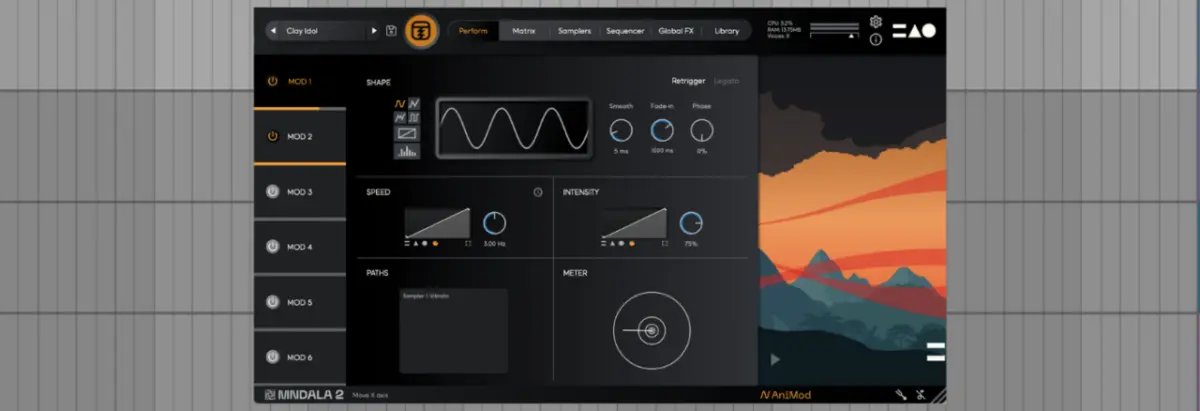
For producers looking to inject evolving, organic life into static patches, the AniMod Global Modulation System is essential. Accessed by clicking the "AniMod" label in the lower-right corner of the interface, this system functions like a modular synthesizer’s modulation bus.

AniMod provides six distinct modulation sources arranged vertically on the left. Each source features comprehensive controls:
- Waveform Shapes: Standard options include sine, triangle, square, random, custom vector, and stepped shapes. Selecting Custom allows you to click and draw custom modulation curves directly within the viewer.
- Speed and Intensity: Dial in exact frequency rates (synced or free-running) and modulation depths.
- Axis Assignment: Route modulators straight into the X, Y, and Z macro axes or map them to individual sampler targets, keeping track of complex routings via the integrated Paths window.
Tuning Page: Microtonal Flexibility
Accessible via the tuning fork icon in the lower-right corner, the Tuning section lets you configure precise scale parameters. You can adjust tuning on a per-sampler basis or link them globally. MNDALA 2 includes an array of historic and avant-garde tuning presets, alongside a hands-on manual scale editor for experimental microtonal compositions.

Official Statements & Community Integration
MNTRA Instruments has consistently positioned MNDALA 2 not merely as a sample player, but as a living instrument ecosystem designed to bridge acoustic realism with electronic sound design.
Reflecting on the philosophy behind the hardware-software symbiosis that informs instruments like MNDALA 2, MNTRA founder Brian D’Oliveira recently appeared as a featured guest on the Attack Podcast. Discussing the intersection of physical acoustic recording techniques and modern digital manipulation, D’Oliveira emphasized the importance of capturing ultrasonic frequencies and hyper-detailed microphone perspectives to give virtual instruments a tangible, physical soul.

"The main thing to remember is that MNDALA 2 is focused on Real-Time Parameter Controls, or RTPCs… our goal was to remove the barrier between the producer and the sound, allowing complex multi-layered transformations to happen organically beneath your fingertips." — Brian D’Oliveira, MNTRA Instruments
You can stream the full interview with Brian D’Oliveira on Apple Podcasts or Spotify.

Future Outlook
As virtual instrument technology evolves toward deeper integration, real-time spatialization, and higher-resolution audio fidelity, engines like MNDALA 2 point the way forward. By democratizing access to 32-bit/384kHz ultrasonic sound assets through a free core engine, MNTRA has established a powerful framework for cinematic composers, sound designers, and electronic music producers alike.
With upcoming engine updates—such as the highly anticipated fifth Shaper slot for the sampler architecture—promising even greater sonic manipulation capabilities, MNDALA 2 is poised to remain a vital fixture in modern production studios.

To explore the full catalog of instrument packs, download free tools, and dive deeper into the MNTRA ecosystem, visit the official MNTRA Instruments Website and check out their collection of free downloads.