In the ever-evolving landscape of digital signal processing and music production technology, developers continually seek new ways to break away from conventional plugin paradigms. Traditional mixing and sound-design utilities—particularly filters—have long relied on familiar, utilitarian interfaces: a static set of cutoff knobs, a resonance slider, and a rigid choice between lowpass, highpass, and bandpass topologies. While functional, these standard tools often leave producers yearning for more intuitive, organic ways to inject movement and character into sterile tracks.
Enter MNTRA Instruments with their latest release, FLTRS. Expanding upon the design philosophies established by their flagship virtual instrument, MNDALA 2, as well as dedicated effect processors like the BRUITAGE distortion unit and the BOREALIS reverb, FLTRS shatters conventional expectations. By combining an expansive library of 37 distinct filter algorithms with a graphic-driven, three-axis macro workflow, the plugin transforms standard frequency carving into an expressive, performative art form.
This review and comprehensive walkthrough examine FLTRS from the ground up. We will explore how its unique graphical control system functions, unpack its massive library of analog-emulated and experimental algorithms, delve into its deep modulation architecture (Animod and the envelope follower), and evaluate its onboard mastering section. Along the way, we will demonstrate how this plugin can take a clean, lifeless mix and inject it with professional-grade grit, warmth, and motion.
Detailed Chronology & Structural Breakdown of FLTRS
1. Overview: A Bird’s Eye View of the Interface
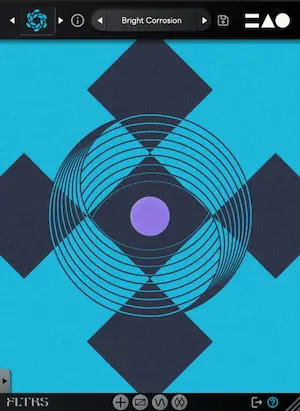
When you first load FLTRS into your digital audio workstation (DAW), you are greeted not by a sea of traditional rotary knobs, but by the Perform View—a sleek, visual workspace centered around the interaction of three distinct spatial axes: X, Y, and Z.
MNTRA has assigned a unique geometric symbol to each axis:
Circle: Represents the first primary macro pathway.
Triangle: Represents the second macro pathway.
Equal Sign (=): Represents the third macro pathway.
Hovering your mouse cursor over the central graphic interface automatically transforms your pointer into the corresponding geometric symbol. Clicking and dragging within this space executes simultaneous control over every parameter mapped to that specific macro axis. Below the interactive window, real-time feedback displays the associated parameters alongside their exact percentage values.
To the left of the main workspace sits the Control Panel, housing primary parameters dictated by the currently loaded algorithm—typically cutoff frequency, resonance, and a third algorithm-specific variable. It also hosts global input/output gain controls, a dry/wet mix slider, and an envelope follower input level. For producers who prefer an uncluttered view, this panel can be easily collapsed via the arrow tab at the bottom.
2. Selecting and Navigating the 37 Filter Algorithms
At the heart of FLTRS’s sonic versatility is its staggering collection of 37 filter algorithms. Rather than forcing users to rely on generic digital curves, MNTRA has curated a rich historical and experimental palette.
The collection includes meticulous emulations of classic analog hardware, such as:
Moog-style Ladder filters known for their warm, self-oscillating drive.
Korg MS-20 filters celebrated for their aggressive, biting character.
Sallen-Key topologies providing unique phase and harmonic responses.
Vintage synthesizer models inspired by the Roland Jupiter-6 and Juno series, alongside modern OTA (Operational Transconductor Amplifier) designs.
For sound designers seeking uncharted sonic territory, FLTRS also includes a suite of experimental and spectral filters. Navigating this library is streamlined: clicking the algorithm logo in the upper-left corner opens the comprehensive effect browser, where users can read detailed descriptions of each topology. Alternatively, clicking the directional arrows flanking the logo allows for rapid, on-the-fly auditioning.
MNTRA wisely includes a category known as Elements within the preset browser. Because FLTRS does not feature a traditional "Initialize" preset, these Elements serve as foundational starting points for every algorithm, showcasing the core sound of the filter without any pre-assigned modulation.
3. Mastering the Macro System and Control Mapping
While the Perform View offers immediate tactile gratification, the true depth of FLTRS lies within its Control Mapping Window. By right-clicking a parameter, clicking its assigned macro icon, or using the bottom menu tabs, users can access detailed mapping tables.
Each table displays the axis macro and an interactive breakpoint envelope that visualizes how the parameter responds across the macro’s range. Users can click and drag the envelope lines to customize the curve response or click the lower-right square to expand the window for fine-tuned graphic editing.
A crucial operational tip for new users: while it is tempting to click and drag directly on parameter graphics like cutoff or resonance, no change will occur unless the parameter is explicitly switched to manual control (indicated by the hand icon). Otherwise, the parameter remains strictly bound to its macro or modulation source.
4. Advanced Movement with Animod and the Envelope Follower
Static filtering rarely satisfies modern electronic music producers. To combat this, MNTRA developed Animod, a robust modulation engine featuring three complex modulators and a dedicated envelope follower.
The Modulators: Each modulator offers selectable waveforms—including sine, triangle, square, and random generators—alongside a built-in step sequencer for rhythmic modulation. Users can independently adjust rate and intensity, and even cross-modulate parameters (such as assigning an LFO to control the rate of another LFO) to generate evolving, unpredictable polyrhythms. The Paths table offers a clear visual map of all modulation destinations.
The Envelope Follower: Reminiscent of advanced utility tools found in host DAWs like Ableton Live, the envelope follower dynamically tracks incoming audio signals. It shines brightest on transient-heavy material such as drum busses and driving basslines. Complete with adjustable threshold, attack, and release controls (which can be linked via a chain icon), it allows producers to use incoming audio peaks to dynamically sweep filter cutoffs or drive distortion stages.
5. The Onboard Mastering Section
Before the audio signal leaves FLTRS, it passes through an integrated Mastering Section. Rather than acting as an afterthought, this section provides professional-grade tools to glue the processed signal back into the mix. It features a fully parametric equalizer for precise tonal sculpting and a dual-mode compressor/limiter offering selectable Modern and Vintage profiles, ensuring that even aggressive, self-oscillating filter sweeps remain controlled and ready for commercial release.
Supporting Context, Metrics & Production Impact
To truly understand the value proposition of FLTRS, one must examine how it fits into the contemporary production paradigm. In modern tech-house, techno, ambient, and bass music, transitions and ear-candy are paramount. Producers frequently spend hours routing multiple automation lanes—automation for filters, drive, saturation, and modulation depth—just to transition between song sections.
Metric Overview of FLTRS:
Filter Algorithms: 37 distinct topologies (ranging from vintage analog emulations to spectral sound design tools).
Control Axes: 3 independent graphic-based macro axes (X, Y, Z).
Output Processing: Parametric EQ paired with a dual-mode (Modern/Vintage) mastering compressor/limiter.
Introductory Pricing: Available for $49 USD until May 14th (standard pricing applies thereafter).
By centralizing these elements into a unified, graphical interface, FLTRS drastically reduces workflow friction. Rather than drawing individual automation curves for cutoff, resonance, and distortion drive, a producer can map all three parameters to a single macro axis, draw a complex response curve, and perform the entire transition with a single mouse gesture or MIDI controller movement.
Official Statements & Developer Insights
Reflecting on the release of FLTRS, the development team at MNTRA Instruments emphasized their commitment to bridging the gap between deep technical capability and intuitive human interaction.
"FLTRS isn’t complicated—far from it—but it is rather unique in how it goes about things," notes the development team. "We wanted to strip away the intimidating walls of numbers and menus traditionally associated with multi-effects units. By leaning into our graphic-based macro system pioneered in MNDALA 2, we are giving artists a canvas where sound design feels sculptural and immediate. You aren’t just twisting knobs; you are physically interacting with the shape of your sound across multiple dimensions simultaneously."
Industry early-adopters have similarly praised the plugin’s ability to breathe life into static material. As demonstrated in initial audio test suites, running individual channels through FLTRS—ranging from clean synthesizer leads to transient-heavy basslines—instantly imparts a cohesive layer of analog grit, harmonic richness, and rhythmic motion without degrading the underlying mix balance.
Future Outlook & Industry Implications
As software developers continue to push the boundaries of virtual studio technology, plugins that encourage experimental, tactile workflows are becoming increasingly vital. FLTRS represents a significant step forward in effect design. By proving that complex modulation routing and deep historical emulation can coexist within a streamlined, graphical interface, MNTRA Instruments has set a new benchmark for what producers should expect from creative utility effects.
Whether used as a subtle tone-shaping tool on individual instrument channels or as a wild, modulation-heavy performance effect for live electronic music setups, FLTRS bridges the gap between surgical precision and artistic expression. With its special introductory pricing set to run through May 14th, the plugin is poised to become a staple in studios worldwide, inspiring a new wave of dynamic, spatially expressive productions.