Executive Overview
In the ever-expanding universe of audio processing plugins, finding an effect that genuinely breaks new ground is a rare occurrence. Too often, developers rely on familiar emulations of vintage hardware—repackaging the same vintage analog warmth, standard low-pass/high-pass topologies, and predictable interfaces. Enter MNTRA Instruments, a boutique software developer celebrated for pushing the boundaries of sound design through innovative workflows. Their latest release, FLTRS, refuses to conform to industry norms.
Combining an astonishing 37 distinct filter algorithms with a graphical, macro-driven control system inherited from their flagship instrument, MNDALA 2, FLTRS rethinks how producers interact with frequency manipulation. Rather than adjusting parameters via dry, static knobs or tedious automation lanes, FLTRS invites users to shape tone spatially and visually across three dynamic axes.

Whether you are looking to infuse a sterile, clean mix with vibrant analog grit or sculpt complex, evolving rhythmic textures that breathe with life, FLTRS bridges the gap between raw power and intuitive design. Available at a special introductory price of $49 until May 14th, this release is poised to become a staple in modern electronic music production. This comprehensive walkthrough explores the core architecture, advanced modulation capabilities, and practical applications of MNTRA’s groundbreaking filter plugin.
Detailed Chronology: The Evolution of MNTRA’s Workflow
To truly understand the design philosophy behind FLTRS, one must examine its lineage within the MNTRA Instruments ecosystem. The developer’s software catalog—which includes the distortion engine BRUITAGE and the ambient reverb BOREALIS—shares a unified DNA rooted in visual, gestural control.

Phase One: The Genesis of MNDALA 2
When MNTRA developed MNDALA 2, their primary goal was to eliminate the cognitive disconnect between music producers and their software instruments. Traditional virtual instruments often scatter hundreds of parameters across hidden menus, sub-pages, and tiny sliders. MNDALA 2 disrupted this approach by introducing a centralized, X, Y, and Z axis interface. Producers could manipulate complex patches holistically simply by moving a cursor across a graphic field.
Phase Two: Translating Instrument Dynamics to Audio Effects
Building on the success of their effect plugins, MNTRA recognized that traditional effects processing lacked this same spatial fluidity. While equalizers and standard filters could sculpt frequency responses, automating them usually required drawing multi-node automation curves in a Digital Audio Workstation (DAW) timeline—a tedious process that separates the producer’s physical intuition from the sound.

FLTRS was conceived to bring the MNDALA 2 performance ethos directly into the realm of filtering and spectral manipulation. By mapping 37 diverse filter algorithms to a three-dimensional macro environment, MNTRA created a plugin that treats frequency modulation not as a mathematical chore, but as a live, performance-ready art form.
Supporting Context & Metrics: Under the Hood of FLTRS
FLTRS is built upon a deceptively simple interface that masks immense sonic depth. Let’s break down its architectural components, operational views, and the staggering variety of processing tools packed inside.

1. The Perform View and Three-Axis Macros
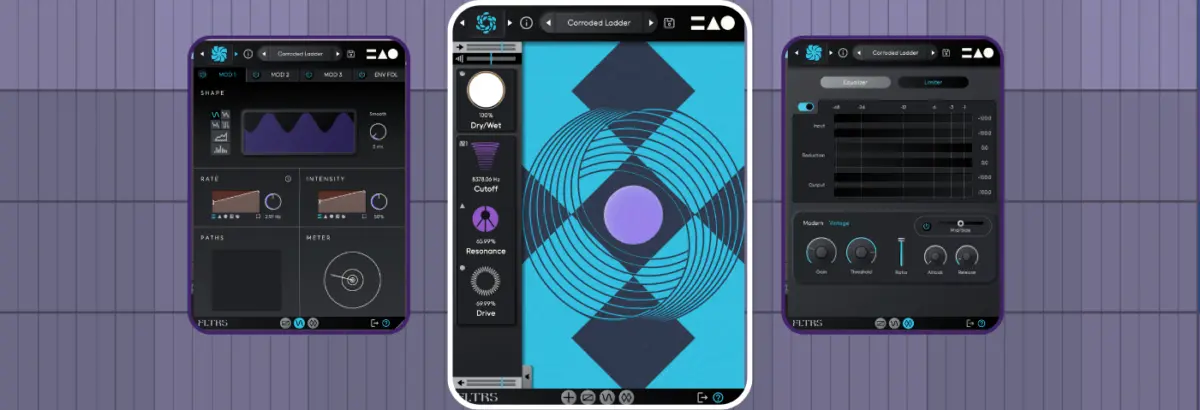
Upon launching FLTRS, users are greeted by the Perform View, a visual hub representing the X, Y, and Z axes. Each axis is visually encoded with a distinct geometric shape:
- Circle
- Triangle
- Equal Sign (=)
Hovering your cursor over the graphic automatically shifts its appearance to match one of these symbols. Clicking and dragging across the space simultaneously alters every parameter mapped to that specific axis. At the bottom of the interface, real-time feedback displays the associated parameters and their exact percentage values.

On the left-hand side sits the Control Panel, housing primary parameters such as cutoff, resonance, input/output gain, and the dry/wet mix. Depending on the chosen algorithm, a third primary parameter is often available. For ease of workspace management, the Control Panel can be collapsed using the arrow tab at the bottom.
2. An Inventory of 37 Filter Algorithms
The true muscle of FLTRS lies in its massive library of 37 distinct filter algorithms. Rather than offering minor variations of the same sound, MNTRA has curated a versatile collection spanning historical hardware emulations and experimental digital processing:

- Vintage Analog Emulations: Includes classic Moog-style Ladder filters, Korg MS-20 filter models, and responsive Sallen Key filter designs.
- Polyphonic Synth Classics: Features filters inspired by the Roland Jupiter-6, Juno series, and modern Operational Transconductance Amplifier (OTA) styles.
- Experimental and Spectral Filters: For producers seeking uncharted sonic territory, FLTRS includes wild, cutting-edge spectral architectures and feedback mesh networks.
Users can explore these algorithms by clicking the algorithm logo in the upper-left corner to access the effect browser, or by using the directional arrows to quickly audition sounds. To help producers get started, MNTRA includes an Elements list within the preset browser. These serve as raw, unmodulated starting points for each algorithm, offering an immediate window into the raw character of the underlying filter topology.
3. The Power of Macros and Control Mapping
The heart of the FLTRS workflow revolves around macro assignment. By clicking the small icon next to any parameter in the Control Panel, or by opening the Control Mapping Window, producers gain granular control over macro ranges and response curves.

Each mapping table features an interactive envelope display showing how the effect scales across its range. Clicking the square icon in the lower-right corner opens an expanded view with access to a wider variety of custom envelope shapes.
Top Tip: When working with parameters like cutoff or resonance, you might initially attempt to click and drag directly on their graphical readouts. However, unless the parameter is explicitly assigned to manual control (indicated by the hand icon), no change will occur. Switching a parameter to manual mode allows for direct, old-school adjustments when macro routing isn’t needed.
4. Advanced Modulation with Animod
Static filter sweeps are useful, but dynamic, evolving motion breathes life into modern productions. FLTRS addresses this via Animod, a comprehensive modulation engine accessible via the bottom navigation tabs.
Animod features three complex modulators and a dedicated envelope follower:

- Complex Modulators: Offer classic waveshapes (sine, triangle, square, and random) alongside a fully programmable step modulator for rhythmic sequencing.
- Modulation on Modulation: Rates and intensities for each modulator are fully assignable. Producers can route an LFO from Modulator 1 to control the rate of Modulator 2, generating shifting, polyrhythmic modulations that never repeat in a predictable pattern.
- The Envelope Follower: Ideal for transient-heavy material like drums and driving basslines, the envelope follower listens to an incoming audio signal (or external sidechain input) to dynamically trigger filter parameters. With adjustable threshold, attack, and release controls, it transforms static tracks into pulsating, reactive grooves.
5. The Mastering Section
Because aggressive filtering, distortion, and resonance boosts can drastically alter gain staging, FLTRS concludes its signal chain with a dedicated Mastering Section. Featuring a high-grade parametric equalizer for precise tonal sweetening and a transparent compressor/limiter with switchable Modern and Vintage modes, this section ensures your processed signals remain glue-coherent and ready for the commercial mix bus.
Official Statements and Industry Reception
Industry response to MNTRA Instruments’ latest release has been overwhelmingly positive, cementing the developer’s reputation as an innovator in plugin design.

"With FLTRS, we wanted to challenge the assumption that a filter plugin has to be a static utility tool," notes the development team at MNTRA Instruments. "By combining historical hardware topologies with our spatial macro workflow, we’ve created an effect that behaves more like an instrument. It encourages you to touch, play, and perform your automation rather than drawing it in boxy lines on a screen."
Early adopters and electronic music producers have similarly praised the plugin’s dual nature: its ability to function as a subtle, pristine analog tone-shaper on delicate synth leads, and its capacity to completely liquefy, distort, and rhythmically fracture drums and industrial soundscapes.

Future Outlook: The Role of Gestural Effects in Modern Production
As Digital Audio Workstations continue to evolve, the interface between human creativity and software execution remains a primary battleground for developers. The traditional paradigm—relying heavily on mouse clicks, rotary knobs, and linear automation curves—can often feel disconnected from the visceral experience of playing a physical instrument.
Plugins like FLTRS point toward a more expressive future in audio engineering. By championing gestural, multi-dimensional macro control, MNTRA Instruments is teaching a new generation of producers to think about mixing and sound design as performance-driven arts.

Whether FLTRS is deployed to gently filter a lush pad, sidechain a driving bassline via its envelope follower, or mangle a drum bus through complex modulation routing, it proves that there is still plenty of room for innovation within classic audio effects categories.
FLTRS is currently available at a special introductory price of $49 (regular pricing applies after May 14th). Producers looking to upgrade their sound design arsenal can find out more directly through the MNTRA Instruments Official Website.