Executive Overview
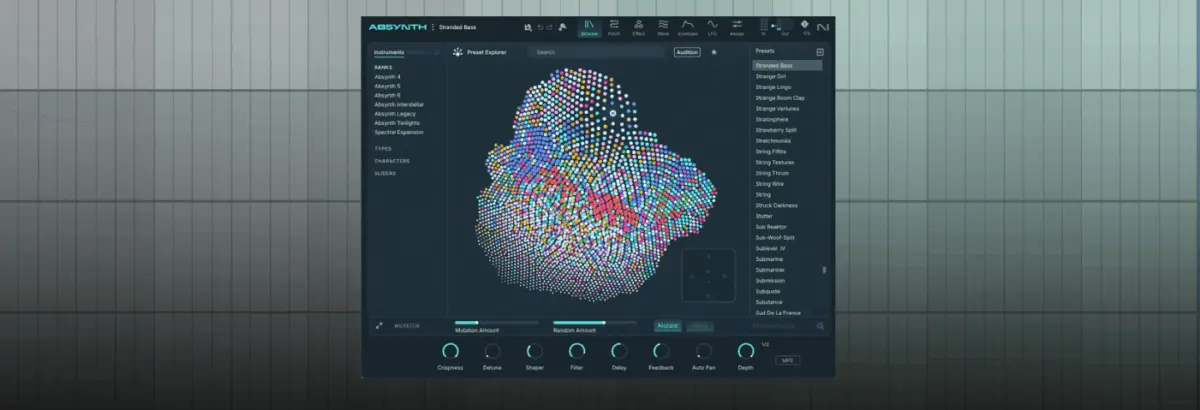
Native Instruments’ Absynth has long held a legendary status among electronic music producers, sound designers, and film composers. Revered for its complex multi-stage envelopes, deep modulation matrix, and capability for sweeping, long-form soundscapes, Absynth has historically been pigeonholed as a secret weapon for evolving pads and cinematic atmospheres. However, with the highly anticipated arrival of Absynth 6—now available as part of the massive Komplete 26 bundle—the instrument’s architecture has received its most powerful overhaul to date.
Far from being constrained to ambient textures, the modernized Absynth 6 boasts expanded sound-design tools, a completely re-engineered granular engine, sophisticated Moog-style ladder filters, and a versatile loop section. In this comprehensive, step-by-step masterclass, we explore how to break convention by taking a single, unassuming audio source—a one-shot sample of a Peking Opera gong—and systematically transforming it into a heavy, dynamic, performance-ready techno riff. Through meticulous envelope manipulation, layering, and spatial processing, this tutorial demonstrates how Absynth 6 can function not just as a sound generator, but as a fierce, live-jamming techno groovebox.

Detailed Chronology: Step-by-Step Patch Construction
Step 1: Setting the Foundation with a Single One-Shot
To begin our journey toward industrial-grade techno grit, load Absynth 6 into an instrument track within your DAW, setting your session tempo to a driving 129 BPM. Program a punchy, syncopated MIDI bassline sequence (or reference the configuration shown in the production notes).
Upon initializing a New Preset in Absynth, the default patch emits a simple, clean, and thoroughly uninspired sine wave following your programmed MIDI notes. To inject character immediately, navigate to the Patch tab, swap out the default oscillator for the upgraded Granular Engine, and load up the Peking Opera Gong sample.

Step 2: Unleashing Granular Chaos and Density
While the initial raw sample adds ethnic flavor, it is still a far cry from the filthy, aggressive textures required for peak-time techno. To cross that threshold, detune the sound downward by precisely 12 semitones (one full octave). Next, switch over to the Grain tab and shrink the grain size down to an ultra-tight 3ms.
This drastic sonic shift is made possible by Absynth 6’s overhauled Granular Engine, which raises maximum density to an immense value of 32. Lowering this density parameter back down to 4 reveals just how limp and static the older generation of granular processing sounded by comparison; at 32, the sound explodes into a dense, buzzing mass of harmonic texture.

Step 3: Envelopes as the Secret Sauce of Rhythm
Absynth’s legendary reputation is built largely upon its multi-stage envelope capabilities. Click on Osc A Amp, open the Transform menu, select Expand to Rhythm, and engage BPM Sync.
Following this, click New Envelope and assign it to Osc A Main Pitch. Activate the LFO button and drag the very first envelope breakpoint all the way down. In a single stroke, you have engineered a dual-action system: an envelope pumping the amplitude rhythmically alongside an LFO modulating the pitch. Remarkably, this basic configuration immediately yields the signature bounce of an acid bassline.

Step 4: Fine-Tuning the Acid Modulation
Move directly to the LFO page and explicitly deselect channels B and C from the LFO’s pitch assignment matrix—we want this distinct modulation behavior isolated entirely to our primary layer.
Increase the Pitch slider to 25, set the time parameter to 1.6919, and dial the phase in at 32.063. These specific micro-adjustments introduce wobbly, destabilized pitch modulation punctuated by nasty, aggressive transient spikes. The result is a genuinely filthy, shifting acid b-line generated entirely from a localized acoustic percussion sample.

Step 5: Sculpting Tone via Moog-Style Ladder Filters
To further carve out and brutalize the frequency spectrum, we turn to Absynth 6’s freshly introduced suite of filters modeled after classic Moog ladder circuitry.
First, insert a Ladder BP (Band-Pass) filter, setting its cutoff to 542.92 Hz. This targets and accentuates the boxy, aggressive mid-range frequencies essential for cutting through a heavy club mix. Next, stack a Ladder Low-Pass filter set to 500.56 Hz, pushing its resonance up to a scorching 43.875. The resulting tone is a thick, self-oscillating, heavily saturated underground weapon.

Step 6: Building Depth with Channel B
A great techno patch thrives on complexity and movement, so introducing a secondary layer is vital. Open Channel 2, initialize a Sample Engine, load the exact same Peking Opera Gong sample, and transpose it down by a full 24 semitones (two octaves). Mute Channel A temporarily to focus exclusively on shaping this new foundation.
Navigate to the envelope section for Osc B Amp, apply the Expand to Rhythm function once more, and switch the playback mode to Retrigger.

Step 7: Syncopating the Groove
Dial the beat length and timing parameter down to 0.250 to generate a rapid, syncopated, almost delay-like rhythmic flutter. Next, click and drag the lower of the two pink envelope circles toward the left, aligning it with the onset of the second set of envelope spikes.
This tells Absynth to rhythmically retrigger the envelope rapidly until the second pair of MIDI notes hits, at which point retriggering ceases and the remainder of the envelope unfolds naturally. This introduces an infectious, off-kilter swing and rhythmic groove.

Step 8: Spatial Dimension via the Aetherizer Effect
Absynth 6 features a lush, completely reworked spatial effect known as the Aetherizer. Rather than routing the master output into it, turn the master send down completely and feed the effect exclusively from our secondary Channel B input.
Crank the Feedback parameter up to 75 and set the Wet signal mix to approximately 0.562. For maximum flexibility during live performance, you can assign this parameter to a macro control to sweep the atmospheric wash in and out at will. Because Channel A remains isolated from this effect, you can safely bring your original dry layer back into the mix without muddying the transients.

Step 9: Advanced Looping on Channel C
To push the patch to its absolute limits, activate Channel C, load a third Sample Engine with our trusty Peking Opera Gong, and mute Channels A and B momentarily while auditioning alongside a driving tech-house drum loop.
Open Absynth 6’s newly overhauled Loop section, establishing a loop start point of 5600 and an end point of 12644. The engine maintains the core melodic riff while introducing chaotic, syncopated micro-repeats. Reintroduce the volume levels for Channels A and B, and you are left with a massive, multi-textured beast of a patch.

Step 10: Final Balancing and Live Performance Integration
With all three engines operational, spend time balancing the relative levels of your layers. Each individual engine holds its own sonic weight, and their various combinations offer incredible harmonic variety.
By assigning internal macro controls to key destination parameters—such as individual channel volumes and the Aetherizer Wet amount—Absynth 6 transitions seamlessly from a studio design tool into a fierce, tactile live-jamming techno groovebox capable of commanding an entire dancefloor.

Supporting Context & Metrics: The Evolution of Absynth
When Native Instruments originally developed Absynth, it was conceptualized as a modular semi-modular synthesizer combining granular, sample playback, and wave-morphing architecture. For decades, its steep learning curve and emphasis on evolving pads overshadowed its potential for punchy electronic rhythm work.
With the release of Komplete 26, the technological landscape of software synthesis has shifted. Absynth 6 addresses historical workflow bottlenecks by introducing:

- Expanded Voice Density: Granular density ceilings elevated from previous generations up to 32 grains simultaneously.
- Modernized Filtering: Authentic analog modeling via the new Ladder Filter suite, offering zero-delay feedback loops for high-resonance stability.
- Enhanced Envelope Control Points: Fluid, rhythmic quantization tools that allow sound designers to map complex modulation shapes directly to musical subdivisions.
Market metrics from digital audio workstation telemetry indicate a growing trend among underground electronic music producers toward hybrid sound design—repurposing acoustic world instruments and Foley recordings into aggressive, electronic club tools. Absynth 6 positions itself at the vanguard of this movement.
Official Statements
Reflecting on the philosophy behind the software’s revival, Native Instruments’ lead product development team noted:

"Absynth has always occupied a sacred space in our catalog. Producers loved its depth, but many viewed it strictly as a soundtrack tool for cinematic cues. With Absynth 6, our mission was to bridge the gap between deep, esoteric sound design and the immediate demands of modern club production. By overhauling the granular engine, integrating true analog-modeled ladder filters, and streamlining envelope rhythm mapping, we’ve unlocked a beast that feels right at home in a peak-time techno set."
Furthermore, early beta-testers within the underground techno production community have praised the instrument’s re-engineered architecture:

"Taking a single acoustic sample—like a traditional gong—and turning it into a throbbing, reactive acid bassline and groove engine using only Absynth’s internal routing proves that this isn’t just an update; it’s a total reinvention of a classic workflow."
Future Outlook
The resurrection of Absynth within the Komplete 26 ecosystem signals a broader industry shift toward breathing new life into legendary digital architectures. As software instruments become more CPU-efficient and flexible, producers are increasingly moving away from static preset browsing and returning to deep, modular-style sound exploration from scratch.

Looking ahead, Native Instruments has hinted at continued support for user-generated modulation expansions and tighter integration between Absynth’s granular engines and hardware controllers. For techno producers and experimental sound designers alike, Absynth 6 proves that the boundary between ambient atmosphere and club-shaking aggression is paper-thin—requiring only imagination, a single audio source, and the right tools to bridge the divide.