Executive Overview
In the crowded landscape of virtual instrument plugins, sample players often fall into familiar, well-trodden paradigms. Whether patterned after hardware romplers or legacy software samplers like Native Instruments’ Kontakt, most follow a predictable workflow: load a sample map, tweak an envelope, drop in a filter, and call it a day. Enter MNTRA Instruments with MNDALA 2, a free, highly unconventional sound engine that completely reimagines how producers interact with sampled audio.
At first glance, MNDALA 2 can feel intimidating. Its aesthetic is organic, its interface is deeply esoteric, and it refuses to adhere to standard software design conventions. Yet, beneath its alien exterior lies a powerhouse of sonic manipulation. Built around the concept of Real-Time Parameter Controls (RTPCs) mapped across three macro axes (X, Y, and Z), MNDALA 2 encourages a fluid, performance-oriented approach to sound design. Capable of handling Extended Resolution Audio and ultrasonic content recorded at a staggering 32-bit/384kHz, it bridges the gap between ultra-high-fidelity acoustic capture and generative electronic sound design.

This comprehensive guide breaks down every core component of the MNDALA 2 ecosystem. From navigating its unique library browser and mastering the Perform View to programming complex motion via the Matrix, Samplers, Sequencers, AniMod modulation system, and Tuning sections, here is everything you need to know to unlock the full potential of MNTRA’s flagship engine.
Detailed Chronology & System Architecture
1. Installation, Browser, and Library Management
Your journey with MNDALA 2 begins by downloading and installing the free engine core. Once installed, the first destination is the Library, housing both free and commercial instrument packs. Because MNDALA 2 supports ultra-high-definition audio (32-bit/384kHz), the sonic fidelity is pristine, capturing subtle micro-dynamics and ultrasonic frequencies that translate into unprecedented depth when pitch-shifted or heavily processed.

When acquiring a new library, users are prompted to designate a download directory. Because sound libraries can take up significant storage due to their high sample rates, it is best practice to organize these directories systematically.
Once your libraries are installed, open the Preset Browser (located in the upper left-hand corner). Here, you can filter sounds by:

- Instrument: The root sound source (e.g., organic percussion, stretched strings, synthesized textures).
- Type: The functional category of the patch.
- Character: The tonal descriptor or emotional resonance.
- Preset: The specific factory or user patch.
The browser also allows you to organize custom subfolders, overwrite factory settings, and save your own patches, ensuring your workflow remains streamlined as your sonic palette expands.
2. The Perform View: The Heart of Performance
The Perform View serves as your primary workspace, functioning similarly to the Play View found in modern software synthesizers like Arturia’s Pigments. It is here that composition meets visual art; MNTRA’s design team has crafted reactive graphics for each instrument that visibly warp and evolve in real-time as you manipulate the macro controls.

MNDALA 2’s architecture revolves around six independent sample layers per preset. Each layer can host its own modulation, effects, and sequencers, compounded by global effects. Without macro management, tweaking a patch could quickly become overwhelming. MNDALA solves this through Real-Time Parameter Controls (RTPCs) channeled into three global axes:
- X-Axis: Represented by an equal sign (
=). - Y-Axis: Represented by a triangle (
▲). - Z-Axis: Represented by a circle (
●).
These three symbols appear ubiquitously across the GUI, denoting where parameters can be tied to macro movements. You can manipulate these axes directly in the Perform View by dragging the translucent sliders on the left, interacting with the central graphic, or mapping them to external hardware via MIDI or DAW automation.

3. The Matrix Page: Mapping Dimensional Motion
To truly understand how the X, Y, and Z axes control your sound, you must move to the Matrix page. Positioned as the next tab to the right of the Perform View, this page governs the volume and pan behaviors of the six sampler lanes across the X and Y axes.
- Gain and Pan Tables: Each row features individual tables for the axes. The left side represents the macro’s starting position; the right side represents its end position.
- Custom Shapes: By default, tables use a linear ramp rising to the right. However, clicking the square icon at the bottom right expands the table for precise editing. You can select preset curves or click directly on the line to create custom nodes and control points, allowing for intricate crossfading between sample layers as you move a single macro knob.
- Remote Monitoring: Removable macro representations (circle, triangle, equal sign) sit on the right side of the screen, allowing you to audition your routing in real-time.
4. Samplers, Generators, and Effects
The Samplers page is where traditional synthesis meets sample manipulation. Arranged in a vertical column on the left, the six sampler slots let you choose sample maps—which often contain multiple articulations and velocity layers—and sculpt them using a comprehensive set of synthesis tools.

Key parameters include:
- Velocity Range and Velocity to Gain: Fine-tune how dynamics affect volume (available on multi-dynamic sample maps).
- Pitch & Vibrato: Essential tools for melodic shaping.
- AHDSR Envelope: Attack, Hold, Decay, Sustain, and Release controls for amplitude shaping.
- Sample Start Modulation: Use velocity to dynamically alter the playback starting point of a sample.
- Multi Mic Mixer, Heat Saturation, and EQ: Dedicated tone-shaping modules located adjacent to each sample’s volume knob.
- Link Buttons: Force global parameter uniformity across all active samplers simultaneously.
Generators and Colours (Effects)
Below the primary synthesis controls lie slots for a Generator and three stereo effects slots called Colours (with a fifth slot, Shaper, reserved for future updates).

- Generators: Act as synthesizer-style oscillators that can supplement organic samples or run entirely on their own without loaded samples. Options include Additive, FM, and a Simple Synth (a Virtual Analog single-oscillator engine featuring sine, triangle, square, saw, and noise waveforms).
- Colours (FX): A massive suite of stereo effects ranging from lush reverbs and delays to advanced filters, modulation tools, and compressors. Parameters can be mapped directly to the macro axes or modulators.
- Global FX: An additional five stereo bus effects are available under the global tab for processing the final output.
5. Advanced Motion: Sequencers and AniMod
For rhythmic and evolving textures, MNDALA 2 provides two powerhouse motion systems: Sequencers and the AniMod Global Modulation System.
- Step Sequencers: Each sampler features an independent step sequencer with dedicated lanes for Note, Velocity, and Length. Global link buttons allow you to standardize these settings across all lanes instantly. At the bottom of the page, users can dial in shuffle, DAW-synced speed, step counts, and Stride (which dictates the interval of steps between triggered notes—e.g., a Stride of 2 triggers notes on every other beat).
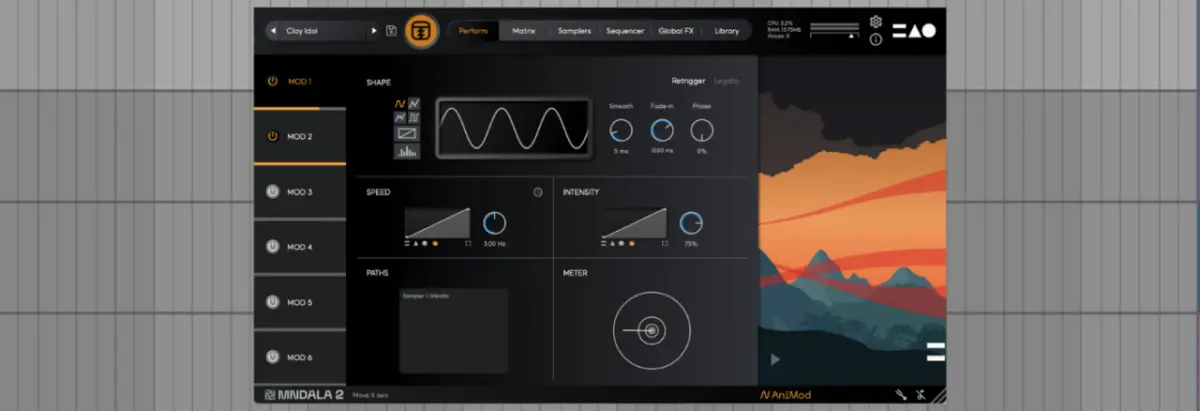
- AniMod Global Modulation System: Accessed via the "AniMod" button in the lower right corner, this system functions like a modular synthesizer’s modulation matrix. Six source modulators sit on the left column, offering shapes like sine, triangle, square, random, stepped, and custom (drawn via user nodes). You can control speed, intensity, and axis assignment while monitoring routing behavior in the Paths window.
6. Tuning Section
Finally, microtonal flexibility and custom scales are managed in the Tuning section, accessed via the tuning fork icon. Users can apply pre-loaded tuning temperaments or build custom scales manually in the editor, either per-sampler or globally via the link function.

Supporting Context & Metrics: The Engineering Behind MNDALA 2
MNDALA 2 is not just a cosmetic overhaul of standard sampling technology; it is a technical feat engineered to handle extreme audio fidelity.
| Feature Category | Technical Specification / Capability |
|---|---|
| Audio Resolution | Supports 32-bit / 384kHz Extended Resolution Audio |
| Sample Layers | Up to 6 independent sample/synthesis layers per preset |
| Macro Architecture | 3 Real-Time Parameter Control (RTPC) axes (X, Y, Z) |
| Modulation Sources | 6 independent AniMod sources with custom shape-drawing capabilities |
| Synthesis Integration | Additive, FM, and Virtual Analog (VA) single-oscillator generators |
| Licensing Model | Free sound engine with access to both free and paid MNTRA sample packs |
By pushing sample rates into ultrasonic territories, MNTRA ensures that users who heavily pitch-audio down or apply extreme time-stretching retain clarity and harmonic richness that standard 24-bit/48kHz sample libraries simply cannot match.

Official Statements and Industry Reception
The philosophy behind MNDALA 2 stems from MNTRA Instruments’ core mission: to forge intimate, organic connections between musicians and software. Co-founder and visionary Brian D’Oliveira has frequently emphasized that virtual instruments should feel less like spreadsheets of data and more like living, breathing acoustic entities.
Reflecting on the ethos of MNTRA’s instrument design, the development team notes:

"The main thing to remember is that MNDALA 2 is focused on Real-Time Parameter Controls, or RTPCs. By bringing everything together in three global controls, you can concentrate on playing and composing rather than on individual parameter changes."
This design philosophy has garnered significant praise across the electronic music and film scoring communities. Producers praise the engine’s ability to turn organic foley, rare ethnic instruments, and bowed metals into mutating, cinematic soundscapes using only a few macro movements.

Future Outlook
As software instrument developers increasingly lean toward AI-driven generation and static romplers, MNTRA Instruments continues to carve out a unique space focused on tactile performance and hyper-detailed acoustic capture.
With the upcoming integration of the Shaper slot in the sampler architecture and a continuously expanding catalog of experimental sound libraries (ranging from free introductory packs to deep cinematic expansions), MNDALA 2 is positioned to remain a staple for forward-thinking producers, sound designers, and film composers alike.

Whether you are looking to inject organic warmth into pristine electronic arrangements or build evolving, generative ambient soundscapes from scratch, mastering MNDALA 2 offers an extraordinary return on investment—proving that when software breaks the mold, creativity naturally follows.
To find out more about MNDALA 2, explore free instrument packs, or dive deeper into MNTRA’s catalog, visit the MNTRA Instruments website. For more insights into modern music production, check out Attack Magazine’s recent podcast episode featuring Brian D’Oliveira on Apple Podcasts and Spotify.