In the contemporary landscape of live electronic music and multimedia performance, the boundary separating audio engineering from visual art is rapidly evaporating. Audiences no longer settle for static projections or pre-rendered loops synchronized to a timecode; they demand a living, breathing symbiosis where sound dictates sight, and conversely, visual data informs acoustic textures.
Achieving this high level of bi-directional interactivity requires robust, sophisticated software architecture. While several creative coding and node-based environments exist, few integrate as seamlessly—or possess as much raw performance horsepower—as the combination of Ableton Live and Derivative’s TouchDesigner.
This technical deep-dive explores a custom performance setup designed to bridge the gap between human vocal execution and generative 3D visual environments. By leveraging custom Max for Live (M4L) devices, granular MIDI signal routing, and the robust communication bridge provided by TDAbleton, this setup captures a live vocal performance, splits it into six distinct harmonized voices, maps them across independent audio channels, and drives a real-time, GPU-accelerated 3D graphics network.
The result is a genuine marriage of sensory mediums: an ecosystem where every micro-nuance in vocal volume, pitch transposition, and hardware effects routing is physically manifested on screen, and where spatial positioning in the visual field directly impacts the auditory mix.
Detailed Chronology: Anatomy of a Hybrid Performance Setup
To understand how this immersive audio-visual ecosystem functions, we must examine the signal flow from its inception at the hardware controller through the digital audio workstation (DAW) and finally into the node-based visual engine.
1. The Ableton Live Vocal Processing Architecture
The core composition featured in this workflow relies on a dense vocal arrangement consisting of up to seven distinct voices: one raw, unedited live vocal paired with six dynamically generated harmony voices. Rather than relying on polyphonic plugins that obscure individual voice handling, this workflow assigns each harmony to a separate, dedicated instance of Ableton’s Auto Shift device. This granular approach grants the artist surgical control over the formant, pitch, and timbre of every single harmonic layer.
The routing schema operates as follows:
The Master MIDI Track: MIDI performance data enters the DAW via a master controller. This data is lightly transposed, and its velocity dynamics are flattened to ensure uniform trigger responses across all harmony engines.
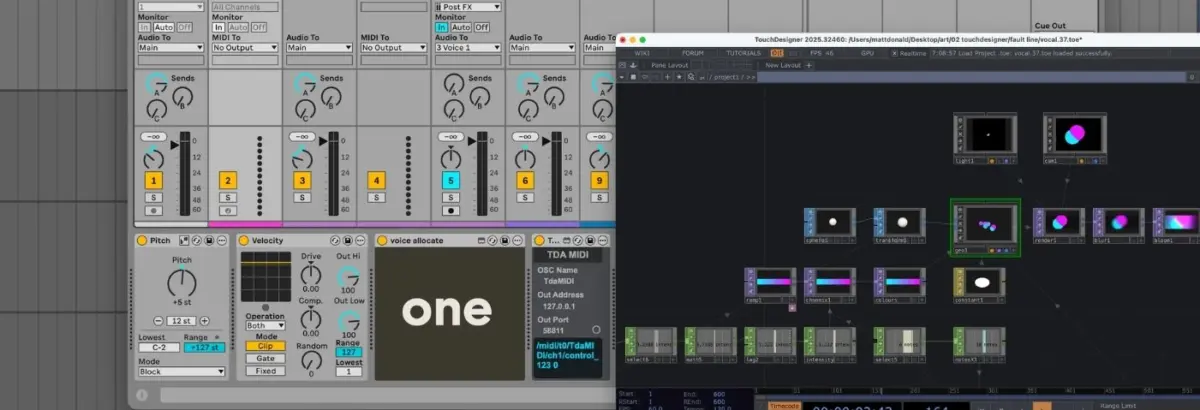
Voice Allocation via Max for Live: The processed MIDI stream feeds into a custom M4L device entitled Voice Allocate. This utility parses incoming chords or polyphonic phrases, assigns a unique identification (ID) tag to each active note, and broadcasts them across separate channels.
Voice Receive Nodes: Each Auto Shift audio effect is grouped into a dedicated channel strip paired with a companion MIDI track. These MIDI tracks receive input exclusively from custom Voice Receive M4L devices, which filter out all incoming data except for their assigned Voice ID.
Monophonic Isolation: Set to monophonic MIDI mode, each Auto Shift instance handles precisely one note split from the original controller input. Meanwhile, the dry live vocal is routed to a master audio bus and multi-fed into all six Auto Shift chains simultaneously, creating a lush, towering vocal stack.
2. The TDAbleton Communication Bridge
While TouchDesigner natively supports Open Sound Control (OSC) for network communication, configuring custom message paths for complex polyphonic routing can introduce unnecessary latency and configuration overhead. To bypass this, the setup utilizes TDAbleton—a native suite of bundled Max for Live devices and accompanying MIDI controller scripts developed specifically for this interoperability.
Once initialized, TDAbleton establishes a two-way telemetry highway between Ableton Live and TouchDesigner. This allows the visual network to query any parameter within the DAW—ranging from track volume and panning to specific device values—while simultaneously transmitting control data back to modulate audio effects in real time.
3. The TouchDesigner GPU-Accelerated Visual Network
To maintain optimal CPU headroom during live performances, the visual component relies on an economical yet visually striking instancing network built within TouchDesigner.
Rather than rendering complex geometry on the CPU, instancing utilizes the GPU to duplicate a single source asset across thousands of coordinates simultaneously.
Geometry & Instancing: The network initiates with a single Sphere SOP (Surface OPerator), subjected to basic transformations before feeding into a Geometry Component (Geo Comp) where the instancing magic occurs.
Procedural Positioning: A collection of Noise CHOPs (Channel Operators) generates organic, fluid XYZ coordinates for each instance, bounded securely within the physical aspect ratio of the output display.
Color Interpolation & Shading: A Ramp TOP (Texture Operator) interpolates between two distinct color endpoints, assigning a unique chromatic hue to each instance. By applying a constant material to the Geo Comp, depth perception is stripped away, transforming the 3D spheres into crisp, flat geometric discs that evoke minimalist modern art.
Post-Processing Pipeline: The final scene is captured via a Camera and Light Component pair, fed into a Render TOP, and enriched with atmospheric post-processing effects including high-end bloom and blur before reaching the master output display.
4. Bi-Directional Interactivity and Feedback Loops
The true brilliance of this setup lies in its closed-loop feedback architecture. Audio does not merely trigger visuals; the physical behavior of the visuals actively shapes the audio mix:
Audio-Driven Visuals: An abletonLevel CHOP monitors the master audio channel in real time. Higher vocal amplitudes directly increase the opacity of the Ramp TOP (making the graphics more solid and commanding) and accelerate the speed of the Noise CHOPs driving the instances’ spatial trajectories.
MIDI-Driven Density: An abletonMIDI CHOP tracks active input notes. By calculating the total number of active notes plus one (accounting for the primary live vocal), TouchDesigner dynamically scales the number of active instances generated by the Noise CHOPs and updates the color-step resolution on the Ramp TOP.
Spatial Audio-Visual Pan Mapping: The horizontal X-axis coordinates generated by the Noise CHOPs are mapped directly to the pan controls of seven independent Ableton track components (abletonTrack COMPs). As the visual spheres drift across the screen, their corresponding vocal harmonies physically pan across the stereo field in the auditory mix.
Hardware Glitch Integration: A Count CHOP tracks specific performance triggers—such as repeated strikes on note F3. Upon hitting a programmed threshold, it fires a hardware routing command that sends Ableton’s audio output through an external Hologram Electronics Chroma Console running an aggressive, fragmented "Inference" algorithm. A secondary abletonLevel CHOP reads the return signal of this hardware effect and maps it to a chromatic aberration shift in TouchDesigner, causing the visual shapes to fracture and glitch in precise synchronization with the audio distortion.
Supporting Context & Metrics: Performance and Efficiency
When designing software rigs for stage deployment, stability and CPU efficiency are paramount. Laptops crashing mid-set due to unoptimized processing loops represent an unacceptable risk for professional touring acts.
System Parameter
Optimization Strategy
Technical Benefit
Visual Rendering
GPU-based SOP/CHOP Instancing
Shifts heavy geometric processing from the central processor to the graphics card, preventing audio buffer underruns.
Vocal Polyphony
Individual Auto Shift Instances
Eliminates phase cancellation and cross-talk issues inherent in shared polyphonic pitch-shifters; allows granular control.
Data Communication
TDAbleton M4L / OSC Hybrid
Minimizes network jitter and round-trip latency, ensuring sub-frame synchronization between audio transients and visual pulses.
Resolution Scaling
Free Tier (1280×1280) vs. Licensed
Allows extensive prototyping on the free version of TouchDesigner, with commercial licenses unlocking full 4K output capabilities for festival stages.
Official Statements and Industry Perspective
As multimedia integration becomes an industry standard for electronic music artists, software developers are increasingly tailoring their ecosystems for cross-platform compatibility.
"The modern electronic music performance is no longer a passive listening experience," notes audio software systems analyst Marcus Vance. "When artists take the stage today, they are acting as conductors of multi-sensory environments. Tools like TDAbleton and TouchDesigner democratize workflows that were once exclusive to massive stadium tours with multi-million dollar production budgets. By tying spatial audio panning directly to GPU particle coordinates, performers achieve a psychological immersion that traditional timecode setups simply cannot replicate."
Derivative, the creators of TouchDesigner, have frequently emphasized the platform’s suitability for real-time musical accompaniment. The node-based architecture allows performers to adapt their visual patches dynamically during a soundcheck, patching in new control data parameters without needing to recompile code or restart performance sessions.
Future Outlook: The Next Evolution of Multi-Sensory Performance
As we look toward the future of live electronic music production, several technological trajectories are poised to expand upon this Ableton-TouchDesigner foundation:
Spatial Audio Integration (Dolby Atmos / Ambisonics): While this specific setup maps X-axis visual movement to stereo panning, future iterations will likely incorporate multi-channel spatial audio engines. Imagine vocal harmonies orbiting a 360-degree speaker array while matching 3D spherical coordinates rendered in a dome projection environment.
AI-Driven Generative Control: Integrating machine learning models (such as real-time audio-to-gesture neural networks) could allow TouchDesigner to anticipate vocal phrasing, generating anticipatory visual movements before the artist even hits a high note.
Hardware Convergence: With external boutique pedals like the Chroma Console already playing a role in modulating visual parameters via audio return levels, the distinction between outboard hardware processing and software-driven digital art will continue to blur.
For producers and visual artists looking to elevate their live sets, mastering the bridge between Ableton Live and TouchDesigner offers an unmatched creative playground. It transforms music from something merely heard into a living, tangible environment—proving that when sound and sight share a single digital nervous system, the possibilities are virtually limitless.
Don’t have Ableton Live yet? You can explore purchase options directly through Ableton’s official shop. (Please note: This is an affiliate link; purchases made through this portal provide a small commission to support ongoing educational content without affecting your purchase price).