In the crowded landscape of virtual studio technology and software samplers, truly groundbreaking innovations are rare. Most sample players adhere to a well-trodden blueprint established decades ago: load a map, adjust an envelope, tweak a filter, and apply standard effects.
MNTRA Instruments has consistently rejected this conventional framework. With the release of MNDALA 2, the developer has delivered a free, highly capable sound engine that reimagines how producers interact with sampled audio. While it functions fundamentally as a sample player—sharing conceptual lineage with powerhouses like Native Instruments’ Kontakt—MNDALA 2 operates under an entirely unique set of rules.
Designed from the ground up to house MNTRA’s proprietary sample libraries, MNDALA 2 immediately commands attention through its striking visual aesthetic and deeply integrated workflow. At its core, the software pivots away from endless menus and disparate parameter adjustments, centralizing control into a fluid, real-time macro system. By mapping up to six independent sample layers, internal synthesis generators, and extensive modulation networks to three distinct axes of movement (X, Y, and Z), MNDALA 2 transforms static audio recordings into living, breathing, continuously morphing instruments.
For producers stepping into the environment for the first time, the interface can feel both awe-inspiring and intimidating. However, beneath its avant-garde exterior lies a deeply logical architecture. This guide provides an exhaustive walkthrough of MNDALA 2, detailing how to navigate its browser, master its Perform and Matrix views, build complex patches via its Samplers and Sequencer pages, and wield the AniMod global modulation system to elevate your music production.
Detailed Chronology & System Architecture
Understanding MNDALA 2 requires dissecting its architectural evolution and how its various internal modules communicate. Unlike traditional samplers that treat modulation as an afterthought, MNDALA 2 was engineered around Real-Time Parameter Controls (RTPCs).
1. Installation, the Library, and Extended Resolution Audio
The journey begins by downloading the free MNDALA 2 engine from MNTRA Instruments. Once installed, users access the internal Library tab to acquire instrument packs, which span both complimentary entries and premium releases.
A defining technical characteristic of the MNDALA 2 ecosystem is its native support for Extended Resolution Audio. Libraries are recorded at staggering 32-bit/384kHz specifications. This captures a wealth of ultrasonic content—auditory data well above the human threshold of hearing. When pitch-shifted, time-stretched, or processed aggressively within the engine, these high-resolution assets retain pristine clarity, avoiding the digital artifacts that typically plague standard 24-bit/48kHz or 16-bit audio files.
When downloading libraries, users must designate specific storage directories. Once acquired, patches are managed via the Preset Browser (located in the upper left corner), allowing producers to filter by Instrument type, Character, and specific Preset variations, as well as build custom user subfolders.
2. The Perform View: Visuals Meet Macro Control
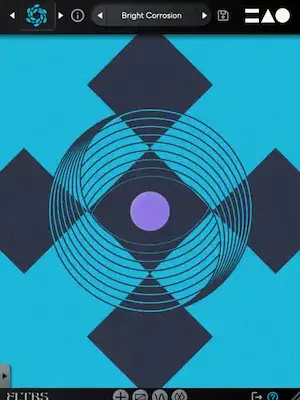
Once a preset is loaded, producers are greeted by the Perform View. Serving as the primary compositional canvas, this screen bridges high-end audio engineering with dynamic visual art. Each instrument pack features bespoke, responsive artwork that dynamically morphs and reacts as the user manipulates the core macro axes.
The engine’s operational philosophy relies heavily on macro control. Because a single preset can harbor up to six independent sample lanes—each equipped with dedicated modulation, effects, and step sequencing—tweaking parameters individually during a performance is impractical. MNDALA 2 solves this by consolidating control into three global axes:
X-Axis: Represented by an equal sign (=)
Y-Axis: Represented by a triangle (△)
Z-Axis: Represented by a circle (◯)
These three geometric symbols act as universal navigational waypoints throughout the entire GUI. Whenever a parameter can be linked to macro movement, these icons appear. Users can modulate these axes directly via the translucent on-screen sliders in the Perform View, by interacting with the central graphic, by mapping physical knobs on an external MIDI controller, or by drawing automation curves within their Digital Audio Workstation (DAW).
Supporting Context & Metrics: Navigating the Core Pages
To look beyond the surface of the Perform View, producers must dive into MNDALA 2’s comprehensive tabbed architecture: the Matrix, Samplers, Sequencers, AniMod, and Tuning pages.
+-----------------------------------------------------------------+
|                       MNDALA 2 ARCHITECTURE                     |
+-----------------------------------------------------------------+
  |
  +--> [Perform View] ---> Central X, Y, Z RTPC Macro Controls
  |
  +--> [Matrix Page] ----> Gain & Pan Tables for 6 Sample Lanes
  |
  +--> [Samplers Page] --> AHDSR, Multi Mic, Heat, EQ, Generators, FX
  |
  +--> [Sequencers] -----> Step Sequencing (Note, Velocity, Length)
  |
  +--> [AniMod System] --> 6 Global Modulation Sources & Custom Shapes
  |
  +--> [Tuning Page] ----> Custom Scales & Microtonal Adjustments
The Matrix Page: Sculpting Spatial Movement
Situated immediately to the right of the Perform tab, the Matrix page is where spatial choreography begins. Here, producers manage the volume (gain) and panoramic placement (pan) of all six sampler lanes relative to the X and Y axes.
The interface presents clear grid rows for each sampler. The left side of a given table dictates the parameter’s starting position, while the right side denotes its endpoint. By default, these values follow a standard linear ramp upward, but users can click the square icon in the bottom right corner to expand the table for microscopic precision. Here, producers can load preset routing curves or click directly onto the line to establish custom nodes, pulling and bending trajectories to create complex crossfading and panning behaviors as the macro moves.
The Samplers Page: Deep Synthesis and Effects
The Samplers page functions as the heart of the engine’s synthesis capabilities. Arranged in a vertical column on the left, the six sampler slots allow users to load distinct sample maps—often containing multiple distinct performance articulations.
Sample Start Modulation: This feature enables velocity-sensitive manipulation of the initial playback point, injecting organic variation into repetitive passages.
On-Board Mixing & Saturation: Positioned alongside the primary sample volume knobs are dedicated controls for the Multi Mic Mixer (crucial for multi-microphone orchestral or acoustic recordings), Heat saturation, and parametric EQ settings.
Global Link Functionality: Many parameters feature an integrated link button. Clicking this forces all six samplers within the active preset to adopt identical settings simultaneously.
Below these core shaping tools lie slots for sound Generators and stereo effects (Colours). Generators act as onboard synth oscillators, allowing producers to blend synthesized tones with organic samples—or bypass samples entirely. Three types are available: Additive, FM, and Simple Synth (a virtual-analog single-oscillator offering sine, triangle, square, saw, and noise waveforms).
The Colours slots offer a vast library of stereo insert effects (reverbs, delays, filters, modulation tools, and compressors). Producers can assign dry/wet mixes directly to the macro axes or internal modulators. Furthermore, five additional stereo bus effects are housed under the Global FX tab.
The Sequencers Page: Polyrhythmic Motion
MNDALA 2 features an advanced step sequencer section, providing independent sequencing lanes for every sampler slot within a patch. Each lane handles Note selection, Velocity, and Step Length.
At the base of the sequencer interface, users can program global parameters such as shuffle amount, DAW-synced playback speed, step count, and Stride. Stride introduces polyrhythmic complexity by defining the number of sequencer steps that pass between each triggered note (e.g., a stride setting of 2 triggers a note every other beat). Individual randomize and reset buttons per lane ensure that evolving, unpredictable rhythmic patterns are always a single click away.
The AniMod Global Modulation System
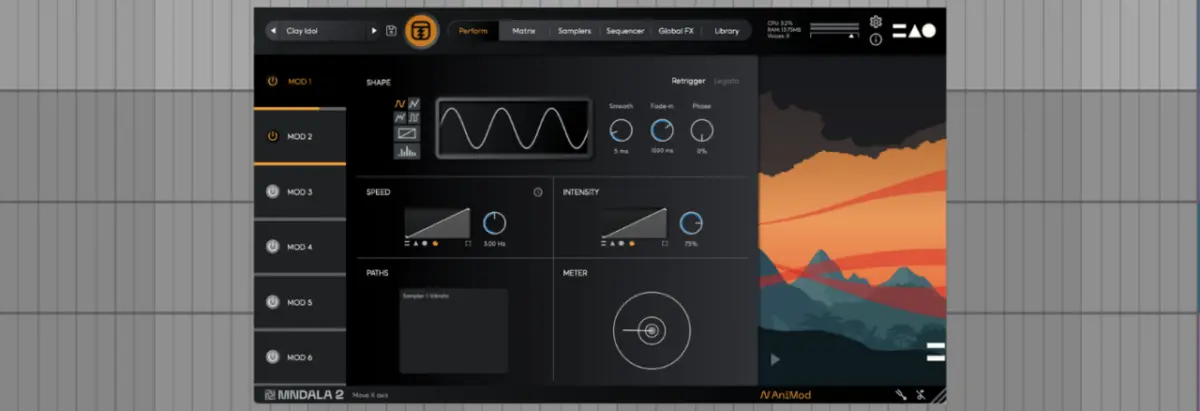
For producers looking to push patches into self-generating territory, the AniMod Global Modulation System offers deep modulation routing. Accessed via the "AniMod" tag in the lower right corner, the system houses six independent modulation sources in a left-hand column.
Modulator shapes include standard waves (sine, triangle, square), randomized generators, stepped patterns, and custom hand-drawn vector shapes. Users can independently adjust speed, intensity, and target assignments, mapping modulators directly to the X, Y, and Z axes while monitoring routing paths via the dedicated window.
The Tuning Page: Microtonal Exploration
Accessible via the tuning fork icon in the lower right corner, the Tuning section unlocks microtonal capabilities. Producers can apply alternative tuning systems on a per-sampler basis or link them globally, choosing from a curated list of historic scales or designing custom temperaments via the manual editor.
Official Statements & Industry Impact
The philosophy behind MNTRA Instruments’ design ethos was illuminated further during a recent appearance by company founder Brian D’Oliveira on the Attack Magazine Podcast. Discussing the intersection of organic performance and software development, D’Oliveira emphasized the necessity of bridging the tactile feel of acoustic instrumentation with the infinite possibilities of digital sound processing.
"The main thing to remember is that MNDALA 2 is focused on Real-Time Parameter Controls, or RTPCs," notes the foundational design document. By distilling complex, multi-layered sound design parameters into intuitive physical movements, MNTRA bridges the gap between passive listening and active, expressive performance.
Industry reception to MNDALA 2 has highlighted its unique positioning: it serves as both a high-fidelity cinematic sample library player and an experimental sound design sandbox. Because the core engine is distributed freely, producers of all backgrounds can access ultra-high-resolution 32-bit/384kHz audio environments without financial barriers.
Future Outlook
As software instruments continue to evolve, the demand for intuitive, performance-oriented interfaces is at an all-time high. Producers are increasingly fatigued by screen-heavy workflows that rely on static preset browsing and tedious mouse adjustments.
MNDALA 2 points toward a more expressive future in music technology. With upcoming features already hinted at—such as the forthcoming Shaper slot within the sampler architecture—MNTRA Instruments is actively expanding the sonic boundaries of the platform. Whether used for lush, organic cinematic soundscapes, aggressive electronic sound design, or shifting polyrhythmic sequences, MNDALA 2 redefines what a sample player can achieve in the modern studio.
To dive deeper into MNDALA 2, explore free instrument downloads, and discover more production insights, visit the official MNTRA Instruments website and check out the full interview with Brian D’Oliveira on Apple Podcasts or Spotify.