In the realm of contemporary electronic music performance and audiovisual art, the boundaries separating auditory experiences from visual spectacles are increasingly porous. Audiences no longer expect a passive listening experience supplemented by static, pre-rendered projections; instead, they demand an immersive, symbiotic relationship between the music they hear and the visuals dancing across the stage. Achieving this synergy requires robust technical architecture capable of translating complex musical data into responsive graphical outputs—and conversely, allowing visual parameters to influence sonic textures in real time.
While various creative coding environments and media servers exist to bridge this technical divide, few integrate as seamlessly or powerfully with industry-standard Digital Audio Workstations (DAWs) as TouchDesigner. Developed by Derivative, TouchDesigner is a node-based visual development platform that treats data like a fluid current. Much like Max/MSP, individual nodes perform specialized operations, passing parameters downstream to construct intricate systems. However, TouchDesigner distinguishes itself through its exceptional handling of massive data arrays and its heavy reliance on GPU-accelerated processing, making it uniquely suited for real-time graphics generation.
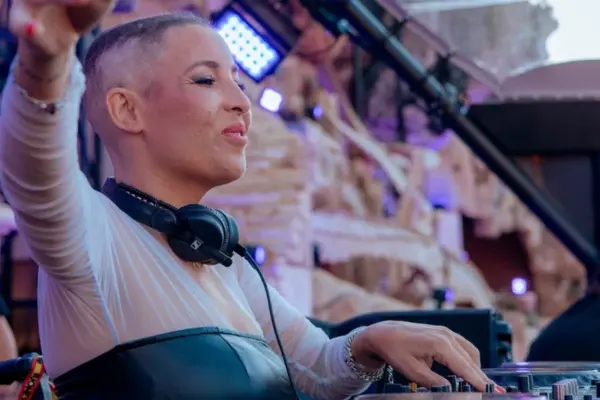
This technical breakdown examines a custom-built, highly responsive performance setup that marries the granular audio-routing capabilities of Ableton Live with the procedural graphics engine of TouchDesigner. Focusing on a live performance featuring a multi-layered vocal harmonizer and reactive 3D spatial geometry, this guide explores how harmonized vocals can drive immersive visuals, and how spatial data can simultaneously shape the spatial audio mix.
Detailed Chronology: Building the Audiovisual Pipeline
To understand how this dynamic performance operates, we must dissect the pipeline step by step: examining the Ableton Live configuration, the TouchDesigner visual network, and the bidirectional communication protocols that bind them together.
1. The Ableton Live Vocal and MIDI Architecture
The core of the performance relies on a complex vocal processing chain comprising up to seven distinct voices: one primary live vocal and six harmonized vocal layers. While Ableton’s native Auto Shift device possesses polyphonic capabilities, deploying a single polyphonic instance can limit fine-grained control over individual harmony voices. To achieve absolute precision, the setup routes audio through separate, dedicated instances of Auto Shift for each harmony layer.
MIDI Routing and Voice Allocation:
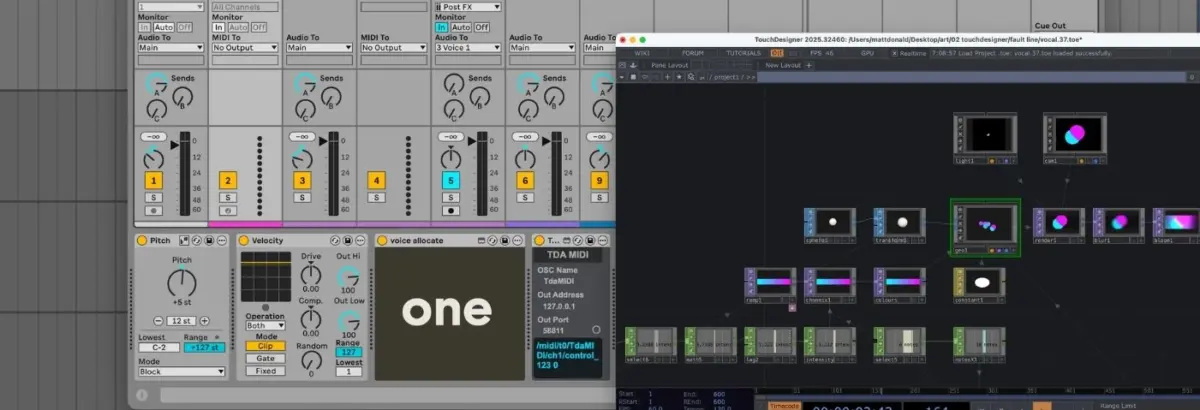
A master MIDI track captures input from a live performance controller. Incoming notes are lightly transposed, and their dynamics are flattened via a velocity-limiting utility to ensure consistent processing thresholds. This MIDI data is then routed into a custom Max for Live device aptly named Voice Allocate.
Voice Allocate performs a critical function: it dissects polyphonic chord inputs, assigns a unique identification (ID) number to each individual note, and distributes them across separate channels. Each harmony track features a complementary custom Max for Live device called Voice Receive, which is hardcoded to listen exclusively to its assigned ID.
Audio and Effect Chain Integration:
The live vocal is captured on a dedicated master audio track and routed simultaneously into all seven Auto Shift instances. Because each Auto Shift device is grouped with a MIDI track driven by its respective Voice Receive module and set to monophonic MIDI mode, the incoming vocal is instantly split into six distinct, harmonized vocal parts played via the keyboard controller. Combined with the dry live vocal, the performance features seven independent audio streams, each occupying its own mixer channel.
2. Establishing the Bridge via TDAbleton
Communication between a DAW and a visual engine can notoriously introduce latency and synchronization bottlenecks. While TouchDesigner can communicate via standard Open Sound Control (OSC) protocols, Derivative and the creative tech community provide a far more streamlined ecosystem: TDAbleton.
TDAbleton is a curated suite of Max for Live devices and accompanying MIDI controller scripts designed specifically to integrate Ableton Live directly into TouchDesigner’s node network. Once installed, it establishes a two-way telemetry pipeline. TouchDesigner can instantly poll data from any parameter, track, device, or mixer element within Ableton Live, while Ableton can receive control signals back from TouchDesigner with sample-accurate precision. Adding a connection requires nothing more than dropping a TDAbleton-compatible device onto the desired Ableton track, instantly spawning a corresponding telemetry node in TouchDesigner.
3. The TouchDesigner Procedural Visual Network
To maintain optimal frame rates and prevent CPU throttling during intense live sets, the TouchDesigner network relies heavily on GPU instancing. Instancing allows developers to render thousands of geometric copies using a single source mesh, offloading the computational heavy lifting entirely to the graphics card.
Geometry and Spatial Positioning:
The visual network begins with a single Sphere Surface Operator (SOP), which undergoes minor transformations before feeding into a Geometry Component (Geo Comp) where GPU instancing is initialized. A series of Noise Channel Operators (CHOPs) generates organic, fluctuating XYZ coordinates for each instance, ensuring the spheres wander smoothly within fixed screen boundaries.
Color Interpolation and Shading:
A Ramp Texture Operator (TOP) assigns a dynamic color gradient to the instances, smoothly interpolating between two endpoint hues. To achieve a clean, graphic aesthetic, the Geo Comp is assigned a constant material that strips away depth perception, rendering the 3D spheres as flat, glowing 2D discs.
Post-Processing and Rendering:
The resulting geometry is framed by a Camera Component, illuminated by a Light Component, and captured via a Render TOP. Before hitting the final output display, the signal passes through auxiliary processing nodes—specifically bloom and blur filters—to add a soft, cinematic radiance to the moving shapes.
4. Bidirectional Interactivity and Parameter Mapping
The true magic of this performance setup lies in the feedback loop established between sound and sight. TDAbleton acts as the nervous system connecting the two platforms:
Audio-Driven Visuals:
An abletonLevel CHOP monitors the master audio output level in Ableton Live. This audio signal is mapped directly to two visual parameters:
Opacity: The alpha channel of the Ramp TOP is tied to the master volume, causing the visual circles to glow with greater solidity and intensity as the vocals swell.
Motion Speed: The rate of the Noise CHOPs driving the sphere positions is modulated by the audio level, causing the visual elements to accelerate dynamically during louder, more energetic passages.
MIDI-Driven Density:
An abletonMIDI CHOP tracks all active notes entering the master MIDI input track. The total note count (plus one to account for the live vocal) dictates two crucial parameters:
The number of active position-generating Noise CHOPs, which dynamically scales the instance count in the Geo Comp.
The color distribution steps across the Ramp TOP, altering the visual palette in real time based on harmonic complexity.
Visual-Driven Audio (Spatialization and Glitch Processing):
The influence is not strictly one-way. The horizontal X-coordinates of the instances generated by TouchDesigner’s Noise CHOPs are mapped directly back to the pan controls of the seven individual vocal tracks in Ableton Live. As the visual circles drift across the screen, the listener hears the respective harmony voices panning across the stereo field.
Additionally, a Count CHOP in TouchDesigner listens for specific performance triggers—such as repeated strikes of the F3 key on the MIDI controller. Once a threshold is met, it fires a signal routing audio out of Ableton into external hardware (such as a Hologram Electronics Chroma Console set to an aggressive "Inference" glitch algorithm). An abletonLevel CHOP reads the wet return level of this effect, mapping the audio destruction back into a visual color-shift intensity parameter, fracturing the graphics precisely in sync with the audio degradation.
Deploying a real-time audiovisual system in a live venue demands rigorous attention to system performance, latency management, and resource allocation. Below is an overview of key performance metrics and structural considerations for running a stable Ableton-TouchDesigner rig:
System Parameter
Target Metric / Threshold
Optimization Strategy
Frame Rate (TouchDesigner)
Stable 60 FPS (Minimum 30 FPS)
Utilize GPU instancing via Geo Comps; restrict heavy TOP filters (bloom/blur) to render passes.
Audio Buffer Latency
64 samples to 128 samples (~1.5ms to 3ms)
Utilize dedicated ASIO/CoreAudio drivers; freeze heavy VST instruments prior to performance.
OSC / TDAbleton Network Latency
< 5ms round-trip time
Run local loopback (localhost / 127.0.0.1) over a hardwired ethernet bridge if splitting across machines.
CPU vs. GPU Load Balance
CPU < 60%, GPU < 80%
Offload geometry generation to SOP instancing; monitor Max for Live CPU spikes via Ableton’s built-in profiler.
By keeping TouchDesigner output resolutions optimized (within the bounds of free or commercial license parameters) and leveraging efficient CHOP-to-DAT data flows, performers can run complex generative visuals alongside heavy multi-channel vocal processing rigs without experiencing audio dropouts or visual stutter.
Official Statements and Industry Insights
The integration of generative visual software with linear DAWs reflects a broader paradigm shift in electronic music performance. Creators and software developers alike are emphasizing workflow fluidity over rigid division of labor.
In discussions regarding the philosophy of modern live electronics, system architects often emphasize that the historical barrier between audio engineers and visual artists is artificial. Industry commentators and performance technologists note:
"When audio signals dictate spatial geometry and visual coordinates actively manipulate audio panning, the performer is no longer simply playing an instrument or triggering a clip. They are conducting a closed-loop cybernetic system where cause and effect continually blur."
Furthermore, developers behind TDAbleton and similar interoperability frameworks stress that lowering the technical barrier to OSC and Max for Live integration encourages musicians to experiment with multimedia storytelling. By allowing producers to utilize familiar MIDI controllers and DAW environments to drive complex GPU-accelerated graphics engines like TouchDesigner, live electronic music is reclaiming the visceral, synesthetic impact once restricted to massive, multi-million-dollar festival productions.
Future Outlook: The Horizon of Audiovisual Integration
As real-time rendering engines continue to evolve, the methodologies pioneered by setups combining Ableton Live and TouchDesigner point toward an exciting future for live performance art.
1. Spatial Audio and Immersive XR Environments
With the rapid expansion of Dolby Atmos and spatial audio standards in live venues, the mapping demonstrated between TouchDesigner coordinates and Ableton track panning is merely scratching the surface. Future iterations of these performance rigs will likely incorporate true 3D ambisonic spatialization, where visual objects moving through a TouchDesigner simulation directly calculate 3D audio coordinates in real time, surrounding audiences in a fully realized spatial dome of sound and light.
2. Machine Learning and Generative AI Interoperability
As neural network nodes become standard features within visual development environments, upcoming performance setups will undoubtedly integrate real-time AI image generation and style transfer. Imagine a vocal performance where pitch contour and timbre directly seed latent space prompts in generative video models—transforming live singing into morphing, high-definition textural dreamscapes on the fly.
3. Hardware Convergence
As laptop processing power and unified memory architectures (such as Apple Silicon and high-end NVIDIA mobile GPUs) continue to advance, running a heavy DAW alongside a complex node-based graphics engine on a single portable rig is becoming increasingly accessible to independent artists. The democratization of these tools ensures that underground clubs and independent tour venues can deliver world-class, reactive audiovisual spectacles previously reserved for arena-scale productions.
Conclusion
The marriage of Ableton Live and TouchDesigner through tools like TDAbleton represents a masterclass in modern performance engineering. By routing a multi-voiced, MIDI-controlled vocal harmonizer into an efficient, GPU-instanced visual network, artists can achieve a true synesthetic synthesis. Volume dictates opacity and speed, MIDI notes drive spatial density, and visual positioning physically relocates sound across the stereo field.
For producers and performers looking to elevate their live shows beyond standard backing tracks and pre-programmed loops, mastering this cross-platform workflow unlocks an infinite horizon of expressive potential—proving that when sound and sight speak the same language, the audience doesn’t just hear the music; they live inside it.