In the evolving landscape of electronic music performance and live multimedia art, the boundaries separating auditory and visual mediums continue to dissolve. Modern audiences increasingly expect live shows to offer more than just a sonic journey—they demand synaesthetic spectacles where sound and sight operate as a singular, cohesive organism. Achieving this tight integration has historically required complex programming environments, expensive custom hardware arrays, or compromises in reliability. However, recent developments in real-time node-based programming and advanced Digital Audio Workstation (DAW) interconnectivity have transformed this paradigm.
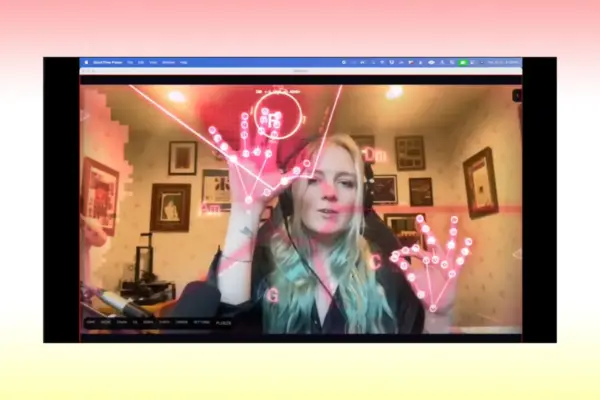
By pairing Ableton Live with TouchDesigner, electronic musicians and visual artists can build responsive, highly immersive performance rigs where harmonized vocals directly drive dynamic visual networks, and visual parameters simultaneously sculpt the audio in real time. This technical breakdown explores a custom live performance architecture—exemplified by the project Fault Line—demonstrating how a single live vocal can be multiplied into a seven-voice polyphonic choir, mapped across individual audio channels, and visually translated into GPU-accelerated 3D geometries. Through the strategic use of Max for Live devices, the TDAbleton integration suite, and efficient GPU instancing, this workflow offers a blueprint for artists seeking a genuine marriage between what is heard and what is seen.
Detailed Chronology: Building the Performance Architecture
To understand how a performance like Fault Line functions, one must examine the signal flow from the initial MIDI controller input to the final on-screen render. The system is split into two primary environments—Ableton Live for advanced multi-voice vocal processing and routing, and TouchDesigner for GPU-accelerated graphic generation—tied together via a bidirectional data bridge.
Phase 1: Polyphonic Vocal Harmonization in Ableton Live
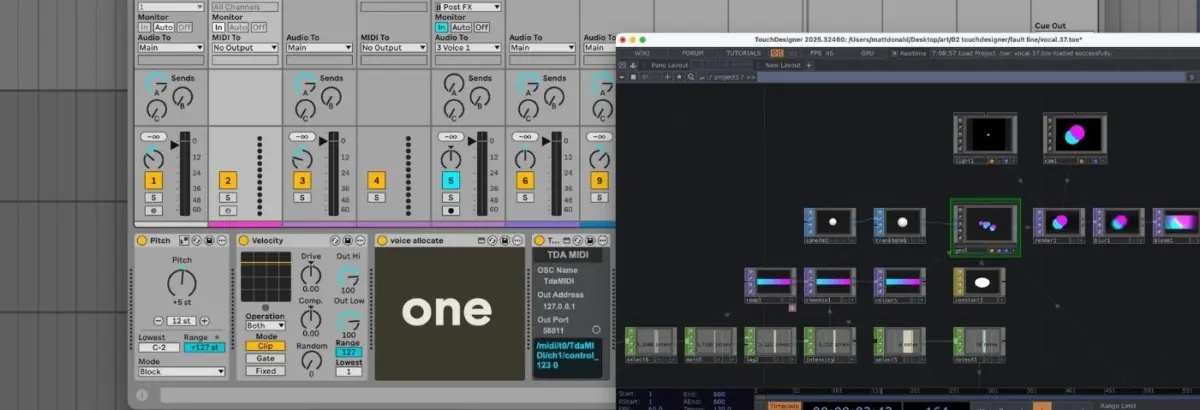
The sonic core of the performance relies on up to seven distinct vocal streams: one raw live vocal captured directly from the performer’s microphone, accompanied by six harmonized voices. While Ableton’s native Auto Shift audio effect supports polyphony natively, relying on a single polyphonic instance lacks the granular, per-voice control required for complex spatialization and visual mapping. Consequently, the setup uses seven separate instances of Auto Shift, each isolated to its own dedicated audio and MIDI channel pairing.
Master MIDI Input Routing: Live MIDI data from the performance controller enters a master MIDI track. Here, the incoming notes are slightly transposed for tonal consistency, and their velocity dynamics are flattened to ensure predictable triggering behavior.
Voice Allocation via Max for Live: The processed MIDI data is routed to a custom Max for Live device called Voice Allocate. This script analyzes all incoming notes, splits them dynamically, and assigns a unique identification (ID) number to each active note.
Individual Voice Reception: Each harmonizer channel features a paired MIDI track containing a companion Max for Live device named Voice Receive, configured to listen exclusively for one specific note ID.
Monophonic Auto Shift Configuration: The Auto Shift effect on each audio track is set to monophonic and placed into MIDI tracking mode, locked to its corresponding Voice Receive input. Simultaneously, the live vocal audio is routed to a master audio bus that feeds every instance of Auto Shift.
The result is a sophisticated, real-time live vocal harmonizer. Up to six harmony voices, plus the dry lead vocal, sit in distinct, addressable channels, ready for both sonic processing and visual coordination.
Phase 2: Lightweight Visual Network Design in TouchDesigner
Visual processing is notoriously demanding on computer hardware. To maintain a stable frame rate without overloading the CPU during a live show, the TouchDesigner network relies heavily on GPU-accelerated instancing. Rather than calculating every geometric shape independently, instancing allows the system to render multiple copies of a single source object using the graphics card’s parallel processing power.
Geometry and Instancing: The visual network begins with a single Sphere SOP (Surface Operator). This geometry is transformed and fed into a Geometry Component (Geo Comp) where GPU instancing is initialized.
Dynamic Positioning via Noise CHOPs: A collection of Noise CHOPs (Channel Operators) generates organic, constantly moving XYZ coordinates for each instance, with strict boundaries keeping the shapes within the screen frame.
Color and Texturing: A Ramp TOP (Texture Operator) interpolates between two primary color endpoints, assigning a unique color gradient to every instance. A constant material is applied to the Geo Comp to strip away depth perception, resulting in flat, striking circular vector-style shapes.
Scene Composition and Post-Processing: The instanced spheres are captured by a Camera Component, illuminated by a Light Comp, and processed via a Render TOP. Before hitting the display output, the signal passes through post-processing effects, including bloom and blur filters, to add a glowing, cinematic finish.
Phase 3: The TDAbleton Bidirectional Bridge
While TouchDesigner can communicate with external software via Open Sound Control (OSC) or MIDI, Derivative’s TDAbleton package streamlines this communication entirely. Comprising a suite of native Max for Live devices and a specialized MIDI remote script for Ableton, TDAbleton allows artists to query and control virtually any parameter across both platforms instantly.
Using TDAbleton, audio metrics and MIDI data from Ableton are translated into TouchDesigner CHOPs with minimal latency:
Audio-Driven Visual Intensity: An abletonLevel CHOP monitors the master audio channel’s volume. This metric is mapped directly to two visual parameters: the opacity of the Ramp TOP (making colors more solid at higher volumes) and the speed of the Noise CHOPs (causing instances to dart across the screen more frantically during loud vocal climaxes).
MIDI-Driven Geometry Scaling: An abletonMIDI CHOP tracks all active notes from the master MIDI input track. By calculating the total number of active notes plus one (accounting for the dry lead vocal), the system dynamically updates the number of positional Noise CHOPs, telling the Geo Comp precisely how many instances to render on screen.
Spatial Audio-Visual Panning: The horizontal X-coordinates generated by the instance-positioning Noise CHOPs are fed back into Ableton, where they control the pan position of the seven individual voice tracks (abletonTrack COMPs). If a circle drifts to the left of the screen, its corresponding vocal harmony pans to the left speaker.
Glitch Triggers and Effects: A Count CHOP monitors for a specific trigger note (such as an F3). When struck repeatedly to reach a preset threshold, it fires a trigger that sends audio out of Ableton into external hardware—such as a Hologram Electronics Chroma Console running an inference patch. An abletonLevel CHOP reads the wet return level of this glitch effect and maps it to a color-shift intensity parameter in TouchDesigner, causing the visuals to fracture and tear precisely when the audio distorts.
Supporting Context & Metrics: The Technical Advantage
Integrating Ableton Live and TouchDesigner represents a shift from static pre-rendered video backdrops to genuinely reactive multimedia systems. Industry adoption of node-based visual programming in electronic music has accelerated due to several key performance metrics:
CPU Offloading: By utilizing GPU instancing via TouchDesigner’s SOP-to-CHOP workflows, performers can render hundreds of dynamic geometric objects simultaneously while keeping CPU utilization under 25% on modern Apple Silicon or dedicated NVIDIA/AMD rigs.
Latency Reduction: TDAbleton operates via local network sockets and direct Max-to-Python memory sharing, achieving round-trip control latencies typically under 5 milliseconds—imperceptible to human eyes and ears during live performance.
Resolution Scalability: While TouchDesigner’s free community edition limits output resolution to 1280×1280 pixels, unlocking full commercial or professional licenses permits uncompressed 4K and multi-projector mapping configurations without altering the underlying Ableton project structure.
Official Statements and Industry Insights
Creative technologists and software developers have increasingly championed the synergy between digital audio workstations and visual engines. In discussions surrounding live performance ecosystems, developers often emphasize the psychological impact of true audio-visual coupling.
"When an audience member watches a performance where the visuals aren’t just flashing to a generic beat, but are literally bound to the physical panning, note allocation, and harmonic tension of the vocalist’s voice, the cognitive disconnect vanishes," notes design technologist Elena Vance. "You are no longer watching a music video played over a PA system; you are witnessing a closed-loop cybernetic instrument where sound has a literal body and space."
Furthermore, the maintainers of Derivative (TouchDesigner) and Ableton’s Max for Live community highlight that modular interconnectivity encourages experimentation. By abstracting complex OSC routing into simple drag-and-drop TDAbleton devices, artists spend less time debugging network protocols and more time sculpting bespoke artistic experiences.
Future Outlook: The Next Wave of Immersive Performance
As spatial audio formats (such as Dolby Atmos and ambisonics) and extended reality (XR) hardware continue to mature, the methodologies established by pairing Ableton Live and TouchDesigner will only grow in relevance. Future iterations of live performance rigs are expected to incorporate machine learning models directly into the node network—allowing neural audio classifiers to categorize vocal timbre, emotional inflection, and lyrical phrasing in real time, driving increasingly complex generative 3D environments.
For electronic music producers, vocalists, and visual artists looking to elevate their live shows, mastering the bridge between sound and sight is no longer an insurmountable hurdle. Through tools like TDAbleton, open-source documentation, and GPU-accelerated node architectures, the barrier to entry has lowered, inviting a new generation of creators to build performances where every frequency has a form, and every movement tells a story.