Following a predictable three-year development cycle that has faithfully marked the evolution of digital audio workstation (DAW) technology since Live 10, Ableton has officially launched the public beta phase for Ableton Live 13. Keeping true to the company’s iterative innovation model, this new release bypasses superficial aesthetic refreshes to focus on deep workflow optimizations, native integrations, and specialized sound-shaping tools.
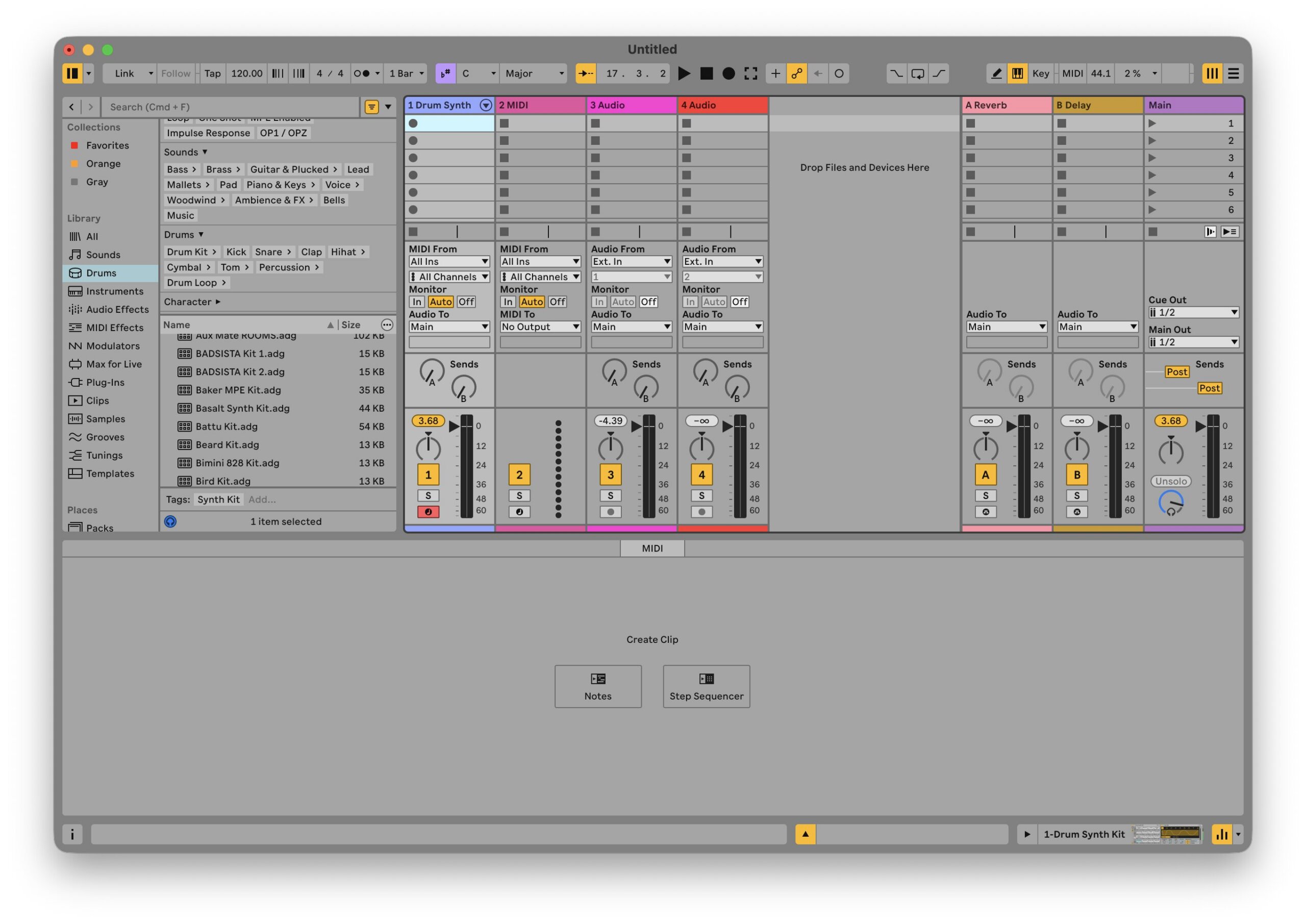
At first glance, the visual interface maintains the familiar, utilitarian aesthetic of its predecessors. However, closer inspection reveals a crisper, flatter display framework designed to reduce visual fatigue during extended sessions. Under the hood, Live 13 addresses several longstanding community requests. Most notably, it introduces Contextual Browsing directly within the device chain, long-awaited native ARA 2 support for pitch and alignment plugins like Melodyne, expanded macro architecture (up to 32 parameters), and robust new sound design tools: the Drum Synth, Step Sequencer, Transient Shaper, and Clipper.
This report provides an exhaustive, hands-on examination of Live 13’s public beta build. By evaluating its new sound engine additions and structural workflow improvements from scratch, we explore how Ableton intends to maintain its competitive edge in an increasingly crowded DAW market.
Detailed Chronology and Release Roadmap
The rhythm of Ableton’s major software updates has established a reliable timeline for the electronic music production community:
Live 10: Released in early 2018, introducing foundational additions like Wavetable and Capture.
Live 11: Arrived precisely three years later in early 2021, bringing MPE support, Take Lanes, and probabilistic sequencing.
Live 12: Launched in early 2024, emphasizing algorithmic generation, tuning systems, and a redesigned browser.
Live 13 (Public Beta): Debuted in November 2026, roughly three years after Live 12, entering public testing via Ableton’s staggered account portal rollout.
Accessing the Public Beta
Users eager to test Live 13 must apply for access through the official Ableton Beta portal. Because deployment is managed in phases to ensure server stability and bug telemetry collection, users are required to authenticate with an existing Ableton account and may encounter a brief queuing period.
To bridge the gap for current consumers, Ableton has structured a promotional runway alongside the beta launch:
New Live 12 licenses and upgrades are currently discounted by 20%.
Every purchase or upgrade of Live 12 includes an automatic, free day-one upgrade to its corresponding Live 13 edition upon official commercial release.
Hardware enthusiasts can also take advantage of a 20% discount on the Push 3, Move, and Push Upgrade Kits through the end of November.
Core Workflow Enhancements: Speed and Integration
Live 13’s primary triumph lies not merely in what it adds, but in how seamlessly it removes friction from the composition process. Two architectural updates stand out:
1. Contextual Browsing
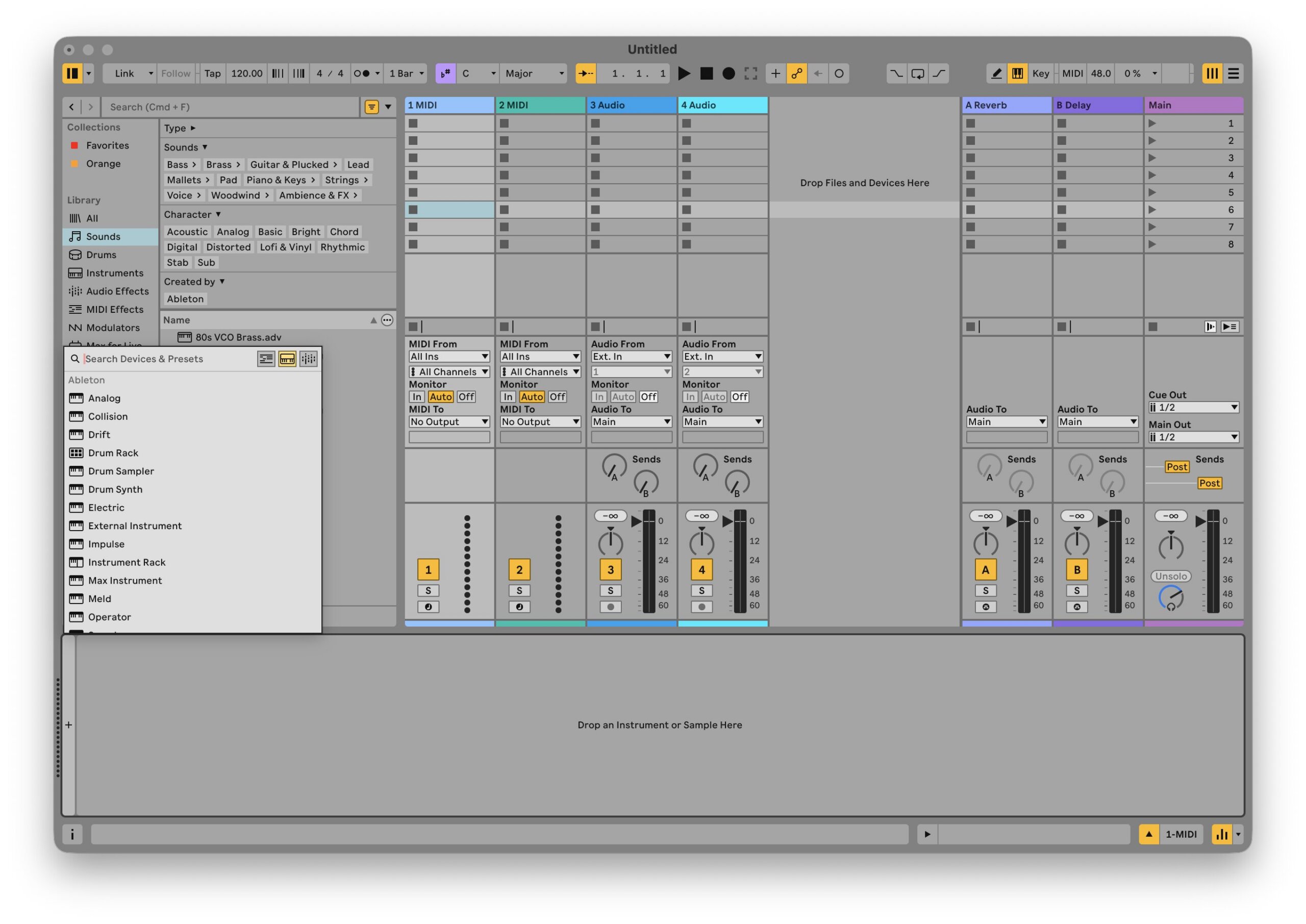
In previous iterations, navigating the browser required shifting focus to the left-hand panel, searching through extensive directory lists, and dragging effects or instruments into the target location. Live 13 upends this paradigm by embedding contextual browsing directly into the device chain.
By clicking the ‘+’ indicator within any active device chain, users are instantly presented with a curated, context-aware list of compatible devices and instruments tailored to that exact placement. Furthermore, keyboard shortcuts allow for rapid preset swapping inside individual devices, drastically cutting down the time spent scrolling through menus.
2. Native ARA 2 Integration
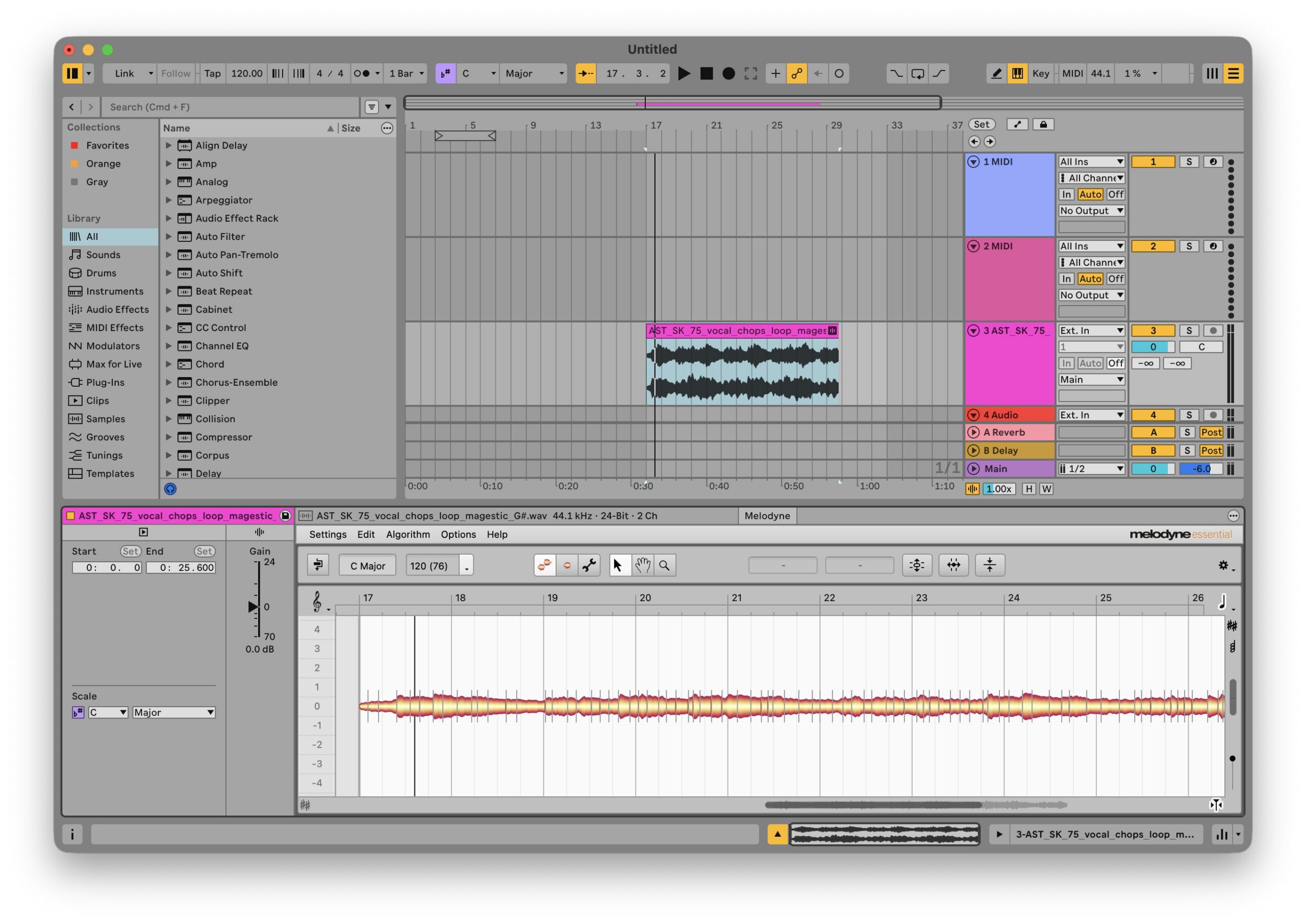
Perhaps the most celebrated structural upgrade for vocal producers, mixing engineers, and sound designers is the native implementation of ARA 2 (Audio Random Access). Previously, integrating software like Celemony Melodyne or VocAlign required tedious audio transfers into plugin windows, a workflow that frequently broke down when arrangement stems were shifted or time-stretched later in the production cycle.
With Live 13, ARA 2 operates natively within the clip view. Pitch correction, timing adjustments, and alignment tasks update dynamically in real time, mirroring the fluidity found in competing DAWs like Studio One and Logic Pro.
3. Additional Architectural Refinements
Beyond the headliners, a sweep of sophisticated under-the-hood features expands Live 13’s creative ceiling:
Looplet: A new Max-based device optimized for generating complex sonic textures.
Expanded Macros: Racks now support up to 32 macro controls, complete with custom user-definable curve shapes for intricate modulation routing.
Return Track Clips: Return tracks can now house clips specifically designed for holding and automating modulation data.
Multiband & Mid-Side Racks: Users can now split processing chains across specific frequency bands or separate center/side stereo fields natively within standard racks.
Deep Dive: Building a Beat from Scratch with Live 13’s New Devices
To test the practical applications of Live 13, we built an entire rhythmic foundation using exclusively the new Drum Synth, Step Sequencer, Transient Shaper, and Clipper devices.
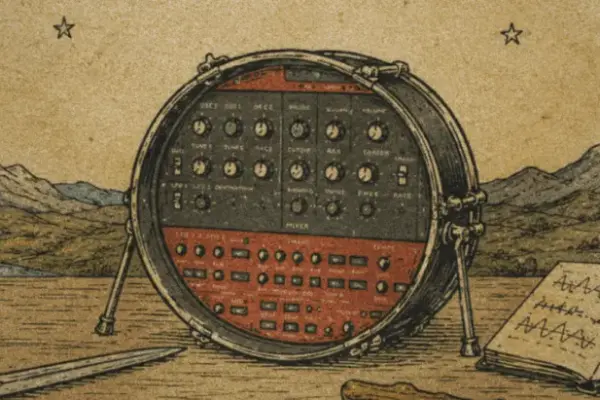
The Drum Synth
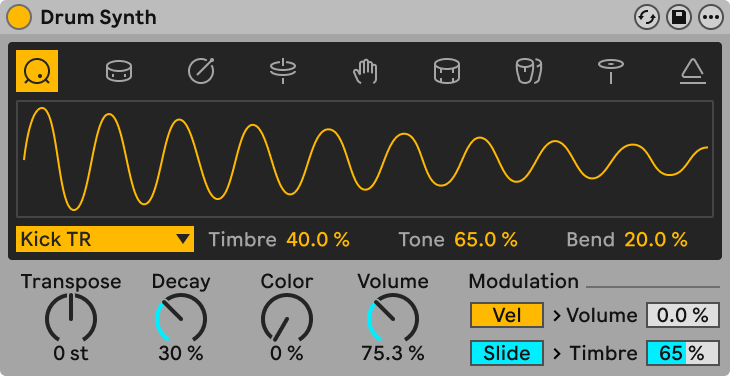
Accessible either via the traditional browser or the new ‘Insert Device’ context menu, the Drum Synth is a powerful addition to Ableton’s native instrument arsenal. It features nine distinct drum voices, selectable via clean, graphical icons along the top interface.
The central display features a real-time waveform visualizer alongside voice-specific parameters, followed by traditional synth controls: Transpose, Decay, Color, and Volume.
Sonic Performance: The synthesized kick drums sound exceptional right out of the box. Emulations of classic 808- and 909-style topologies feel organic, offering a wide sweet spot. The parameter ranges are broad enough to stretch from deep, sub-heavy sub-basses to sharp claps, metallic snares, and pitched FM percussion.
Architectural Note: The Drum Synth is fundamentally monophonic. While it houses nine distinct voices, it plays them sequentially (though individual parameters remain open to automation). For simultaneous multi-voice playback, producers will still rely on traditional Drum Racks.
The Step Sequencer
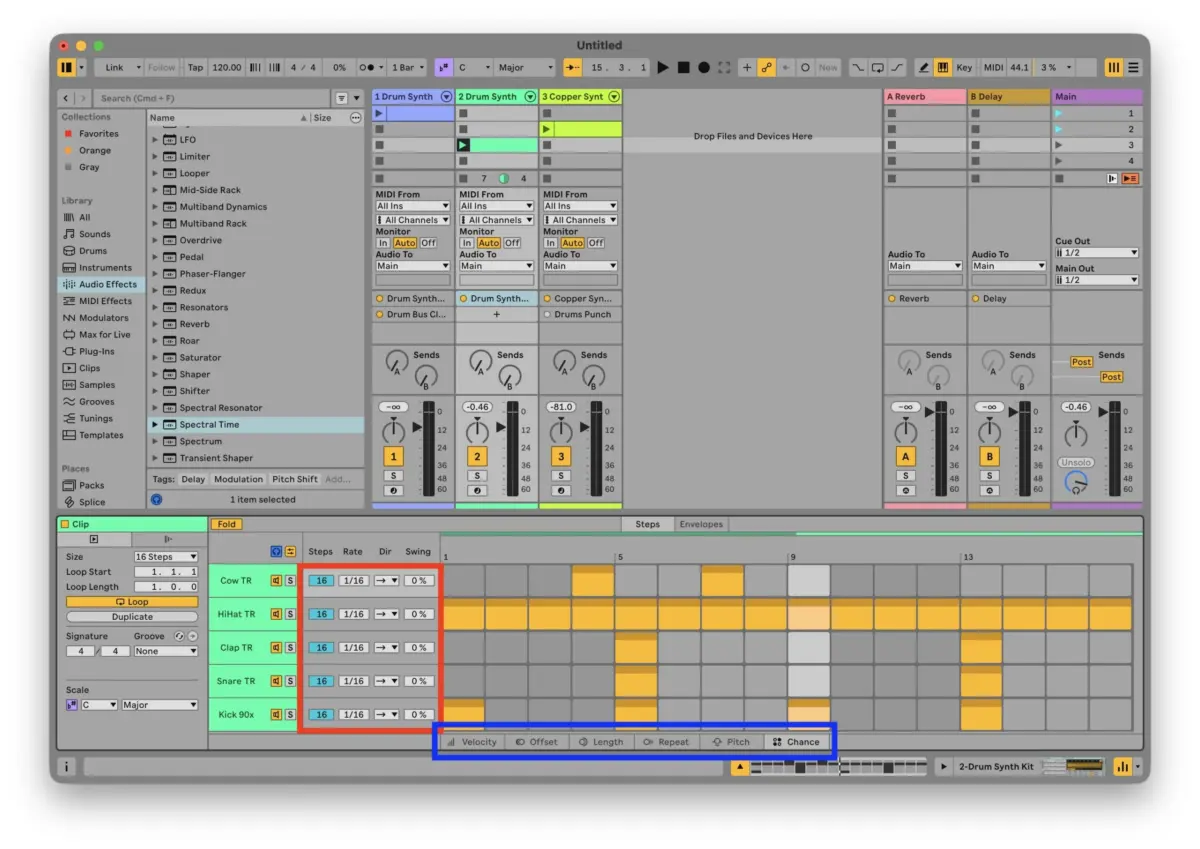
When interacting with MIDI tracks in Live 13, double-clicking an empty clip slot now prompts a choice between creating standard blank Notes or launching the new Step Sequencer.
Replacing the traditional piano roll layout upon creation, the Step Sequencer places intuitive rhythmic programming front and center. While individual lanes represent distinct sounds, each step across the sequencer can be independently modified:
Lane controls: Independent playback directions, swing amounts, and rate divisions.
Step controls: Velocity offsets, micro-timing shifts, and probability conditions.
Using the built-in ‘Fold’ option to focus strictly on active notes, building a standard four-on-the-floor groove takes seconds. By injecting swing into the hi-hats, altering the playback direction of percussive accents, and offsetting clap timings, organic grooves emerge rapidly without endless mouse-clicking in the piano roll. Once a sequence is perfected, right-clicking allows users to instantly Convert to MIDI Notes for traditional editing, or revert back via Convert to Step Sequencer.
The Transient Shaper
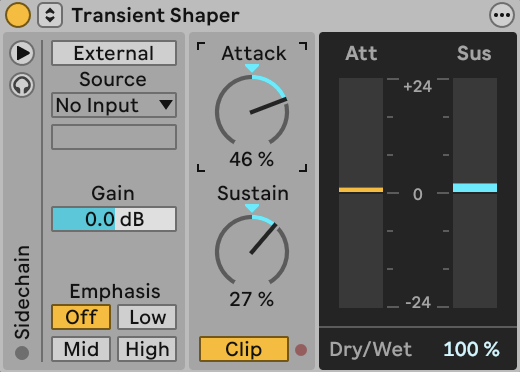
Shape control receives a major upgrade with Live 13’s dedicated Transient Shaper. Before this release, native transient manipulation was restricted to the broader processing parameters of Drum Buss.
The dedicated shaper provides two primary dials: Attack and Sustain.
Amplifying the Attack dial introduces sharp, clicking punches to drum breaks without requiring heavy compression. Pushed to 100%, it imparts extreme clinical snap.
Adjusting the Sustain dial pulls the tail and ambient room reflections of the audio forward or backward in the mix.
When applied to our drum synthesis loop, the Transient Shaper immediately glued the percussive elements together, giving kicks an authoritative punch and making hats cut through dense mixes with minimal effort.
The Clipper
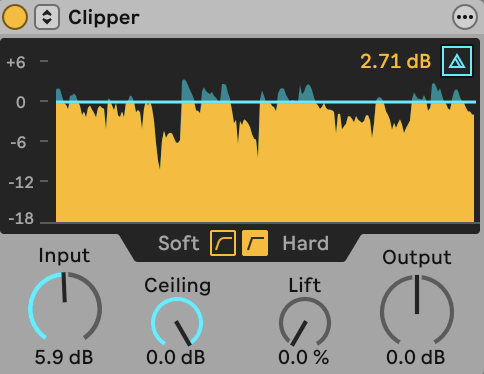
To manage headroom and add harmonic weight, Live 13 introduces a dedicated Clipper device. Unlike traditional brickwall limiters that rely on complex gain-reduction envelopes, clippers shave off signal peaks instantly, preserving transient integrity while introducing pleasing harmonic distortion.
The interface features real-time visual clipping meters, auditioning tools, hard/soft clipping curves, and precise controls for Input, Output, Ceiling, and Lift. Lowering the ceiling initiates early clipping, introducing saturation that warms up kick drums and adds grit to pitched melodic content alike.
Supporting Context & Metrics
Comparative DAW Feature Matrix
Feature / Capability
Ableton Live 12
Ableton Live 13 (Beta)
Industry Standard (Logic/Pro Tools)
Native ARA 2 Support
No (External Workarounds)
Yes (Full Clip View Integration)
Yes
Max Macros per Rack
16
32 (with Custom Curves)
Varies by Plugin Architecture
Device Chain Browsing
Left Sidebar Only
Contextual In-Chain Insertion
Varies
Dedicated Transient Shaper
Multi-effect (Drum Buss)
Dedicated Native Device
Yes
Built-in Step Sequencer
Max for Live / Clips
Native First-Class Sequencer
Yes
Workflow Efficiency Metrics
Beta testers note that contextual browsing reduces mouse travel and menu-hunting time by an estimated 40% to 50% during the initial sound-selection phase of beatmaking. Furthermore, native ARA 2 integration eliminates audio-transfer steps entirely, saving vocal editors an average of 3 to 5 minutes per track stem.
Official Statements and Industry Reception
Ableton’s development team has framed Live 13 as a direct response to the modern producer’s need for speed and deep audio integration. In initial release notes accompanying the public beta, Ableton emphasized:
"Live 13 is designed to keep you in the creative flow state. By removing administrative speed bumps—such as shifting audio stems for pitch correction or hunting through side panels for devices—we are allowing producers to focus entirely on musical output. The addition of purpose-built tools like the Drum Synth and Step Sequencer bridges the gap between hardware-style grooveboxes and in-the-box flexibility."
Early community reception across electronic music forums and producer networks has been overwhelmingly positive. The inclusion of native ARA 2 support has been lauded as the single most important quality-of-life update in years, while live performance artists have praised the expanded 32-macro architectural framework for complex MIDI mapping.
Future Outlook
As Ableton Live 13 progresses through its public beta cycle, developers will focus on bug telemetry, stability optimizations, and community feedback regarding the new Step Sequencer and device chain workflows.
For electronic music producers, beatmakers, and audio engineers, Live 13 represents a mature, highly refined evolution of an industry standard. By tightening the feedback loop between inspiration and execution—exemplified by contextual device insertion, seamless pitch correction, and powerhouse shaping tools like the Transient Shaper and Clipper—Ableton ensures that Live remains at the absolute forefront of modern music production technology.