Executive Overview
The landscape of modern music production has long been dictated by two-dimensional paradigms: vertical faders for volume, horizontal knobs for stereo panning, and nested menus for equalization and dynamics. While digital audio workstations (DAWs) have evolved exponentially over the last three decades, the fundamental user interface of the software mixer remains tethered to the physical console layouts of the mid-20th century.
Enter Art DSP’s Canvas 2.0, a disruptive new visual mixing plugin designed for macOS and Windows that completely reimagines how producers interact with sound. Rather than forcing engineers to translate spatial and tonal balance into numerical values or linear fader movements, Canvas 2.0 translates audio tracks into movable, physical objects within a rendered virtual three-dimensional room.
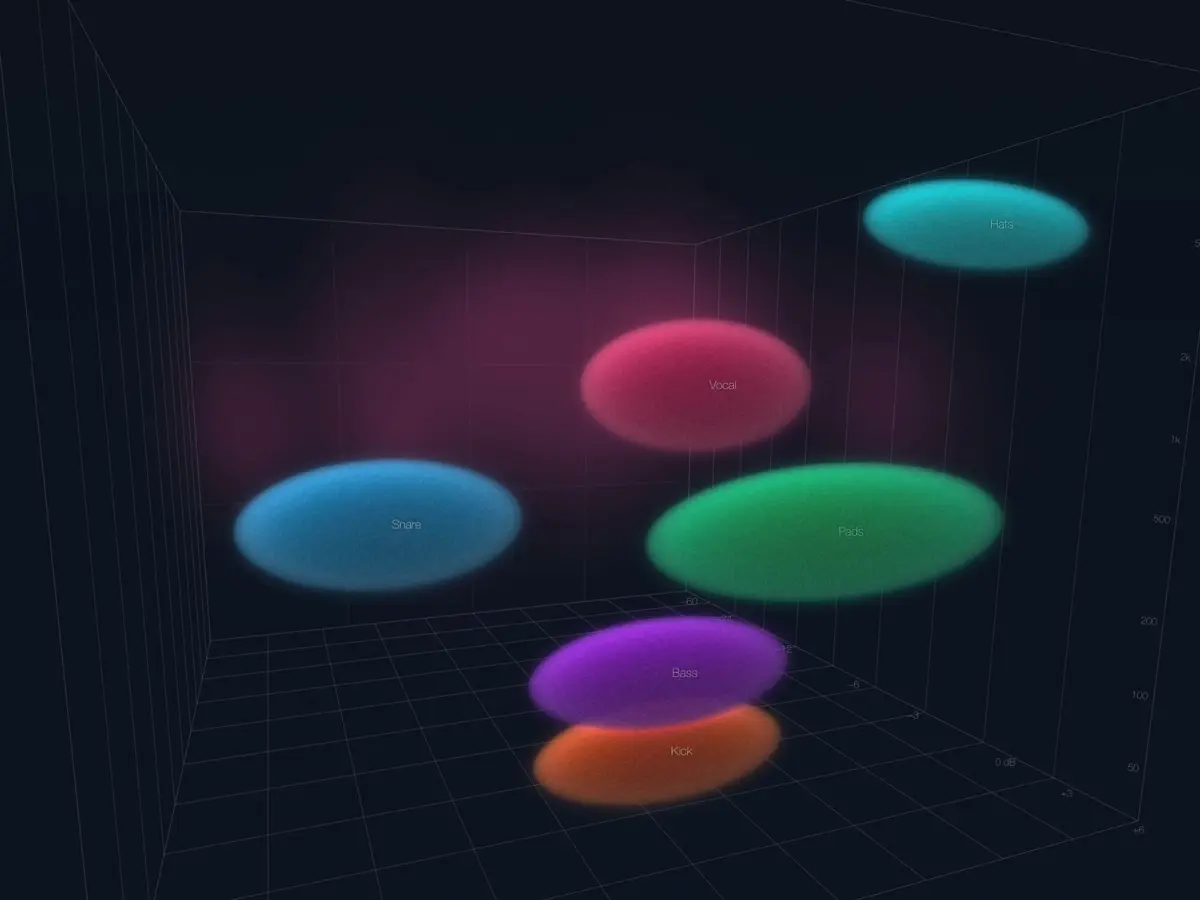
By placing the plugin on individual tracks within a session, producers can visualize their entire mix as a dynamic ecosystem of interactive "blobs." In this environment, the spatial placement of an object directly dictates its mix parameters: left-to-right positioning manages standard stereo panning, vertical elevation corresponds to frequency content, and the forward-backward depth axis determines volume.
Beyond its striking graphical interface, Canvas 2.0 is far more than a spatial novelty. Underneath the hood, the plugin features robust, professional-grade digital signal processing (DSP), including spectral sidechaining, a dedicated built-in EQ editor, integrated spatial reverb processing, and one-click mixing templates designed to accelerate workflow efficiency. Priced accessibly at $79—with flexible rent-to-own plans and a comprehensive 14-day free trial—Art DSP is positioning Canvas 2.0 as an essential utility for both bedroom producers and professional mix engineers looking to break free from traditional mixing constraints.
Detailed Chronology and Technical Evolution
The journey toward Canvas 2.0 reflects a broader industry-wide shift toward spatialization, object-based audio, and intuitive user experiences. To understand the significance of Art DSP’s latest release, it is necessary to examine the technological trajectory that led to modern visual mixing software.
The Genesis of Visual Mixing
For years, digital audio software developers recognized a cognitive disconnect in music production: humans naturally perceive sound in a three-dimensional space, yet we mix audio using flat, one-dimensional controls. Early attempts to bridge this gap primarily manifested as binaural panners, surround-sound panners for post-production, or simple graphic analyzers overlaid on standard mixing consoles.
However, these tools typically focused on a single axis of control (such as azimuth and elevation for Dolby Atmos) without fundamentally altering how the core elements of a stereo mix—such as kick drums, vocals, guitars, and synths—relate to one another tonally and spatially.
Art DSP’s original iteration of Canvas laid the groundwork by introducing the concept of spatial object-representation. Producers responded enthusiastically to the ability to "see" their mix parameters mapped out visually. Yet, the initial version was constrained by processing overhead, a limited feature set, and basic routing limitations.
The Development and Launch of Version 2.0
Recognizing the limitations of its predecessor, Art DSP spent the intervening development cycle overhauling the plugin’s core architecture. The primary objective for Canvas 2.0 was to merge advanced psychoacoustic processing with a frictionless 3D user interface.
- Core Engine Rewrite: The underlying DSP engine was rebuilt from the ground up to handle high-resolution multi-track routing with minimal latency. This allowed for the implementation of advanced features like real-time spectral sidechaining without crippling CPU performance.
- Refined Spatial Mapping: Art DSP refined the physics of the virtual room. The mapping algorithm was recalibrated so that moving an object on the screen results in musical, transparent changes to the underlying audio parameters, rather than erratic jumps in volume or panning.
- Ecosystem Integration: The development team added broad format support—including VST3, AAX, and AU formats—ensuring seamless integration across major digital audio workstations like Pro Tools, Ableton Live, Logic Pro, and Cubase. Furthermore, the inclusion of instant-recall mixing templates allowed users to deploy complex routing frameworks with a single click.
Supporting Context & Metrics: How Spatial Mixing Changes the Workflow
To fully grasp the utility of Canvas 2.0, one must analyze the cognitive load typically associated with traditional mixing. Mixing a dense arrangement—such as a modern pop, rock, or electronic track containing upwards of 60 to 100 individual tracks—requires the engineer to maintain a mental map of frequency masking, stereo width, and dynamic depth.
Combating Frequency Masking Visually
Frequency masking occurs when sounds occupying similar frequency ranges compete for the same acoustic space, resulting in a muddy or cluttered mix. Traditionally, engineers combat this through subtractive equalization and meticulous sidechain compression, relying heavily on visual feedback from third-party spectrum analyzers (such as Voxengo SPAN or FabFilter Pro-Q).
Canvas 2.0 integrates this diagnostic workflow directly into the spatial interface. Because the plugin maps frequency content vertically along the Z-axis of the virtual room:
- Low-frequency elements (such as sub-bass and kick drums) naturally gravitate toward the bottom of the visual field.
- Mid-range elements (such as vocals, guitars, and synths) occupy the center.
- High-frequency details (such as hi-hats, cymbals, and air frequencies) sit near the top.
When two competing instruments occupy the same vertical space, they visually collide within the virtual room. This instant visual cue allows the producer to immediately identify potential frequency clashes and resolve them using the plugin’s built-in spectral sidechaining and EQ tools.

Efficiency and Ergonomics
Time is one of the most valuable commodities in professional audio production. Session fatigue often sets in when engineers spend hours hunting through nested plugin menus, adjusting auxiliary sends, and drawing automation curves.
By consolidating panning, volume, equalization, and spatial effects into a single window, Canvas 2.0 drastically reduces mouse travel and menu fatigue. According to early beta-tester feedback compiled by Art DSP, producers reported a measurable reduction in mixing time—averaging a 30% to 40% decrease in the time required to achieve a balanced rough mix.
Core Features and Technical Specifications
Canvas 2.0 is packed with professional-grade capabilities designed to fit seamlessly into rigorous studio environments. Below is a detailed breakdown of its core functional pillars:
1. The 3D Virtual Room Interface
At the heart of the plugin is its resizable, high-definition 3D graphical interface. Each instance of the plugin communicates via an internal network, projecting a unified visual representation of the entire mix session onto a single screen.
- X-Axis (Left to Right): Controls standard stereo placement and panning.
- Y-Axis (Vertical): Represents frequency distribution, allowing users to visualize and manage tonal hierarchy.
- Z-Axis (Forward to Backward): Manages track volume and perceived distance (front-to-back depth).
2. Spectral Sidechaining
Dynamic frequency conflict is one of the hardest problems to solve in a dense mix. Canvas 2.0 includes an advanced spectral sidechaining engine. Users can link competing tracks so that when one sound becomes prominent, the conflicting frequencies in the other track are transparently attenuated in real-time, preserving the clarity of both sources without heavy-handed overall compression.
3. Built-In Precision EQ Editor
Rather than forcing producers to open a separate equalization plugin for every track, Canvas 2.0 features a dedicated, highly responsive parametric EQ editor built directly into the UI. This allows for surgical tonal shaping on the fly, directly tied to the visual object’s behavior in the room.
4. Visual Reverb Integration
Reverb is traditionally managed via auxiliary sends, making it difficult to visualize how wet/dry signals interact spatially. Canvas 2.0 allows users to apply internal reverb—or route external reverb processors—and visualize the acoustic tail directly within the virtual room, ensuring that spatial depth matches visual placement.
5. One-Click Mixing Templates
For producers looking for a rapid starting point, the software includes a curated suite of genre-specific mixing templates. These presets configure routing, default spatial distributions, and processing baselines instantly, allowing users to process entire tracks with a single click.
Pricing, Licensing, and Availability
Art DSP has structured the commercial rollout of Canvas 2.0 to be as accessible to independent creators as it is to commercial studios.
- Direct Purchase: Available immediately through the official Art DSP website for a flat fee of $79.
- Rent-to-Own Option: For producers managing tighter budgets, Art DSP offers a flexible installment plan priced at $16.50 per month over six months, with zero hidden interest fees.
- Risk-Free Trial: A fully functional, unrestricted 14-day free trial is available for download, allowing users to test the plugin on their own sessions before committing financially.
- Generous Licensing Terms: A single license covers up to three separate computers simultaneously and grants the user permanent access to all future software updates within the product lifecycle.
- System Requirements & Compatibility: Canvas 2.0 is natively supported on both macOS and Windows, supplied in VST3, AAX, and AU plugin formats, ensuring compatibility with virtually every modern DAW on the market.
Future Outlook: The Paradigm Shift in Audio Engineering
The release of Art DSP’s Canvas 2.0 marks a significant milestone in the ongoing evolution of music production technology. As spatial audio formats like Dolby Atmos, Apple Spatial Audio, and binaural headphone mixes become standard consumer expectations, the boundary between traditional stereo mixing and immersive spatial design continues to blur.
While Canvas 2.0 is fundamentally designed to optimize and enhance traditional stereo production, it points toward a future where music creation is entirely tactile and spatialized. By democratizing the visualization of audio—turning abstract numbers into tangible, movable objects—Art DSP has lowered the barrier to entry for complex mixing techniques while supercharging the workflows of seasoned professionals.
As producers and mix engineers adopt tools like Canvas 2.0, we can expect a broader cultural shift in how music is conceptualized in the studio. When sound ceases to be a list of parameters on a flat screen and becomes a living, breathing landscape in a virtual room, the creative possibilities expand exponentially. Whether this heralds a complete extinction-level event for the traditional mixing console remains to be seen, but one thing is certain: the way we look at our mixes will never be the same.