Executive Overview
In the rapidly evolving landscape of software-based audio production, developers are continually challenged to look beyond conventional digital emulations of vintage hardware. While classic low-pass, high-pass, and band-pass architectures remain foundational to modern music creation, producers increasingly demand workflows that offer deeper tactile engagement, spatial fluidity, and algorithmic unpredictability. Enter MNTRA Instruments with its latest release: FLTRS.
Far from being just another utilitarian filter plugin, FLTRS represents a major step forward in MNTRA’s ongoing mission to fuse organic human gesture with complex digital signal processing (DSP). Inheriting the innovative graphic-based workflow pioneered in the developer’s flagship virtual instrument, MNDALA 2, and expanding upon the sonic ethos established by sibling effects like BRUITAGE (distortion) and BOREALIS (reverb), FLTRS places 37 distinct filter algorithms under the command of a spatial, axis-driven macro system.

Designed for electronic music producers, sound designers, and mix engineers seeking to infuse static tracks with rich grit, dynamic motion, and intricate character, FLTRS bridges the gap between meticulous studio processing and expressive performance control. This comprehensive walkthrough explores the architectural philosophy, workflow mechanics, modulation capabilities, and onboard mastering facilities that make FLTRS a standout addition to any contemporary producer’s plugin arsenal.
Detailed Chronology & Architectural Overview: Navigating the FLTRS Ecosystem
The development of FLTRS marks a significant evolution in MNTRA Instruments’ software philosophy. Building upon the success of MNDALA 2, the engineering team sought to distill the expressive potential of a complex multi-sampled instrument into a dedicated, agile insert effect. The result is a plugin that completely rethinks how producers interact with frequency-shaping parameters.

The Perform View: A Bird’s-Eye Perspective
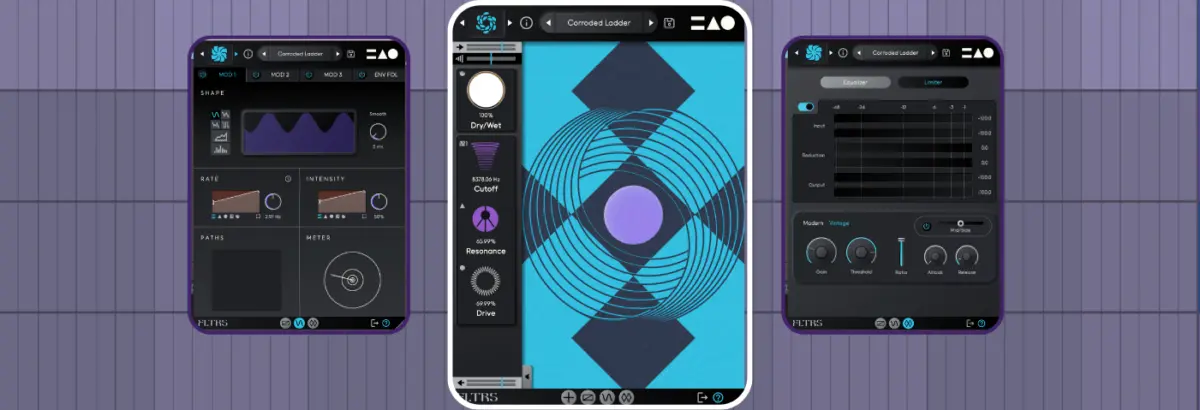
Upon launching FLTRS, the user is immediately greeted by the Perform View—a visually arresting, abstract representation of the plugin’s core operational mechanics. Rather than presenting a wall of traditional rotary knobs and linear sliders, FLTRS centers its interface around an intuitive X, Y, and Z spatial axis system.
Each axis is distinguished by a unique geometric glyph:

- The Circle: Governs the primary macro trajectory.
- The Triangle: Controls secondary modulation assignments.
- The Equal Sign (=): Manages tertiary shaping parameters.
Hovering a mouse cursor over the central graphic transforms it into the corresponding symbol, indicating active macro control. Clicking and dragging across the space simultaneously alters every parameter bound to that axis, offering fluid, multidimensional morphing with a single gesture. At the base of the interface, real-time readouts display the associated parameters and their exact percentage values, ensuring precision amidst abstract control.
The Control Panel and Core Parameters
Flanking the Perform View is the collapsible Control Panel, accessible via an arrow tab at the bottom of the interface. Here, producers can adjust foundational mixing metrics:

- Input and Output Gain: Positioned respectively at the top and bottom of the signal path to maintain gain staging before and after processing.
- Dry/Wet Blend: Essential for parallel processing and subtle tonal layering.
- Algorithm-Specific Parameters: Typically comprising cutoff frequency, resonance, and a third variable parameter dictated by the chosen algorithm.
To prevent interface clutter, the Control Panel can be instantly hidden, leaving the Perform View unobstructed for live performance automation or focused listening sessions. Secondary pages—including the Animod modulation matrix and the Mastering Section—are reached via dedicated icon tabs lining the bottom edge of the screen.
Exploring the 37 Filter Algorithms: From Vintage Emulations to Spectral Chaos
At the heart of FLTRS lies an expansive library of 37 distinct filter algorithms. Each algorithm functions as a curated preset combining a specific filter topology with complementary saturation, wavefolding, or spectral effects.

Bridging Analog Heritage and Modern Synthesis
MNTRA has spared no effort in modeling legendary analog circuitry alongside avant-garde digital architectures. Notable inclusions span:
- The Moog-Style Ladder Filter: Celebrated for its warm, self-oscillating resonance and musical saturation.
- Korg MS-20 Filter: Renowned for its aggressive, screaming resonance and distinctive nonlinear distortion characteristics.
- Sallen-Key Filter Topology: Offering smooth, transparent filtering with unique phase responses.
- Classic Synth Emulations: Dedicated algorithms mirroring the filter behaviors found within vintage polyphonic synthesizers, including the Roland Jupiter-6, Juno series, and modern Operational Transconductance Amplifier (OTA) topologies.
- Experimental & Spectral Models: Designed for sound designers seeking metallic resonances, comb-filtering artifacts, and otherworldly frequency shifts.
The "Elements" Starting Points
Navigating this vast collection can initially feel daunting. To streamline the exploration process, MNTRA includes an Elements list within the preset browser. These serve as raw, unmodulated starting points for each of the 37 algorithms, allowing producers to audition the naked tonal character of every filter model without interference from internal LFOs or envelopes.

Workflow Mechanics: Mastering Macros and Precision Control
While the spatial macro system encourages fluid, spontaneous performance gestures, FLTRS provides granular under-the-hood control for producers who demand surgical precision.
The Control Mapping Window
By clicking a parameter’s accompanying macro icon, right-clicking the control, or accessing the dedicated mapping tab, users unlock the Control Mapping Window. This interface exposes tables that dictate the precise range and response curves of every macro assignment.

- Envelope Response Displays: Visual graphs illustrate how an effect scales across its operational range. Clicking within the graph allows users to redraw response curves.
- Expanded View: Selecting the square icon in the lower-right corner opens an enlarged editor featuring advanced curve-shaping options.
Manual Control vs. Macro Automation
A common point of confusion for new users involves direct parameter manipulation. Attempting to click and drag a graphical representation of a cutoff or resonance slider will yield no result unless that specific parameter has been toggled to Manual Control (indicated by the hand icon). This deliberate design choice prevents accidental mouse adjustments from disrupting programmed macro movements.
Once configured, these macros can be easily automated within any Digital Audio Workstation (DAW), allowing complex filter sweeps, resonance swells, and texture shifts to evolve predictably over the course of a track.

Advanced Modulation: Unlocking the Animod Section and Envelope Follower
Static filtering can quickly become fatiguing to the listener. To inject organic life and perpetual motion into audio material, FLTRS features a robust modulation engine titled Animod.
The Animod Modulation Matrix
Accessible via the bottom navigation bar, Animod houses three complex modulators alongside an advanced envelope follower.

- Diverse Waveforms: Each modulator supports traditional shapes—sine, triangle, square—as well as comprehensive random generators and a dedicated step sequencer for rhythmic, pattern-based modulation.
- Modulation on Modulation: A standout feature of the Animod architecture is its routing flexibility. Rate and intensity parameters are not confined to static settings; they can be bound to manual control, macro axes, or even other modulators. For instance, assigning an LFO within Modulator 2 to control the rate of Modulator 1 creates complex, morphing modulations that speed up and slow down organically over time.
- Paths Tables: Dedicated routing displays offer clear visual feedback, detailing precisely which destinations each modulator is currently influencing.
The Envelope Follower
For transient-heavy material such as drums, percussion, and aggressive basslines, the onboard envelope follower provides an invaluable dynamic modulation source. Functioning similarly to hardware envelope detectors or DAW-native followers (such as Ableton Live’s built-in utility), it tracks the amplitude envelope of an incoming audio signal and translates it into a modulation voltage.
- Threshold Fine-Tuning: Producers can utilize the graphical input signal monitor to adjust threshold points with surgical precision.
- Dynamic Triggering: Beyond standard audio-rate triggering, the envelope follower can be modulated by external LFOs or macros, opening the door to highly unconventional gating and filtering behaviors.
- Attack & Release Controls: Independent attack and release times can be adjusted manually or linked via a chain icon for cohesive transient response.
Signal Finalization: The Onboarding Mastering Section
Before audio leaves FLTRS, it passes through an integrated Mastering Section designed to polish the processed signal and ensure professional output levels.

- Parametric Equalizer: Allows for final tonal balancing, enabling producers to carve out muddy low-mid frequencies or add air to high-frequency spectral enhancements.
- Mastering-Grade Compressor/Limiter: Equipped with two distinct operating modes—Modern and Vintage—this final stage acts as a safety net against digital clipping while imparting cohesive glued character or transparent peak control.
Supporting Context & Production Metrics
To evaluate the practical impact of FLTRS in a real-world mixing environment, producers can examine comparative audio tests demonstrating the transformation of clean stems into heavily processed, cohesive mixes. Applying FLTRS across multiple channels—from subtle analog warmth on synth leads to aggressive envelope-driven sweeps on basslines—illustrates the plugin’s versatility.
Industry Reception and Pricing
Since its announcement, FLTRS has garnered positive attention from the electronic music production community for its unique synthesis of performance-driven macro design and deep academic filter modeling.

- Availability: FLTRS is available now through the official MNTRA Instruments website.
- Introductory Promotion: MNTRA is offering FLTRS at a special launch price of $49 USD until May 14th, after which standard pricing will apply.
Future Outlook
As software developers continue to explore ways to humanize digital workflows, plugins like MNTRA Instruments’ FLTRS point toward an exciting future for audio production tools. By moving away from rigid, skeuomorphic emulations of physical gear and embracing spatial, gesture-based macro systems, developers are empowering musicians to interact with DSP in ways that feel more akin to playing an acoustic instrument.
Whether used for subtle analog saturation, rhythmic filtering, or chaotic spectral destruction, FLTRS proves that creative signal processing can be both intellectually deep and immediately intuitive. As MNTRA expands its ecosystem of effects, producers have much to anticipate in the ongoing convergence of expressive control and uncompromising sonic fidelity.