Executive Overview
In the ever-crowded landscape of virtual studio technology, audio plugin developers face a monumental challenge: how to reinvent foundational tools like EQ, compression, and filtering without falling into the trap of unnecessary complexity or unimaginative emulation. While countless developers are content to churn out yet another standard lowpass/highpass/bandpass plugin modeled after vintage analog hardware, MNTRA Instruments continues to carve out a distinct, highly idiosyncratic path of its own.
Following the critical acclaim of their flagship physical-modeling instrument MNDALA 2, alongside specialized sound-shaping units like the BRUITAGE distortion processor and BOREALIS reverb, MNTRA has returned with FLTRS. Billed primarily as a filter effect, FLTRS is far from your conventional utility plugin. Instead, it combines a massive arsenal of 37 distinct filter algorithms with a graphical, macro-driven workflow inherited from MNTRA’s cutting-edge ecosystem.

Designed to infuse static, sterile stems with rich harmonic texture, unpredictable motion, and aggressive analog-style grit, FLTRS rethinks how producers interact with modulation and parameter control. Rather than relying on tedious, linear automation lanes for every single variable, FLTRS utilizes a three-axis macro framework represented visually on a dynamic X, Y, and Z coordinate plane. Paired with a deep modulation engine dubbed Animod, a responsive envelope follower, and a full-fledged mastering tier featuring both vintage and modern limiting capabilities, FLTRS is built to transform how modern electronic music producers, sound designers, and mixing engineers approach frequency manipulation.
This walkthrough serves as an exhaustive guide to navigating the plugin’s unique architecture, evaluating its diverse algorithm library, and mastering its complex modulation routing systems to turn clean, lifeless tracks into living, breathing sonic landscapes.

Detailed Chronology: Navigating the FLTRS Interface and Workflow
To fully harness the power of FLTRS, producers must first unlearn standard DAW plugin habits and adapt to MNTRA’s visual, performance-oriented workflow. The plugin’s architecture is meticulously designed around fluid, organic control, transforming what could be a dense mathematical process into a tactile, visual experience.
The Bird’s-Eye View: Perform View and Control Panels
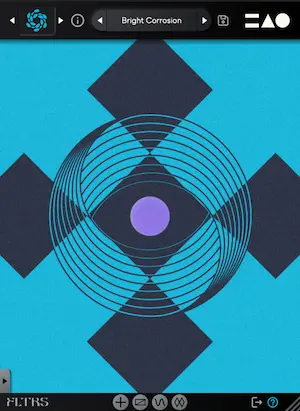
When you first instantiate FLTRS on an audio track or bus, you are greeted by the Perform View. This central screen acts as a visual hub representing the plugin’s core X, Y, and Z macro axes. Each axis is assigned a distinct geometric symbol—a circle, a triangle, or an equal sign—which corresponds directly to parameters across the plugin. Hovering your mouse over the central graphic causes your cursor to morph into one of these symbols, indicating that you are ready to manipulate a multi-dimensional macro node by simply clicking and dragging.

FLTRS cleverly separates its functions into modular zones. To the left of the main interface lies the Control Panel, which houses the foundational parameters for whichever algorithm is currently loaded. While parameters fluctuate depending on the chosen algorithm, users will universally find critical frequency controls like cutoff and resonance alongside dry/wet blending, input gain at the top, and output gain at the bottom. For a cleaner, distraction-free mixing environment, the Control Panel can be instantly hidden by clicking the directional arrow tab at the bottom of the interface.
Accessing deeper parameter pages, the Animod modulation matrix, and the mastering suite is handled via a row of minimalist icons anchored at the base of the screen. This layout ensures that despite housing 37 algorithms and a massive modulation matrix, the plugin never feels cluttered or overwhelming.

The Algorithm Library: 37 Flavors of Filtering
At the heart of FLTRS lies a staggering collection of 37 filter algorithms. Eschewing a one-size-fits-all approach, MNTRA has curated a menu that spans historical analog hardware emulation, modern synthesizer architectures, and experimental spectral processing.
Accessing this library is as straightforward as clicking the algorithm logo in the upper-left corner of the interface to open the comprehensive effect browser, or clicking the directional arrows to cycle through them on the fly.

The algorithmic roster reads like a museum of electronic music history, featuring:
- Classic Analog Emulations: Authentic recreations of the legendary Moog-style Ladder filter, Korg’s aggressive MS-20 filter, and flexible Sallen-Key circuit designs.
- Synth-Inspired Filters: Dedicated profiles modeled after the distinct frequency behaviors of the Roland Jupiter-6 and Juno synthesizers, alongside a punchy, modern OTA (Operational Transconductance Amplifier) style filter.
- Experimental & Spectral Processors: Wild, untamed algorithms tailored for modern sound design, glitch music, and industrial soundscapes.
Rather than forcing users to start from an arbitrary initialization state, MNTRA includes an Elements list within the preset browser. These serve as baseline, unmodulated starting points for every single algorithm, allowing producers to audition the naked tonal character of each filter type before diving into complex modulation.

Demystifying Macros and Control Mapping
Macros form the operational heartbeat of FLTRS. Every parameter on the Control Panel features a small icon next to it, denoting which of the three macro axes controls it.
By right-clicking a parameter, clicking its corresponding icon, or utilizing the bottom tab, producers can open the Control Mapping Window. This interface reveals the inner workings of the macro routing via detailed transformation tables. Each table showcases an interactive envelope illustrating how the assigned effect behaves across the macro’s full range of travel.

Producers can reshape these curves by clicking directly on the envelope display or opening the expanded view via the lower-right square icon for access to advanced shaping options.
- Top Tip for Manual Control: A common stumbling block for first-time users is attempting to click and drag directly on a parameter graphic—such as a filter cutoff knob—only to find it locked in place. Unless a parameter is explicitly assigned to manual control (denoted by the hand icon), it remains enslaved to its macro axis. Toggling the hand icon unlocks direct, independent adjustment when needed.
Supporting Context & Metrics: Unlocking Modulation and Advanced Routing
Once the structural fundamentals of FLTRS are established, the plugin truly shines through its dynamic modulation architecture. By moving beyond static automation and introducing self-modulating networks, producers can inject perpetual motion into their mixes.

The Animod Matrix: Modulation on Modulation
FLTRS features a robust, multifaceted modulation section called Animod, accessed via the dedicated tab at the bottom of the plugin window. Animod provides three independent, highly complex modulators alongside a dedicated envelope follower.
The core modulators offer a diverse array of wave types—including sine, triangle, square, and random waveforms—alongside a built-in step modulator for rhythmic, sequenced parameter shifts. Each modulator features dedicated rate and intensity controls, both of which possess their own independent mapping tables.

This is where FLTRS transcends standard effects processing: the modulation sources can themselves be modulated. For instance, a producer can assign Modulator 2’s internal LFO to control the rate of Modulator 1. This creates complex, evolving polyrhythms where modulation speeds organically accelerate and decelerate over time, preventing the repetitive, robotic feel common in basic plugin LFOs. Furthermore, a comprehensive Paths table provides instant visual feedback, mapping out every destination a specific modulator is currently influencing.
The Envelope Follower: Transient-Driven Dynamics
For material rich in transients—such as punchy drum breaks, driving basslines, or rhythmic percussion loops—the Envelope Follower serves as an indispensable dynamic control source.

Working similarly to envelope followers found natively in digital audio workstations like Ableton Live, the FLTRS envelope follower listens to an incoming audio signal and translates its amplitude changes into a dynamic modulation curve.
- Fine-Tuning the Response: Producers can adjust attack and release times independently—or link them seamlessly using the chain icon—while dialing in the input gain.
- Threshold Triggering: The central Shape monitor displays a graphical representation of the input signal, allowing users to precisely set the threshold point where the envelope triggers. Alternatively, rather than relying solely on audio input, producers can route an external modulator or macro to manipulate the threshold dynamically, yielding erratic, highly creative modulation patterns.
The Mastering Tier: Professional Polish
Because aggressive filtering, resonant peaks, and saturation can easily compromise headroom and introduce unwanted digital clipping, FLTRS integrates a comprehensive Mastering Section at the very end of the signal chain.

Before audio exits the plugin, it passes through:
- A Parametric Equalizer: Designed for surgical tone shaping, allowing engineers to carve out muddy frequencies or accentuate newly unlocked harmonic ranges.
- A Mastering-Grade Compressor/Limiter: Featuring two distinct operating modes—Modern and Vintage—this final stage locks down peak transients, glues the processed audio together, and ensures that even the most extreme filter sweeps and distortion algorithms remain polished, broadcast-ready, and commercially competitive.
Official Statements and Commercial Availability
MNTRA Instruments has consistently positioned its software ecosystem as a bridge between traditional musical performance and forward-thinking digital audio processing. In developing FLTRS, the engineering team aimed to strip away the clinical, uninspired nature of digital signal processing by injecting organic, physical-modeling-derived control schemes into traditional frequency manipulation.

While individual artist endorsements and developer press releases emphasize the plugin’s versatility across genres—ranging from cinematic sound design and industrial electronica to house, techno, and hip-hop—the core philosophy remains rooted in playability. By mapping complex multi-parameter shifts to simple, intuitive gestures on an X/Y/Z plane, MNTRA has successfully transformed a utilitarian mixing tool into a deeply expressive performance instrument.
Pricing and Availability:
FLTRS is available now in VST3, AU, and AAX formats for macOS and Windows systems. MNTRA Instruments is currently offering FLTRS at a special promotional launch price of $49 USD, running through May 14th. Following the promotional window, the plugin will move to its standard retail price. Producers interested in exploring the plugin, downloading trial assets, or reviewing system compatibility requirements can visit the official MNTRA Instruments website.

Future Outlook: The Evolution of Macro-Driven Sound Design
As music production software continues to evolve, the boundary between static mixing tools and dynamic performance instruments is rapidly dissolving. Producers are increasingly demanding plugins that do not merely process audio passively, but actively participate in the composition and arrangement process through generative, organic, and highly customizable modulation systems.
FLTRS represents a significant milestone in this ongoing shift. By synthesizing 37 distinct historical and experimental filter topologies with a unified, graphic-driven macro workflow, MNTRA Instruments has demonstrated that classic concepts can indeed be radically re-imagined.

Looking ahead, the success of plugins like FLTRS, BRUITAGE, and BOREALIS suggests a growing industry appetite for interface innovation over mere analog emulation. As producers seek out signature tones in an increasingly saturated digital marketplace, tools that encourage tactile experimentation, happy accidents, and deep sonic exploration will inevitably define the cutting edge of music production. Whether used to gently warm up a sterile synth pad or utterly obliterate a drum bus into harmonic chaos, FLTRS proves that the humble filter still has vast, uncharted territories left to explore.