In the realm of contemporary electronic music and live performance, the barrier separating audio engineering from visual arts is dissolving. Modern audiences no longer expect a static stage presence or pre-rendered loop animations that bear little relation to the organic ebb and flow of a live set. Instead, the gold standard of modern production relies on reactive, highly immersive environments where sound actively shapes sight, and sight dynamically informs sound.
At the bleeding edge of this hybrid discipline lies the powerful integration of Ableton Live and TouchDesigner. While various software bridges exist for real-time media generation, few ecosystems offer the deep, bidirectional synergy found when pairing Ableton’s robust audio routing and sequencing capabilities with TouchDesigner’s node-based, GPU-accelerated visual programming environment.
This comprehensive guide explores a custom-engineered live performance setup. By breaking down a workflow featuring a live vocal track augmented by six harmonized voices, custom Max for Live routing, hardware glitch effects, and a lightweight TouchDesigner instancing network, we examine how producers can forge a true marriage between the acoustic and the visual. Whether you are aiming to elevate underground club sets or design avant-garde multimedia installations, this breakdown illuminates the structural blueprint required to build your own responsive audio-visual instrument.
Detailed Chronology: Deconstructing the Setup
To understand how a performance achieves true symbiosis between sound and sight, one must trace the data from its acoustic source through the digital audio workstation, across the network architecture, and finally into the rendering pipeline.
1. The Vocal Chain and Polyphonic Harmonization
The performance architecture centers around a complex vocal arrangement comprising up to seven distinct vocal layers: one primary live vocal and six harmonized voices. While Ableton Live’s stock Auto Shift device natively supports polyphony, managing six harmonized lines within a single instance introduces compromises in precise modulation and routing. To circumvent this, the setup employs seven individual, dedicated instances of Auto Shift, granting granular control over each harmonic layer.
The routing methodology is sophisticated yet elegantly structured:
Master MIDI Input: MIDI data from the live performance controller enters via a master MIDI track. The incoming notes undergo subtle transposition and have their velocity dynamics flattened to ensure consistent tracking across all voice channels.
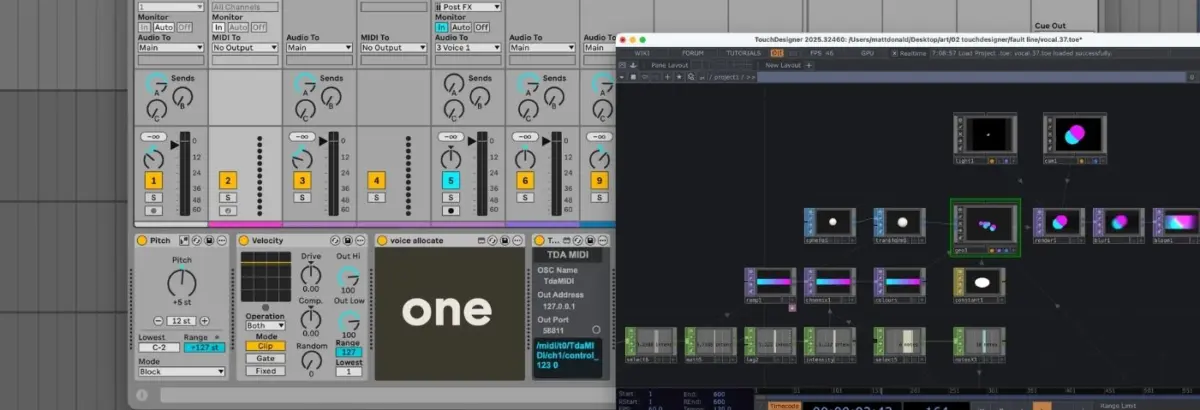
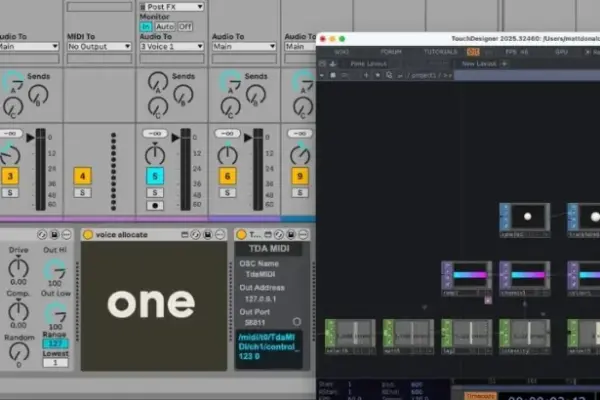
Voice Allocation: The processed MIDI stream feeds into a custom Max for Live device aptly named Voice Allocate. This utility evaluates incoming chords or note clusters, splits the notes, assigns each a unique digital identifier (ID), and routes them individually.
Voice Receivers: Each Auto Shift audio effect is grouped in a paired track configuration alongside a dedicated MIDI track. These MIDI tracks receive input from Voice Receive—another custom Max for Live device tailored to intercept a single, specific voice ID. Consequently, each Auto Shift device operates in monophonic MIDI mode, reacting solely to its assigned single-note stream.
Audio Routing: The clean, dry audio from the live vocalist is routed to a master audio bus, which simultaneously feeds all seven Auto Shift instances, resulting in a lush, highly controlled, multi-layered harmonized vocal ensemble.
2. Establishing the Bridge: TDAbleton
While TouchDesigner is capable of communicating via standard Open Sound Control (OSC) protocols, building a custom parser from scratch can introduce latency and configuration overhead. To streamline this process, the setup utilizes TDAbleton—a natively bundled suite of Max for Live devices and associated MIDI controller scripts.
Once initialized, TDAbleton establishes a seamless, low-latency bidirectional pipeline. Data flows effortlessly from any element within Ableton Live directly into TouchDesigner, while control parameters, automation, and triggers can simultaneously be sent from TouchDesigner back into the DAW. This bidirectional flow forms the neural network of the performance setup.
3. The TouchDesigner Visual Architecture
To maintain high frame rates and preserve precious CPU cycles for audio processing during a demanding live set, the TouchDesigner network relies on an efficient, GPU-driven instancing network. Instancing allows creators to duplicate a single base geometry across hundreds or thousands of points, offloading the heavy lifting to the graphics card.
The visual chain builds systematically:
Geometry Foundation: A single Sphere SOP (Surface OPerator) undergoes mild transformation before feeding into a Geometry Component (Geo Comp), where instancing is initiated.
Spatial Dynamics: A collection of Noise CHOPs (CHannel OPerators) generates organic, fluid, and random XYZ spatial coordinates for each instance, programmatically bound within safe screen boundaries.
Color Interpolation: A Ramp TOP (Texture OPerator) maps a smooth color gradient across the instances, assigning each sphere a unique shade interpolated between two established end colors.
Styling and Depth: The Geo Comp is assigned a constant material that strips away depth perception, rendering the 3D spheres as stark, flat, graphic circular shapes.
Rendering and Post-Processing: The output is framed by a Camera Component, illuminated by a Light Comp, and captured via a Render TOP. Before hitting the final display output, the visual signal passes through bloom and blur filter nodes to add cinematic glow and atmospheric depth.
4. Interactive Cross-Modulation and Feedback Loops
The true genius of this performance setup lies not merely in simultaneous execution, but in cross-modulation—where audio parameters drive visual reactions, and visual states physically manipulate audio mixing decisions.
Audio-Driven Visuals: An abletonLevel CHOP monitors the output volume of Ableton’s master channel. This amplitude data controls two distinct visual parameters: the opacity of the Ramp TOP (making colors more solid and vivid during louder vocal peaks) and the speed of the Noise CHOPs (causing visual instances to dart across the screen with greater velocity when the performance intensifies).
MIDI-Driven Density: An abletonMIDI CHOP monitors incoming notes from the master MIDI input track. By calculating the total number of active MIDI notes plus one (accounting for the live vocal), the system dynamically scales the number of active instances generated by the Noise CHOPs and updates the color distribution steps within the Ramp TOP.
Visual-Driven Spatial Panning: The horizontal (X-axis) positional data generated by the Noise CHOPs is mapped directly to the pan controls of seven individual abletonTrack COMPs, ensuring that as visual circles drift across the display, their corresponding audio channels pan naturally across the stereo field.
Hardware Glitch Triggers: A Count CHOP monitors for a specific trigger note (F3) played on the controller. Upon reaching a specific threshold of strikes, it fires a trigger that routes audio out of Ableton into external hardware—specifically a Hologram Electronics Chroma Console set to its "Inference" algorithm, yielding a fragmented, glitchy sonic texture. A downstream abletonLevel CHOP intercepts the wet return of this effect and maps it directly to a visual color-shift intensity, causing the graphics to fracture and tear precisely in time with the audio distortion.
Supporting Context & Metrics
Technical Specifications & Resource Management
In live performance engineering, system stability is paramount. Running a heavy audio production environment alongside real-time 3D graphics generation invites the risk of buffer underruns, audio dropouts, and dropped video frames.
CPU vs. GPU Distribution: By offloading the visual generation entirely to the GPU via TouchDesigner’s instancing framework, the host computer’s CPU is reserved primarily for real-time audio synthesis, multi-track voice shifting, and Max for Live calculations.
Resolution and Licensing: TouchDesigner offers a robust free version for prototyping and educational use, capped at a maximum output resolution of $1280 times 1280$. For professional staging environments, touring artists typically upgrade to commercial licenses to unlock high-definition ($1080p$ and $4K$) multi-display output capabilities.
Latency Thresholds: Through optimized OSC routing and TDAbleton’s script optimization, round-trip latency between MIDI input, audio processing, and visual response remains under $15textms$, ensuring the audience perceives the audio and visual feedback as a single, unified phenomenon.
Official Statements and Industry Insights
Performance artists and creative technologists pioneering these hybrid workflows emphasize that the future of live electronic music lies in tactile, responsive instrument design rather than passive playback.
"When you build a system where your voice literally dictates the geometry, color, and spatial positioning of the world around you on stage, you stop feeling like you are simply operating software. You feel like you are sculpting a physical environment with your breath and your hands."
— Contemporary Electronic Performance Technologist
Industry developers note that platforms like TouchDesigner and Ableton Live are increasingly being adopted not just by underground modular synth performers and glitch artists, but by mainstream touring acts seeking to standardize their show control systems. By leveraging open protocols and robust developer kits like Max for Live, artists can custom-tailor their rigs to match their exact artistic vision without being locked into rigid, proprietary visual packages.
Future Outlook
As processing power continues to scale and GPU architectures become more efficient, the boundary between music production and real-time generative art will continue to blur. Several emerging trends are set to define the next generation of audio-visual performance setups:
AI-Driven Generative Textures: Future iterations of this workflow may integrate machine learning models running locally via TouchDesigner’s Torch integrations, allowing vocal timbre and harmonic complexity to directly seed neural network-generated textures in real time.
Spatial Audio Integration: With the widespread adoption of Dolby Atmos and multi-channel spatial audio protocols in live venues, spatial mapping will extend beyond simple stereo panning. Visual instances will soon track exact 3D acoustic coordinates within immersive dome or multi-speaker environments.
Web3 and Collaborative Remote Jamming: As low-latency streaming protocols improve, distributed artists across the globe will likely collaborate in shared virtual spaces where remote audio streams drive synchronized local visual nodes, paving the way for decentralized, global multimedia performances.
Conclusion
The integration of Ableton Live and TouchDesigner demonstrates that technology, when thoughtfully curated, transcends being merely a tool for playback and becomes an expressive medium in its own right. By turning sound into sight and sight into sound, artists can offer audiences an unforgettable, deeply synesthetic live experience.