Executive Overview
The landscape of Digital Audio Workstations (DAWs) is historically defined by deep-seated tribalism. For nearly four decades, software loyalties have dictated producer workflows, mixing habits, and creative trajectories. Few rivalries run as deep or as historically significant as the philosophical divide between Steinberg’s Cubase—a pioneering force in MIDI sequencing since 1989—and Apple’s Logic Pro, the powerhouse software that evolved from Emagic’s foundational code.
When a producer’s formative impressions are baked into a specific digital ecosystem, moving outside that comfort zone typically results in frustration, cognitive friction, and an eventual retreat to familiar territory. This review details an unvarnished, long-term experiment: a foundational Cubase Version 1 user, deeply entrenched in Steinberg’s desktop paradigm, stepping away from decades of muscle memory to thoroughly evaluate Apple’s Logic Pro 12.3.
Rather than encountering an insurmountable barrier of alien workflows, this cross-platform deep dive reveals a surprising convergence between the industry’s aging titans. Modern DAWs have borrowed from one another to the point of structural familiarity. Yet, beneath surface-level layouts lie stark divergences in plugin design, track management, stem separation, and generative production tools. While Logic Pro 12.3 cannot completely unseat Cubase as a primary workspace for a 35-year veteran, it introduces enough high-tier innovation—chiefly its stunning stem separation engine, fluid Session Players, and unbeatable price point—to permanently secure a place on the reviewer’s desktop.
Detailed Chronology: From Emagic Enmities to Modern Convergence
To understand the weight of this cross-DAW migration, one must trace the historical origins of both applications. The reviewer’s journey with Steinberg began in the late 1980s, graduating from the pioneering Pro-24 MIDI sequencer to the inaugural release of Cubase in 1989. That leap forward—introducing the graphical arrangement window that forever changed computer-based music production—forged a lifelong loyalty. Over the decades, this relationship expanded to include Pro Tools for heavy audio post-production, Universal Audio’s Luna for analog-modeled tracking, and forward-thinking applications like Bitwig Studio and Ableton Live to bend linear paradigms.
By contrast, historical run-ins with Logic were fraught with friction. Back in the era of Emagic Logic Platinum, the DAW was tolerated solely out of hardware necessity: it was one of the few platforms supporting legacy Pro Tools TDM hardware outside of Pro Tools itself. Those encounters were defined by unproductive hours spent fighting non-intuitive routing conventions, disparate shortcut systems, and a general aesthetic hostility that fostered a deep-seated antipathy.
Fast forward to the present day. Apple’s stewardship of Logic Pro has fundamentally rewritten its DNA. Launching Logic Pro 12.3 today reveals an application that bears virtually no resemblance to the frustrating Emagic-era beast of the past.

The Great DAW Convergence
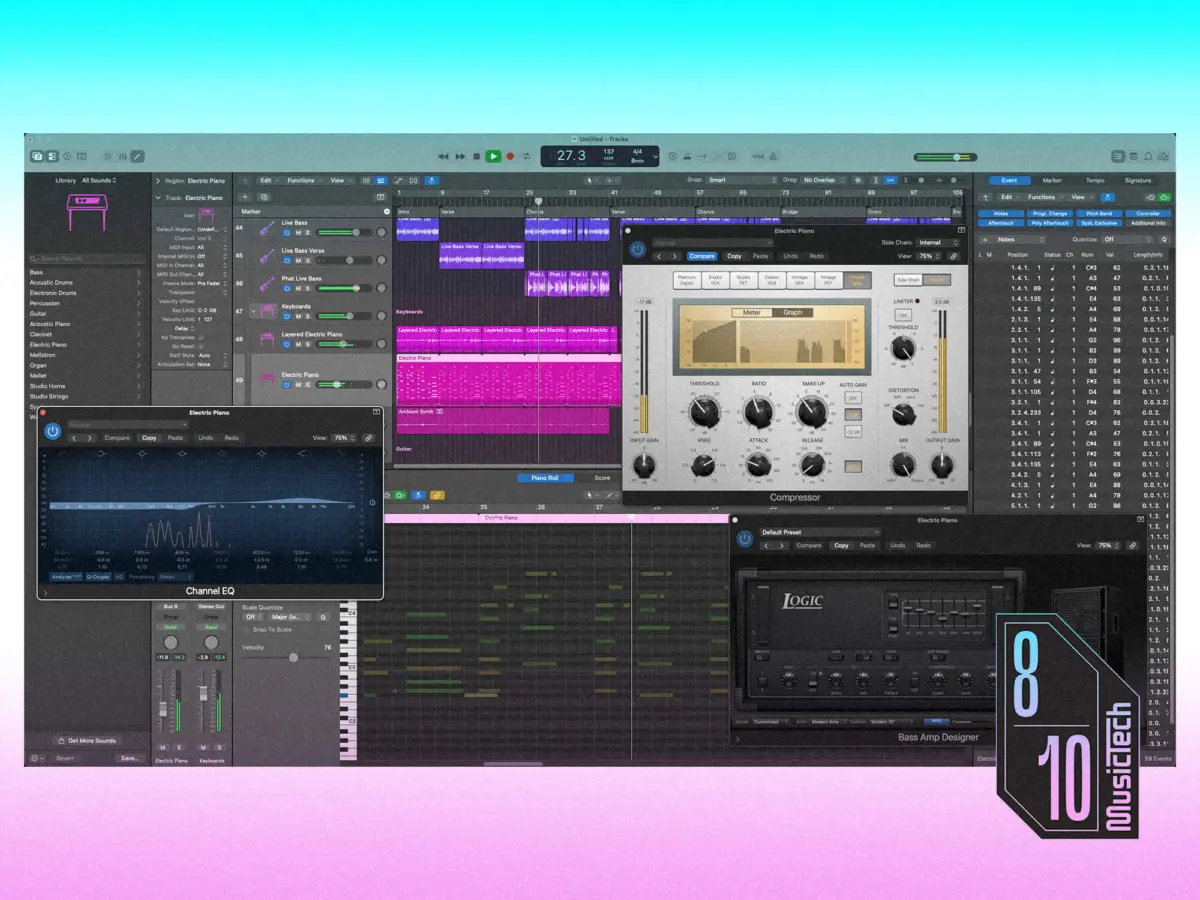
Upon firing up Logic Pro 12.3 for the initial exploratory session, the most striking realization is how closely the two software giants have converged. While the core timeline-based workspace remains an industry standard—vertical track headers intersecting with horizontal audio and MIDI content—both Logic and Cubase have adopted nearly identical UI frameworks to manage screen real estate.
Pop-out side-panels and bottom drawers now govern browser trees, inspectors, editors, and mixing consoles across both ecosystems. For a veteran DAW user, this structural homogenization eliminates the steep learning curve of yesteryear. The foundational mechanics of cutting, pasting, looping, and crossfading behave in comforting, predictable ways.
Naturally, cosmetic differences and nomenclature persist. Logic anchors its transport controls and main info bar at the very top of the interface, whereas Cubase positions its transport bar at the bottom. Logic stores and recalls channel setups as Patches, while Cubase relies on Track Presets. Logic’s Drum Machine Designer converts a standard track into a dedicated drum machine interface, whereas Cubase utilizes a specialized Drum Track object type.
These discrepancies, however, are largely superficial skin-deep variations. The true test of Logic Pro 12.3 lies deeper: in the specific engineering choices that either streamline a workflow or actively obstruct it.
Supporting Context & Metrics: Where Logic Stumbles and Shines
Every DAW possesses unique friction points, and Logic Pro 12.3 is no exception. A thorough, objective analysis must weigh its architectural missteps against its breathtaking functional triumphs.
The Friction Points: What Doesn’t Work
Despite immediate feelings of familiarity, several design choices in Logic Pro 12.3 induce immediate user frustration:

- Stack Tracks vs. Folder and Group Tracks: In most modern DAWs, organizational containers (Folders) and audio routing subgroups (Buses/Groups) are treated as distinct, purpose-built entities. Cubase keeps Folder tracks and Group tracks entirely separate, reflecting decades of analog console routing logic. Logic, conversely, awkwardly mashes these concepts into Stack Tracks. The resulting architecture is unnecessarily convoluted, a reality painfully evident in the dense, word-salad explanations found within the software’s manual.
- Forced Key Signatures: Logic insists on assigning a strict musical key signature to a project upon creation. For experimental composers or sound designers who build tracks organically without a predetermined key, this mandatory administrative step is an unnecessary roadblock.
- Overheated Instrument Outputs: The default output gain staging on many bundled virtual instruments is aggressively, and sometimes dangerously, too hot, demanding immediate volume attenuation upon loading.
- Rigid Aux Track Creation: Unlike environments where auxiliary tracks can be spawned freely at will, Logic restricts aux track generation, typically forcing users to instantiate a send from an existing channel strip first.
- Skeuomorphic Legacy Plugins: While Logic features cutting-edge DSP under the hood, its collection of legacy instruments and processors features some truly hideous artifacts of dated skeuomorphic design. These visual abominations cry out for a modern, flat-design reskin.
- The Absence of a Dedicated Drum Editor: For all of Logic’s sequencing prowess, it still lacks an equivalent to Cubase’s sublime, purpose-built Drum Editor. Forcing complex percussion programming into a standard piano-roll environment is an inadequate substitute for dedicated grid-based drum mapping.
The Triumphs: Where Logic Outshines Cubase
Set against these legacy irritants are several features where Logic Pro 12.3 fundamentally outclasses its competition:
+--------------------------+-----------------------------------+-----------------------------------+
| Feature Category         | Logic Pro 12.3                    | Cubase Pro                        |
+--------------------------+-----------------------------------+-----------------------------------+
| Stem Separation          | Industry-leading, high fidelity   | Basic (relies on SpectraLayers)   |
| Pattern Sequencing       | Live Loops (Deep timeline sync)   | Groove Agent SE (MPC-style)       |
| Generative Production    | Session Players (Bass/Drums/Keys) | Pattern Players / Chord Track     |
| Preset Architecture      | Patches (Includes Aux/Routing)    | Track Presets (Channel-focused)   |
| Price Point              | Exceptional value (£199)          | Premium pricing tier              |
+--------------------------+-----------------------------------+-----------------------------------+- Live Loops: Offering non-linear, pattern-based clip launching à la Ableton Live and Bitwig Studio, Logic’s Live Loops provide a fluid playground for arrangement sketching that integrates far more tightly with the linear timeline than Cubase’s Groove Agent SE equivalent.
- Session Players: Logic’s generative Session Players are nothing short of a revelation. By analyzing project chord progressions and rhythmic frameworks, they instantly conjure remarkably human, convincing basslines, drum tracks, and keyboard parts. While Cubase features chord-following pattern players, they pale in comparison to the musicality of Logic’s implementation.
- World-Class Stem Separation: Logic’s built-in stem separation engine is nothing short of state-of-the-art. While Steinberg hedges its bets to encourage users toward external purchases like SpectraLayers Pro, Logic delivers master-class isolation out of the box, competing with—and occasionally beating—the finest third-party tools available.
- Superior Track Management via Patches: Logic’s Patches prove functionally superior to Cubase’s Track Presets because they capture auxiliary routing configurations alongside main channel settings. Furthermore, the Inspector side-panel’s secondary channel strip view—which dynamically displays output bus faders or active send aux strips—is an ergonomic masterpiece.
Official Statements and Industry Perspective
The release of version 12.3 continues Apple’s strategy of steady, ecosystem-strengthening iterations rather than radical reinventions. Industry reception underscores a growing consensus: Apple has weaponized pricing and bundled value to democratize professional audio production in a way traditional enterprise software companies struggle to match.
While Apple’s internal development teams rarely issue traditional manifesto-style press releases regarding design philosophies, promotional technical briefs accompanying Logic Pro 12.3 highlight a clear engineering mandate: enhancing intelligent audio analysis and granular synthesis.
As noted in recent developer walkthroughs, the latest update focuses heavily on refining existing architectures rather than introducing bloated new paradigms. Updates to Beat Breaker—Logic’s answer to classic ReCycle-style audio slicing—now support per-slice filtering, panning, and automation randomization. Improved loop detection and enhanced Flex audio retiming seamlessly integrate with the software’s broader Smart Tempo engine. Furthermore, improvements to Chord ID deliver lightning-fast, high-precision audio-to-chord analysis across complex arrangements, while Alchemy and Sample Alchemy gain advanced grain synchronization modes and parallel grain stream combination features via the new Granular Alchemy sound pack.
Future Outlook: Value Propositions and Longevity
Evaluating Logic Pro 12.3 in a vacuum of features is incomplete without factoring in economic reality. For existing users and subscribers to Apple Creator Studio ecosystems, these massive feature upgrades arrive at zero additional cost.
When examined purely from a financial standpoint, Logic Pro’s pricing structure is an undisputed knockout blow. Retailing at a fraction of the cost of full-featured flagship DAWs like Cubase Pro, Logic delivers pro-grade mixing tools, world-class virtual instruments, effects processors, and a sprawling 50GB+ content library for an aggressively accessible £199. Of course, this value proposition comes with an unavoidable hardware caveat: it requires full commitment to the macOS hardware ecosystem.

Will the Cubase Veteran Switch?
The ultimate question facing this long-term Cubase loyalist is simple: Will Logic Pro 12.3 replace decades of muscle memory?
The answer is nuanced. Logic Pro 12.3 is not definitively "better" than Cubase, nor is it worse. It is simply different—different enough to require a recalibration of thought patterns, but refined enough to avoid alienating a veteran producer.
Cubase will undoubtedly remain the primary, go-to production environment out of historical habit and deep structural preference. However, the friction that once defined interactions with Apple’s DAW has evaporated. Logic Pro 12.3 has earned a permanent, active slot on the desktop. Features like its peerless stem separation, brilliant Session Players, and frictionless Live Loops make it an invaluable creative partner. Far from remaining an unused icon in the Applications folder, Logic Pro is destined to be opened frequently, proving that even the most stubborn old-school DAW users can learn to appreciate new digital horizons.