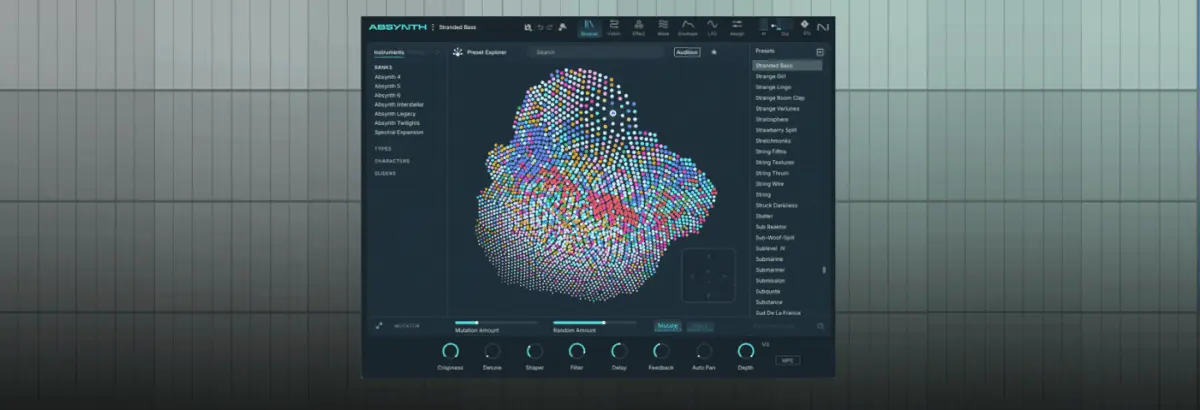
Native Instruments’ Absynth has long occupied a legendary, almost mythical status in the electronic music pantheon. Renowned for its sprawling multi-stage envelopes, deep modulation matrix, and unmatched capacity for long-form, evolving ambient textures, Absynth has historically been favored by film scorers, IDM pioneers, and experimental sound designers. However, reducing this software powerhouse to merely a pad-and-soundscape machine overlooks its true structural potential. Beneath its ethereal exterior lies a remarkably aggressive, malleable architecture that lends itself with terrifying efficacy to the relentless demands of peak-time techno.
With the arrival of Absynth 6—unveiled as a cornerstone of the newly released Komplete 26 suite—Native Instruments has delivered the most powerful iteration of the instrument to date. Featuring a thoroughly overhauled granular engine, expanded sound-design tools, a lush new spatial effect dubbed the Aetherizer, and a suite of ultra-precise Moog-modeled ladder filters, Absynth 6 bridges the gap between cinematic experimentation and utilitarian club production.
To demonstrate the staggering depth of this revived instrument, this deep-dive tutorial breaks down a high-level sound design session. By starting with a single, unassuming audio source—a one-shot sample of a Peking Opera gong—we will trace a 10-step architectural journey. We will transform a quiet, static chime into a multi-layered, performance-ready, filth-laden acid techno sequence that pulses with rhythmic vitality, organic groove, and heavy analog-style saturation.
Detailed Chronology: The 10-Step Sound Design Breakdown
Step 1: Initializing the Patch and Deploying the Granular Engine
The process begins inside your DAW at a driving 129 BPM with a programmed MIDI sequence acting as our compositional blueprint. Upon instantiating a fresh instance of Absynth 6, loading a "New Preset" yields a predictable, utilitarian sine wave playing out the rhythmic pattern. While functional, it is utterly devoid of character.
Navigating to the Patch tab, we bypass the default oscillator setup entirely. In its place, we load Absynth’s newly upgraded Granular Engine and select the Peking Opera Gong sample as our foundational raw material. At this embryonic stage, the sound is sparse, metallic, and disjointed when played against a rhythm track, but it provides a harmonically rich, unprocessed acoustic spectrum from which to carve our techno element.
Step 2: Pitch Transposition and Granular Density Overhaul
To drag the pristine acoustic gong down into the subterranean realms of techno, we detune the sound downward by exactly 12 semitones (one full octave). Next, switching over to the Grain tab, we scale the grain size down to a razor-sharp 3ms.
This is where Absynth 6’s architectural upgrades become glaringly apparent. The maximum grain density has been dramatically increased to a staggering value of 32. By cranking the density to this maximum setting, the individual acoustic grain particles blur into a continuous, aggressive wall of sound. Dropping the density back down to 4 instantly reveals how limp, hollow, and phase-weakened the patch sounds without this heavy granular packing, cementing the setting as crucial to our "filth" aesthetic.
Absynth’s historical supremacy has always hinged on its legendary envelope system. Unlike standard ADSR generators, Absynth allows its multi-stage envelopes to modulate virtually any parameter within the synth engine.
We begin by clicking Osc A Amp, opening the Transform menu, and selecting Expand to Rhythm, followed by engaging BPM Sync. This immediately locks the amplitude contour to our project tempo, turning a sustained tone into a pulsing rhythmic gate. Next, we generate a New Envelope assigned to Osc A Main Pitch, toggle the LFO button, and drag the initial envelope breakpoint all the way down. In a single stroke, we have an envelope driving level control while an LFO modulates pitch—suddenly transforming our gong sample into the unmistakable rhythmic cadence of an acid bassline.
Step 4: Fine-Tuning Envelopes and LFO Modulation Parameters
With the basic sequence mapped, we dive deeper into the modulation routing. Navigating to the LFO page, we deselect channels B and C from the LFO’s pitch assignment, ensuring our complex modulation remains strictly localized to Channel A’s current layer.
We then push the Pitch slider up to 25, the Time parameter to 1.6919, and the Phase to 32.063. These precise architectural tweaks introduce a distinctly wobbly, unstable pitch modulation peppered with sharp, aggressive transient spikes. The result is a genuinely filthy, squelchy acid line born entirely out of an acoustic percussion hit.
Step 5: Sculpting the Mid-Range with Moog-Modeled Ladder Filters
To give the acid sequence its characteristic bite and vocal-like resonance, we employ Absynth 6’s brand-new Moog-modeled Ladder filter suite.
First, we insert a Ladder Band-Pass (BP) filter set precisely to a cutoff frequency of 542.92 Hz. This targets and isolates the boxy, aggressive mid-range frequencies essential for warehouse techno. Stacked directly behind it, we introduce a Ladder Low-Pass (LP) filter set to 500.56 Hz, pushing the resonance parameter up to a fierce 43.875. The interaction between these dual filters carves out sub-bass mud while driving the upper mids into self-oscillating, snarling territory.
Step 6: Layering for Weight via the Sample Engine
A truly massive techno sequence rarely relies on a single oscillator path. To build physical weight, we activate Channel 2, load a dedicated Sample Engine, and feed it the identical Peking Opera Gong sample—this time transposed down a full two octaves (24 semitones).
Temporarily muting Channel A allows us to isolate our new foundation. We access the Osc B Amp envelope, re-apply the Expand to Rhythm transformation, and shift the envelope mode to Retrigger. This establishes a heavy, sub-heavy rhythmic pulse beneath our mid-range lead.
Step 7: Crafting Groove Through Envelope Retriggering
Precision timing is everything in peak-time techno. We pull the beat length down to 0.250 to generate a rapid, highly syncopated, almost delay-like subdivision.
Focusing on the graphical envelope editor, we grab the lower of the two pink circular breakpoints and drag it leftward to align with the start of the second envelope spike. This structural maneuver instructs Absynth to rhythmically retrigger the amplitude envelope in rapid succession until the second MIDI note triggers, at which point the retriggering ceases and the remainder of the envelope plays out. The rigid grid is instantly replaced by an organic, bouncing human groove.
Step 8: Spatial Diffusion via the Aetherizer Effect
Absynth 6 introduces the Aetherizer—a lush, granular-based spatial effect capable of smearing audio across the stereo field into cinematic ether. Rather than feeding the effect with our Master bus, we route only the input from our heavy sub-layer (Channel B), keeping the Master send closed.
Cranking the Feedback parameter to 75 and setting the Wet signal mix to 0.562 creates a cavernous, swirling tail that wraps around our dry elements. Mapping this to a Macro control allows for real-time performance sweeps. With Channel A blended back in, the track achieves a massive duality: dry, punchy transients up front, and sprawling, atmospheric degradation tucked securely in the rear.
Step 9: Adding Movement with the Overhauled Loop Section
To inject further unpredictable variation, we activate a third layer on Channel C using yet another Sample Engine loaded with our ubiquitous Peking Opera Gong sample, dropping Channels A and B out of the monitor mix.
Opening Absynth 6’s freshly overhauled Loop section, we set a loop start point of 5600 and an end point of 12644. The engine continuously cycles through a microscopic slice of the gong’s tail, generating filthy, syncopated micro-repeats that dance across the rhythm track. Bringing Channels A and B back into the mix reveals a dense, interlocking rhythmic tapestry where no two bars sound identical.
Step 10: Macro Assignment and Live Performance Readiness
With all three distinct layers balanced, the patch effectively operates as a self-contained groovebox. To make the patch performance-ready for live hardware integration or DAW automation passes, we assign key architectural parameters—including individual Channel levels and the Aetherizer Wet amount—to assignable Macro controls. The result is a fiercely flexible, infinitely morphable techno weapon built entirely from the bones of a single acoustic sample.
Supporting Context & Metrics
Production Parameter
Target Value / Setting
Sonic Purpose
Tempo (BPM)
129 BPM
Standard driving peak-time techno tempo
Source Sample
Peking Opera Gong (One-Shot)
Harmonically rich acoustic raw material
Granular Density (Step 2)
32 (Max value)
Transforms discrete grains into a cohesive, aggressive wall of sound
Tames high frequencies while adding analog-style self-oscillation
Spatial Effect (Step 8)
Aetherizer (Feedback: 75, Wet: 0.562)
Generates swirling, immersive stereo diffusion on auxiliary layers
Official Statements
Native Instruments product development team members have repeatedly emphasized the deliberate engineering philosophy behind the Komplete 26 ecosystem:
"With Absynth 6, our primary objective was not merely to modernize a classic instrument for contemporary operating systems and DAW standards, but to unlock the dormant aggression buried inside its complex routing architecture. For too long, Absynth was pigeonholed purely as an ambient pad machine. By vastly expanding granular density limits, introducing authentic Moog-modeled ladder filter topologies, and implementing spatial processing tools like the Aetherizer, we wanted to prove that deep sound design engines can serve as direct, visceral weapons for modern club genres like techno."
Future Outlook
The resurrection of Absynth within the Komplete 26 framework signals a broader industry shift toward deep architectural modularity in software instruments. As electronic music production increasingly gravitates toward hybrid workflows—where producers demand both pristine cinematic scoring tools and uncompromising club-ready powerhouses—synths like Absynth 6 represent the future of software synthesis.
By demonstrating that complex, evolving multi-stage architectures can distill a single acoustic one-shot into a pounding, rhythmically hypnotic techno tour-de-force, Native Instruments has successfully future-proofed a piece of synthesis history. Producers willing to dive beneath the surface-level presets will find that Absynth 6 is not just a nostalgic revival, but one of the most creatively liberating sound design environments available on the modern market.